


USA SPEC iPhone interface for iPhone 6


Thread Starter
|
Registered User
Joined: Jul 2014
Posts: 10
Likes: 3
USA SPEC iPhone interface for iPhone 6
Just installed a USA SPEC iPhone interface and wanted to share my experience with the new iPhone. I have a 2004 Bose with a "SAT" button, no nav, prewired for sat, but no sat installed.
I originally ordered the PA15-INFI, which connects to the prewired sat harness in the trunk. I installed and properly grounded the interface, but I could not get the head unit to recognize it. I checked all wires all the way to the back of the head unit, including removing the head unit and checking the actual connections. The unit seemed defective and I ordered another from the same Amazon seller.
The second unit I ordered was a PA15-NIS. After going through all the wires and taking apart the dash to troubleshoot the trunk-connected interface, it seemed easier as a final install to just go ahead and take the dash apart and use the head unit-connected version. The PA15-NIS worked properly except for the charging function. I was able to play and change tracks and get artist/song info back from the iPhone, but there was persistent static that sounded like radio interference and no charging. I tested with several iDevices and decided this interface might be defective as well.
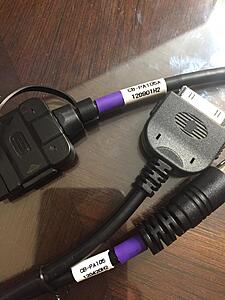
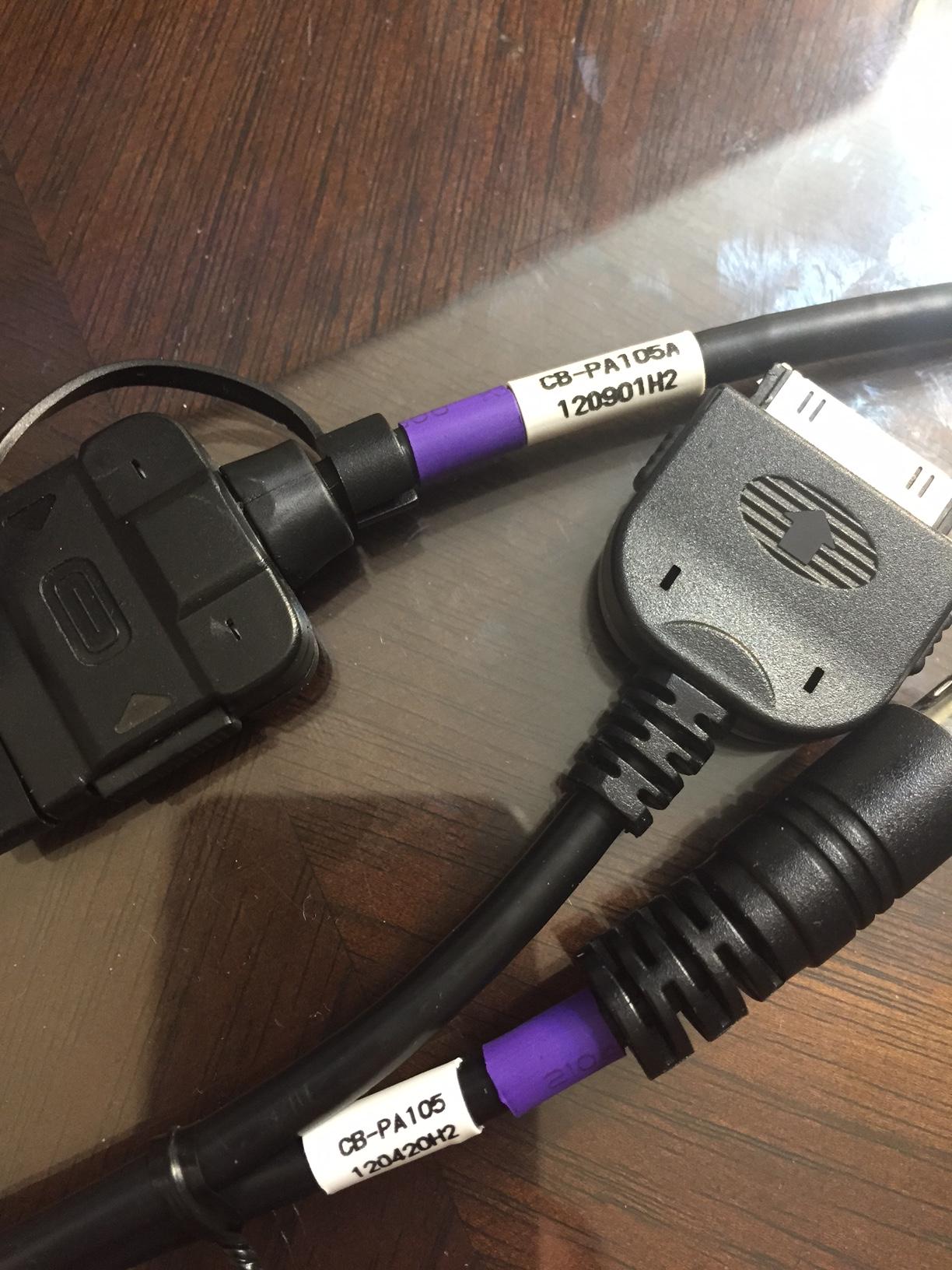
The third unit I ordered was another PA15-NIS. This unit was completely non responsive. I swapped only the box and it was not detected by the head unit. Notably, this 3rd interface came with a 30-pin cable that was built differently from the 2nd unit. When I tried the 3rd unit's iPhone cable with the playable 2nd interface, it seemed to have a short and would lose a right or left channel when I wiggled it. This 30-pin cable is visually distinct and has different model numbers compared to the others. (Pic attached. Bad cable from 3rd unit on bottom.)
The fourth unit, another PA15-NIS, just arrived. I ordered this directly from Amazon. This unit had the same style of 30-pin cable as the second unit (no shorts). I swapped this unit with the 2nd unit and it played my iPhone. Finally, this one charged my phone as well.
Everything works with the 4th unit. I had to pay more than $16 to ship the first PA15-INFI, so for the remaining units I made sure they qualified for Amazon Prime. Units 1-3 were from the same independent seller, with 2 and 3 being PA15-NIS and having prime shipping and free returns. The working unit 4 was a PA15-NIS from the same product page but fulfilled by Amazon. All the PA15-NIS units (2-4) had tape on the package, seemingly indicating they had been opened at some point.
I originally ordered the PA15-INFI, which connects to the prewired sat harness in the trunk. I installed and properly grounded the interface, but I could not get the head unit to recognize it. I checked all wires all the way to the back of the head unit, including removing the head unit and checking the actual connections. The unit seemed defective and I ordered another from the same Amazon seller.
The second unit I ordered was a PA15-NIS. After going through all the wires and taking apart the dash to troubleshoot the trunk-connected interface, it seemed easier as a final install to just go ahead and take the dash apart and use the head unit-connected version. The PA15-NIS worked properly except for the charging function. I was able to play and change tracks and get artist/song info back from the iPhone, but there was persistent static that sounded like radio interference and no charging. I tested with several iDevices and decided this interface might be defective as well.
The third unit I ordered was another PA15-NIS. This unit was completely non responsive. I swapped only the box and it was not detected by the head unit. Notably, this 3rd interface came with a 30-pin cable that was built differently from the 2nd unit. When I tried the 3rd unit's iPhone cable with the playable 2nd interface, it seemed to have a short and would lose a right or left channel when I wiggled it. This 30-pin cable is visually distinct and has different model numbers compared to the others. (Pic attached. Bad cable from 3rd unit on bottom.)
The fourth unit, another PA15-NIS, just arrived. I ordered this directly from Amazon. This unit had the same style of 30-pin cable as the second unit (no shorts). I swapped this unit with the 2nd unit and it played my iPhone. Finally, this one charged my phone as well.
Everything works with the 4th unit. I had to pay more than $16 to ship the first PA15-INFI, so for the remaining units I made sure they qualified for Amazon Prime. Units 1-3 were from the same independent seller, with 2 and 3 being PA15-NIS and having prime shipping and free returns. The working unit 4 was a PA15-NIS from the same product page but fulfilled by Amazon. All the PA15-NIS units (2-4) had tape on the package, seemingly indicating they had been opened at some point.


Registered User
Joined: Jan 2010
Posts: 301
Likes: 19
From: Maryland
That static you heard with the previous unit was most likely due to a defective ipod/iphone cable. Years ago when i did a write up on the install, I had to have the manufacturer send me a revised cable. Do you have a lightning cable adapter or did your unit come with a lightning cable?
Thread Starter
|
Registered User
Joined: Jul 2014
Posts: 10
Likes: 3
That static you heard with the previous unit was most likely due to a defective ipod/iphone cable. Years ago when i did a write up on the install, I had to have the manufacturer send me a revised cable. Do you have a lightning cable adapter or did your unit come with a lightning cable?
All three of the cables were 30-pin cables. Two were the PA105A like the one on top. Those both worked. I tried them all with a 4S and with an Apple lightning adapter on an iPhone 6. They all had the "H2" numbers, which I think is the updated version from whenever Apple switched to 5v charging.

Thread
Thread Starter
Forum
Replies
Last Post
VatoVazq
Steering & Suspension
16
Jan 3, 2025 11:08 PM