


G35x sedan radio unit.


Thread Starter
|
Registered User
Joined: Jun 2020
Posts: 1
Likes: 0
2005 g35x sedan awd b25
G35x sedan radio unit.
Hey guys brand new to the G era. I’ve seen that some g’s have a radio unit w/ navigation on it. My car doesn’t it’s just the normal stock one no navigation.
I was wondering if I buy the whole radio unit with navigation and slap it into my car would it work? Or do I need extra stuff.
I was wondering if I buy the whole radio unit with navigation and slap it into my car would it work? Or do I need extra stuff.

Registered User


Joined: Jun 2016
Posts: 1,026
Likes: 102
6 speed G35 sedan
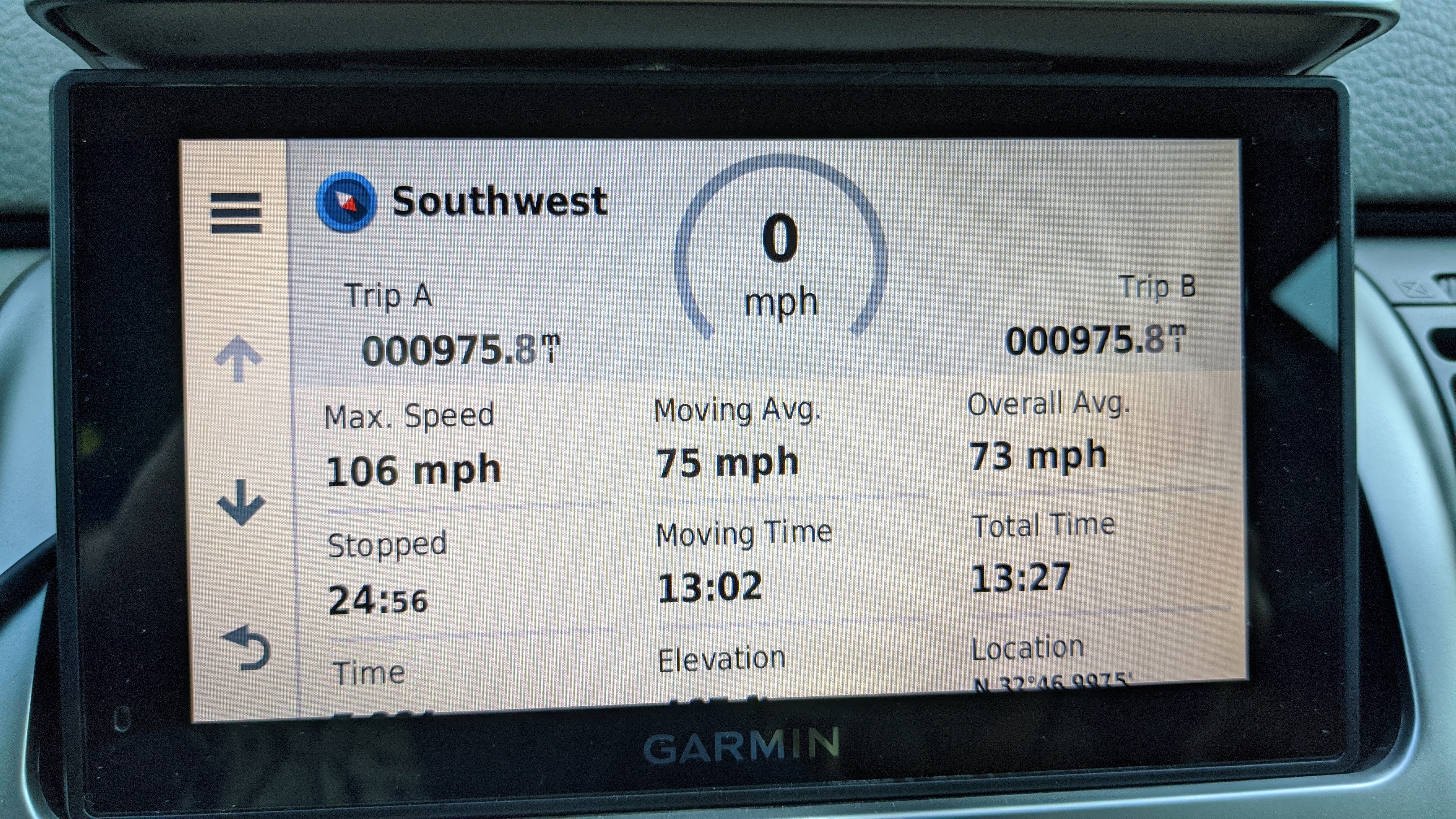
Honestly, you're better off going with an aftermarket navigation than deal with early 2000s technology. I have a Garmin that fits right in where the top door of the center stack opens up. Ignore the top speed, it was done on a private road (that's the story I'm sticking too) but you can see how it fits perfectly and is far more advanced than what our cars had.


Registered User
Joined: Aug 2019
Posts: 417
Likes: 81
From: SoCal
04.5 G35 Sedan 5AT
From what I've heard, you can swap to the OEM navigation, but I've heard its a ridiculous amount of work.
I had an 05 that had the factory nav, and it worked really well, turn-by-turn I was impressed. But, you have to remember its from ~2005. Not touch screen, so you have a joystick to enter addresses/POI's. Which, in the day of smartphones, its a little time consuming. I'm sure it was phenomenal when it came on market.
My rec is to just get a standalone GPS. I guess there is a Garmin unit that fits in the center cubby, that seems like a better option since you can put it in any car you want to.
I had an 05 that had the factory nav, and it worked really well, turn-by-turn I was impressed. But, you have to remember its from ~2005. Not touch screen, so you have a joystick to enter addresses/POI's. Which, in the day of smartphones, its a little time consuming. I'm sure it was phenomenal when it came on market.
My rec is to just get a standalone GPS. I guess there is a Garmin unit that fits in the center cubby, that seems like a better option since you can put it in any car you want to.


Registered User
Joined: Mar 2020
Posts: 23
Likes: 2
G35x, muffler delete, Takeda/AFE Power Stage 2 Intake, Motodyne 5/16" Plenum Spacer
Hi Gsusesbee,
I have a 2006 G35x, which came with the non-bose oem 6-disc. Two years ago I installed a double din unit (a Kenwood DDX9903S). I purchased a stock Japanese OEM double din dash cover and bracket unit to match my interior and the correct dial temp buttons. The kits from Metra look terrible and have the earlier, non-dial buttons from the 2003-2005 models. The Japanese unit I purchased looks stock in my 2006, which is awesome, and has the nicer switch gear.
In terms of extra equipment and tools, I needed a bit of extra stereo wire for grounding the unit. I used the 10mm bolt near the ashtray to ground this and it works just fine (I can watch movies while driving which is technically illegal but a pro for wiring things yourself). You can solder the harness and wiring but I just used a crimp kit w/ closed end connectors, and was very careful about making sure I setup and taped my harness in an organized manner.
The interior on the g35 comes apart surprisingly easily aside for the clock surround (mine is still a little loose but I really don't care). And I was able to get at everything simply using a plastic interior pry-bar kit from Crutchfield, along with a small handled dental-like pick from my local Autozone. I put my head-unit's Mic up top on the central shelf in front of the climate temp/fan speed indicator lights (not blocking my compass) v. wiring it up through the sun-visor, and I really like that solution and would do it again. It saved a ton of extra work and headaches. And for the USB and HDMI inputs, I route those to the side simply out to the passenger foot well (there is a curve in the interior panel near the central of the car where these will easily fit, and it makes connecting to all types of devices and media very easy. I did that v. routing into the glove box or armrest console due to the large number of wires. The solution was easy and works perfectly, and I can use Apple or Android with my phone, while also plugging in other phones, usb's or even HDMI for playback or charging.
I did try to install the steering wheel controller kit offered through Crutchfield, and after several attempts at training and reprogramming the unit, I gave up. That was the one failure of the project. I am still able to control up on the volume, and I can change my source or radio station, but no down volume option, and I'm missing a few other functions. If you can get it to work, it's worthwhile especially as if you don't you have useless buttons on the steering wheel, which is just silly.
I did the install all by myself and took extra time to make sure I was doing this correctly. It was straight forward and an easy installation.
If anyone wants my stock brackets and non-Bose stereo, I'm offering it for sale for $120 OBO.
Adding a double din w. Android and Apple Car was definitely worth it! If I were to do it again I would have invested in a rear camera or proximity sensors, as well as a Maestro car data control and management add-on module, for tuning and monitoring down the road.
Currently debating on adding a low profile 8-10" sub to fit in the Bose sub bracket on the rear parcel shelf, and adding upgraded speakers all around. Looking to add Morel Tempo Ultra 602 Integra speakers, and a low-profile 8" Sub from Pioneer, a Pioneer TS-A2000LD2. (The goal being musicality and listen-ability near audiophile level but at a upper-mid-tier price v. extreme bass and loudness)
More important for me at this point is working on suspension and other engine upgrades. My car was straight piped from the catalytic converters back, by a local shop here (Dan Fast Automotive) which is not 50 state legal, and I have a Takeda Stage 2 intake. The combination and routine maintenance have yielded an excellent daily driver, which is close to ~5.3sec 0-60mph. MY butt dyno tells me my car is much quicker than stock, and I even get some wheel spin if I push it in second gear.
Good luck and let me know if I can help.
Best,
-CKBOSS
The Kenwood Excelon model installed was replaced by anew model. The new model is $650 but I got mine during the generation change a couple years ago for $300 on a Black Friday sale, and installed it over the winter holiday break. https://www.crutchfield.com/S-pTWSnQ...-DDX9903S.html
Supplies:
Plastic interior pry bars.
Screwdriver, maybe 8 or 10mm sockets?
Heat Shrink
Electrical Tape (3M Scotch Super 88 Vinyl)
Fabric Tape (for wrapping harness bundle)
18-14 Gauge Closed End Connectors
12-10 Gauge Closed End Connectors
8-10 gauge stud spade/ring for grounding wire
Voltage meter to test ground bolt (I tested this wither the left or right lower screw is an adequate ground).
I have a 2006 G35x, which came with the non-bose oem 6-disc. Two years ago I installed a double din unit (a Kenwood DDX9903S). I purchased a stock Japanese OEM double din dash cover and bracket unit to match my interior and the correct dial temp buttons. The kits from Metra look terrible and have the earlier, non-dial buttons from the 2003-2005 models. The Japanese unit I purchased looks stock in my 2006, which is awesome, and has the nicer switch gear.
In terms of extra equipment and tools, I needed a bit of extra stereo wire for grounding the unit. I used the 10mm bolt near the ashtray to ground this and it works just fine (I can watch movies while driving which is technically illegal but a pro for wiring things yourself). You can solder the harness and wiring but I just used a crimp kit w/ closed end connectors, and was very careful about making sure I setup and taped my harness in an organized manner.
The interior on the g35 comes apart surprisingly easily aside for the clock surround (mine is still a little loose but I really don't care). And I was able to get at everything simply using a plastic interior pry-bar kit from Crutchfield, along with a small handled dental-like pick from my local Autozone. I put my head-unit's Mic up top on the central shelf in front of the climate temp/fan speed indicator lights (not blocking my compass) v. wiring it up through the sun-visor, and I really like that solution and would do it again. It saved a ton of extra work and headaches. And for the USB and HDMI inputs, I route those to the side simply out to the passenger foot well (there is a curve in the interior panel near the central of the car where these will easily fit, and it makes connecting to all types of devices and media very easy. I did that v. routing into the glove box or armrest console due to the large number of wires. The solution was easy and works perfectly, and I can use Apple or Android with my phone, while also plugging in other phones, usb's or even HDMI for playback or charging.
I did try to install the steering wheel controller kit offered through Crutchfield, and after several attempts at training and reprogramming the unit, I gave up. That was the one failure of the project. I am still able to control up on the volume, and I can change my source or radio station, but no down volume option, and I'm missing a few other functions. If you can get it to work, it's worthwhile especially as if you don't you have useless buttons on the steering wheel, which is just silly.
I did the install all by myself and took extra time to make sure I was doing this correctly. It was straight forward and an easy installation.
If anyone wants my stock brackets and non-Bose stereo, I'm offering it for sale for $120 OBO.
Adding a double din w. Android and Apple Car was definitely worth it! If I were to do it again I would have invested in a rear camera or proximity sensors, as well as a Maestro car data control and management add-on module, for tuning and monitoring down the road.
Currently debating on adding a low profile 8-10" sub to fit in the Bose sub bracket on the rear parcel shelf, and adding upgraded speakers all around. Looking to add Morel Tempo Ultra 602 Integra speakers, and a low-profile 8" Sub from Pioneer, a Pioneer TS-A2000LD2. (The goal being musicality and listen-ability near audiophile level but at a upper-mid-tier price v. extreme bass and loudness)
More important for me at this point is working on suspension and other engine upgrades. My car was straight piped from the catalytic converters back, by a local shop here (Dan Fast Automotive) which is not 50 state legal, and I have a Takeda Stage 2 intake. The combination and routine maintenance have yielded an excellent daily driver, which is close to ~5.3sec 0-60mph. MY butt dyno tells me my car is much quicker than stock, and I even get some wheel spin if I push it in second gear.
Good luck and let me know if I can help.
Best,
-CKBOSS
The Kenwood Excelon model installed was replaced by anew model. The new model is $650 but I got mine during the generation change a couple years ago for $300 on a Black Friday sale, and installed it over the winter holiday break. https://www.crutchfield.com/S-pTWSnQ...-DDX9903S.html
Supplies:
Plastic interior pry bars.
Screwdriver, maybe 8 or 10mm sockets?
Heat Shrink
Electrical Tape (3M Scotch Super 88 Vinyl)
Fabric Tape (for wrapping harness bundle)
18-14 Gauge Closed End Connectors
12-10 Gauge Closed End Connectors
8-10 gauge stud spade/ring for grounding wire
Voltage meter to test ground bolt (I tested this wither the left or right lower screw is an adequate ground).
Last edited by CKBOSS; Jun 30, 2020 at 07:05 PM.
Registered User
Joined: Mar 2020
Posts: 23
Likes: 2
G35x, muffler delete, Takeda/AFE Power Stage 2 Intake, Motodyne 5/16" Plenum Spacer
Do not try to use the old G35 navigation! It's a total waste and I doubt it's up to date. Get an Android Auto or Apple CarPlay equipped model!!! Super easy and up to date on maps and navi, and likely up-gradable in the future.
Also, the best thing about NOT having the stock navigation is having a cleaner looking interior along with the EXTRA STORAGE!!! Trust me, that is the perfect little storage cubby and now that I have a touch screen, I feel bad for everyone with the stock navigation. Stock units are busy, ugly, and not-usable today.
Also, the best thing about NOT having the stock navigation is having a cleaner looking interior along with the EXTRA STORAGE!!! Trust me, that is the perfect little storage cubby and now that I have a touch screen, I feel bad for everyone with the stock navigation. Stock units are busy, ugly, and not-usable today.
I would love to do this swap, just to have an old looking navi in my sedan
two problems
1. looks like a PITA to even get started on, and im not good w electronics
2. I live in Hawaii, and navi during those times didnt even work here LOL
if you do attempt it good luck and keep us posted, but i also recommend going modern at that point
two problems
1. looks like a PITA to even get started on, and im not good w electronics
2. I live in Hawaii, and navi during those times didnt even work here LOL
if you do attempt it good luck and keep us posted, but i also recommend going modern at that point
Trending Topics


Thread
Thread Starter
Forum
Replies
Last Post