


Trojan


Registered User
Joined: Apr 2010
Posts: 1,152
Likes: 1
From: Seattle, WA
yea i would recommend when coming to G35Driver.com to come in directly using the
www.g35driver.com/forums
to bypass it
www.g35driver.com/forums
to bypass it

Registered User
Joined: Nov 2007
Posts: 128
Likes: 3
From: NorCal
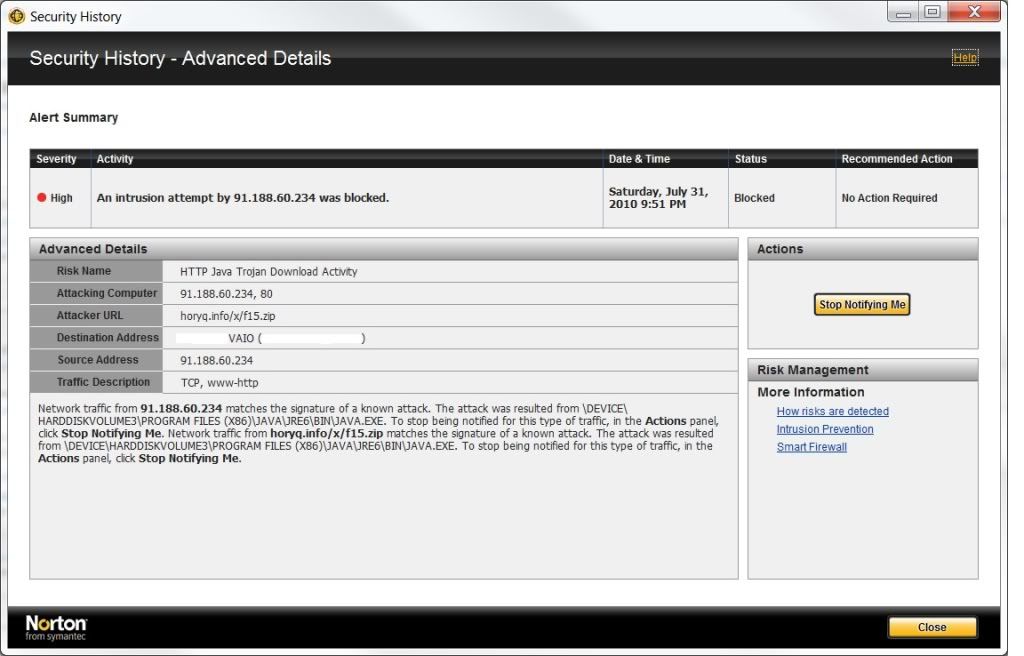
Had it happen twice at work and once at home, luckily my virus software caught it all three times. Will go directly to the forums page from now on. Here's a screen shot of what my Norton 2010 IS says about the virus...
Any word??

Any word??
Registered User
iTrader: (1)
Joined: May 2009
Posts: 702
Likes: 2
From: Where the girls are prettier (562), CA
^ I got that same IP address in a message.
After completing a virus scan I go to G35driver forum home page and all of a sudden Java starts up and I get this message: "unable to access jarfile \\91.188.60.234\public\photo1.jpg"
What's going on here admins?
After completing a virus scan I go to G35driver forum home page and all of a sudden Java starts up and I get this message: "unable to access jarfile \\91.188.60.234\public\photo1.jpg"
What's going on here admins?


IB Staff

Joined: Feb 2010
Posts: 660
Likes: 41
From: Barrie, ON
Thanks for your reports everyone. I don't profess to know wtf is going on, but I definitely think this is getting suspicious. I am re-filing a ticket with tech now.
This is a different report that what has previously been brought up in this thread, this seems somehow more serious/legit.
I would also suggest avoiding the homepage until we can figure this out.
cheers,
robb
This is a different report that what has previously been brought up in this thread, this seems somehow more serious/legit.
I would also suggest avoiding the homepage until we can figure this out.
cheers,
robb


Registered User
Joined: Apr 2007
Posts: 11
Likes: 0
wepawet is a good website tool to identify if site is running malicious code. looks like a hidden iframe and redirect is in the code and the hosting g35driver site is vulnerable to remote attacks.
by querying g35driver.com at the wepawet site, some interesting info is discovered, basically a redirect is made to horyq.info website that hosts the malicious and obfuscated java code as mentioned by previous posts.
once the redirect occurs, 2 security vulnerabities are tested against your system and if not patched, the exploits are performed against your computer, basically against Adobe Reader/Acrobat, and Java Web Start:
1. doc.media.newPlayer Use-after-free vulnerability in the Doc.media.newPlayer method in Adobe Reader and Acrobat 8.0 through 9.2 CVE-2009-4324
2. JWS command-line injection Java Web Start Arbitrary command-line injection CVE-2010-0886
I would check with sysadmins to make sure the g35driver.com hosting site is using the latest security patches for its forum software. as stated at the bottom of the forum website, it looks like it's running vBulletin version 3.7.4, last i read just by googling "vbulletin 3.7.4 exploit" these versions are full of security holes that allow malicious activity.
 ????
????
by querying g35driver.com at the wepawet site, some interesting info is discovered, basically a redirect is made to horyq.info website that hosts the malicious and obfuscated java code as mentioned by previous posts.
once the redirect occurs, 2 security vulnerabities are tested against your system and if not patched, the exploits are performed against your computer, basically against Adobe Reader/Acrobat, and Java Web Start:
1. doc.media.newPlayer Use-after-free vulnerability in the Doc.media.newPlayer method in Adobe Reader and Acrobat 8.0 through 9.2 CVE-2009-4324
2. JWS command-line injection Java Web Start Arbitrary command-line injection CVE-2010-0886
I would check with sysadmins to make sure the g35driver.com hosting site is using the latest security patches for its forum software. as stated at the bottom of the forum website, it looks like it's running vBulletin version 3.7.4, last i read just by googling "vbulletin 3.7.4 exploit" these versions are full of security holes that allow malicious activity.
????


Registered User
Joined: Dec 2006
Posts: 1,281
Likes: 1
From: Aurora, IL
Try to reboot to safe mode and do a Windows Restore to last week or anytime before the infection. Then download/install Malware Bytes' AntiMalware application and run that. It should remove the malware.
Registered User
Joined: Dec 2006
Posts: 1,281
Likes: 1
From: Aurora, IL
That's true, but this particular trojan/virus self-installs and does NOT prompt you to install or run/download anything. As soon as you hit the home page, if you do not have an up-to-date anti-malware running, it tries to kick off a Java app and then opens Acrobat or Windows Media Player. It then installs itself. Happens pretty quickly before you can close out IE or Firefox.
Last edited by kvangil; Aug 2, 2010 at 11:07 AM.

