


1 Super Clean G :: kHahnPhotography








Joined: Jun 2006
Posts: 4,408
Likes: 22
From: Oakland
G
Thanks for the comments.
Read your manual! -___-; lol
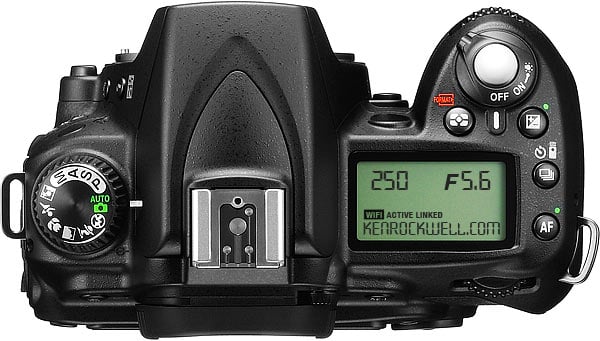
^ In the picture, on the left side of the camera body, there is a rotating dial; turn it to "S." After that, move the dial on the bottom right side of the top of the body so you get "60" where the "250" is located. Make sure you adjust your ISO to 400, too. Play around with the settings; different lighting calls for different ISO, f/stop, and ISO. The settings I gave you certainly do not work for every rolling shot.
Definitely! We need to wait for something of yours that's coming in first, though. 
Read your manual! -___-; lol

^ In the picture, on the left side of the camera body, there is a rotating dial; turn it to "S." After that, move the dial on the bottom right side of the top of the body so you get "60" where the "250" is located. Make sure you adjust your ISO to 400, too. Play around with the settings; different lighting calls for different ISO, f/stop, and ISO. The settings I gave you certainly do not work for every rolling shot.
Originally Posted by elayman
sweet! you, me, and mike need to do a berkeley or SF shoot sometime, rolling shots and BS+OB Gs heh






Good chit, Kev. Now that you're back in the Bay, we're gonna have to hook up so my G can get a lil kHahn photo love. 
PJ & Jay - Cars are looking good, fellas. Hope to see you guys up North, soon!
PJ & Jay - Cars are looking good, fellas. Hope to see you guys up North, soon!
