


TWO Phonebooks!


Joined: Dec 2006
Posts: 3,519
Likes: 32
From: Southern California

TWO Phonebooks!
Man, I'm still learning things about this car! Maybe some of you knew this already, but I didn't. There are actually TWO phone books in the car. One is the 40 number phone book we are all familiar with. Then there is the all inclusive DOWNLOADED phone book.
While working some issues on another thread, I learned I could beam my all my Outlook contacts via bluetooth book into there. For me, that's 500+ phone numbers in about 15 seconds!
So in short, think of the 40 number phone book as your "quick dial" or "voice dial" phone book. You can easily transfer numbers from the downloaded phone book into the 40 number phone book.
The downloaded phone book is still searchable but without voice, however the motion lock-out will still apply.
While working some issues on another thread, I learned I could beam my all my Outlook contacts via bluetooth book into there. For me, that's 500+ phone numbers in about 15 seconds!
So in short, think of the 40 number phone book as your "quick dial" or "voice dial" phone book. You can easily transfer numbers from the downloaded phone book into the 40 number phone book.
The downloaded phone book is still searchable but without voice, however the motion lock-out will still apply.

Registered User
Joined: Apr 2007
Posts: 14
Likes: 0
From: Santa Barbara
Originally Posted by terrycs
Man, I'm still learning things about this car! Maybe some of you knew this already, but I didn't. There are actually TWO phone books in the car. One is the 40 number phone book we are all familiar with. Then there is the all inclusive DOWNLOADED phone book.
While working some issues on another thread, I learned I could beam my all my Outlook contacts via bluetooth book into there. For me, that's 500+ phone numbers in about 15 seconds!
So in short, think of the 40 number phone book as your "quick dial" or "voice dial" phone book. You can easily transfer numbers from the downloaded phone book into the 40 number phone book.
The downloaded phone book is still searchable but without voice, however the motion lock-out will still apply.
While working some issues on another thread, I learned I could beam my all my Outlook contacts via bluetooth book into there. For me, that's 500+ phone numbers in about 15 seconds!
So in short, think of the 40 number phone book as your "quick dial" or "voice dial" phone book. You can easily transfer numbers from the downloaded phone book into the 40 number phone book.
The downloaded phone book is still searchable but without voice, however the motion lock-out will still apply.



Joined: Dec 2006
Posts: 3,519
Likes: 32
From: Southern California
FAQ: Downloading Phone Numbers from Windows Mobile Enabled Cell Phones
Many of us, including myself first thought the car is limited to 40 phone numbers. In reality it is only limited to 40 numbers that can be voice dialed. It can actually hold MUCH more (over 500+ in my case) that can be recalled via menu picks (because of the motion lockout).
This works with cell phones using Windows Mobile 5 with the Microsoft Bluetooth stack. There are many different cell phone models out there. In this example, I am using a Cingular 8525 which I have verified to work with the G35.
1) Download and install software that provides better control over Bluetooth. I used JETware Mobile (Thanks to user chrisbel for telling me about this program). It is free to use for a month and $15 to keep it. The software allows you to select which numbers to transfer by Outlook category, select not to transfer FAX numbers, show signal strength, show cell phone battery power, and a whole lot more. See the JETware Mobile website for more information:
http://www.jetwaremobile.com
Once the S/W is installed on your phone, the features we are most interested in are in the menu pick ADVACED OPTIONS. The screen looks like this:
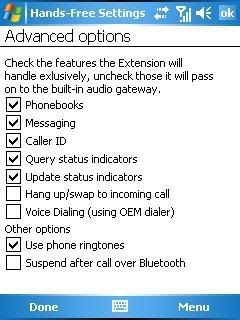
Place checkmarks on PHONEBOOKS, CALLER ID, QUERY STATUS INDICATORS, and UPDATE STATUS INDICATORS. All others are not needed for the G35.
2) Go to the menu pick PHONEBOOK OPTIONS. The screen looks like this:
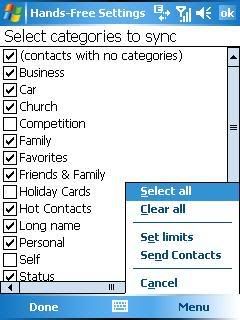
Note that the categories shown are the ones you are using in OUTLOOK. If you haven’t done so already, this would be a good time to organize your Outlook contacts by category! Place a checkmark by the category of contacts you want to send via Bluetooth. There is no problem if you want to send them all.
3) Pick on MENU / SEND CONTACTS (see previous picture).
This pick will let you decide how you want to format your contacts file (FIRST L, F LAST, FIRST LAST, LAST F, LAST FIRST) for display in the G35. Press OK AFTER the car is ready to receive (see next step).
4) Set up the car to receive the downloaded phonebook. The menu picks are:
Settings / Phonebook / Download Phonebook / Download All.
In my case, the download process took about 15 seconds.
5) When your phone book has been downloaded, you can move up to 40 of these numbers to the VOICE DIAL phone book for access while the car is on the move.
If there are questions regarding this FAQ, please post in the appropriate section referencing this FAQ.
This works with cell phones using Windows Mobile 5 with the Microsoft Bluetooth stack. There are many different cell phone models out there. In this example, I am using a Cingular 8525 which I have verified to work with the G35.
1) Download and install software that provides better control over Bluetooth. I used JETware Mobile (Thanks to user chrisbel for telling me about this program). It is free to use for a month and $15 to keep it. The software allows you to select which numbers to transfer by Outlook category, select not to transfer FAX numbers, show signal strength, show cell phone battery power, and a whole lot more. See the JETware Mobile website for more information:
http://www.jetwaremobile.com
Once the S/W is installed on your phone, the features we are most interested in are in the menu pick ADVACED OPTIONS. The screen looks like this:
Place checkmarks on PHONEBOOKS, CALLER ID, QUERY STATUS INDICATORS, and UPDATE STATUS INDICATORS. All others are not needed for the G35.
2) Go to the menu pick PHONEBOOK OPTIONS. The screen looks like this:
Note that the categories shown are the ones you are using in OUTLOOK. If you haven’t done so already, this would be a good time to organize your Outlook contacts by category! Place a checkmark by the category of contacts you want to send via Bluetooth. There is no problem if you want to send them all.
3) Pick on MENU / SEND CONTACTS (see previous picture).
This pick will let you decide how you want to format your contacts file (FIRST L, F LAST, FIRST LAST, LAST F, LAST FIRST) for display in the G35. Press OK AFTER the car is ready to receive (see next step).
4) Set up the car to receive the downloaded phonebook. The menu picks are:
Settings / Phonebook / Download Phonebook / Download All.
In my case, the download process took about 15 seconds.
5) When your phone book has been downloaded, you can move up to 40 of these numbers to the VOICE DIAL phone book for access while the car is on the move.
If there are questions regarding this FAQ, please post in the appropriate section referencing this FAQ.
Last edited by terrycs; Apr 10, 2007 at 12:30 AM.



Registered User
Joined: Dec 2006
Posts: 459
Likes: 0
From: Upstate, NY
Interesting. I have the Cingular 8125, which has Windows Mobile 5. By default, it doesn't support downloading its Outlook contacts to the G35. I wonder if I can get it to do so with the JETware Mobile software.... JETware's web site says that the Cingular 8125 is compatible, but since my phone couldn't, by default, download its Outlook contacts to the G35, I wonder if this software will allow it to do the download. I'll need to do more research on this. Question - did the Cingular 8525 allow you to download its contact information even before you installed this software?
Last edited by randman; Apr 9, 2007 at 01:13 PM.
Trending Topics
Joined: Dec 2006
Posts: 3,519
Likes: 32
From: Southern California
Originally Posted by randman
Interesting. I have the Cingular 8125, which has Windows Mobile 5. By default, it doesn't support downloading its Outlook contacts to the G35. I wonder if I can get it to do so with the JETware Mobile software.... JETware's web site says that the Cingular 8125 is compatible, but since my phone couldn't, by default, download its Outlook contacts to the G35, I wonder if this software will allow it to do the download. I'll need to do more research on this. Question - did the Cingular 8525 allow you to download its contact information even before you installed this software?
Last edited by terrycs; Apr 10, 2007 at 12:33 AM.

Joined: Dec 2006
Posts: 3,519
Likes: 32
From: Southern California
Originally Posted by timn99
Does the phonebook store multiples numbers for each name (for example home and mobile #s), or single discrete entry for each name/number?
Registered User
Joined: Dec 2006
Posts: 459
Likes: 0
From: Upstate, NY
Originally Posted by terrycs
Without the JETware software, you can only beam one at a time using the standard Bluetooth software that comes with WM5. Try the JETware S/W .. it's free for 30 days giving you plenty of time to upload. Be sure to post results.

Joined: Dec 2006
Posts: 3,519
Likes: 32
From: Southern California
Originally Posted by daluder
has anyone tried this with the blackjack?
I have tried with and without this software but it doesn't work
I have tried with and without this software but it doesn't work


