When you click on links to various merchants on this site and make a purchase, this can result in this site earning a commission. Affiliate programs and affiliations include, but are not limited to, the eBay Partner Network.
FREE DIY: How to permanently turn off the AFS light
This should turn off the AFS light...
(1) Disconnect battery
(2) Unplug AFS module
(3) Connect battery
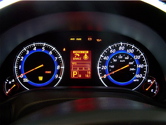
While doing some CAN bus research on my G37, I turned on the AFS light. This is weird, as it doesn't have AFS (adaptive front lighting system)
I turned the car off, restarted it, and the light was still on.
Huh...
I disconnected the battery for 30 seconds and reconnected it.
After starting the car, the light was off and stayed off. Good!
Sooo what happened?
A few different systems on the G35/G37 CAN bus will look for a message from a specific module and use that message to configure itself.
In this case, when the cluster sees a message from the AFS module, it knows it has one.
This "configuration" is stored in a non-volatile memory. If power is removed, the configuration is cleared.
By disconnecting the battery and the AFS module I think the cluster will forget that it did see the AFS module, and the light will stay off.
Then connect the battery and verify the light is off.