
Samsung Galaxy Tab 2 7inch tablet in 2006 double din

Thread Tools
 
Search this Thread
 
Rate Thread
 
Old Jun 20, 2012 | 09:44 AM
  #16  
viceversa's Avatar
Thread Starter
|
Registered User
iTrader: (27)
Joined: Jun 2008
Posts: 2,227
Likes: 23
From: SAN DIEGO
thanks corey! but man I'm having a really hard time understanding what you just said lol
 
Reply
Old Jun 20, 2012 | 10:12 AM
  #17  
djamps's Avatar
Registered User
iTrader: (8)
Joined: Dec 2008
Posts: 3,602
Likes: 75
From: Annapolis, MD
Originally Posted by viceversa
Haha randy haters gonna hate. Bluetooth and audio inputs will be solved with the eq. And radio... Not exactly a critical function for me. If I really wanted radio I would've bought a tablet with a built in radio receiver which they do make in case anyone else is wondering.
Not hating; I think it LOOKS fantastic and you put a ton of work into this obviously...just questioning the practicality and overall usability of the setup in a car.

When I mentioned BT I am speaking mainly of hands free capability (audio being a plus but obviously not requirement)...I know this is pretty easy with carPC setups.
 

Last edited by djamps; Jun 20, 2012 at 10:18 AM.

Reply
Old Jun 20, 2012 | 10:20 AM
  #18  
viceversa's Avatar
Thread Starter
|
Registered User
iTrader: (27)
Joined: Jun 2008
Posts: 2,227
Likes: 23
From: SAN DIEGO
Originally Posted by soysssauce
great job! can you post up some more detail picture of how to connect the wires.
I have the headphone jack (left audio, right audio and ground) spliced into the low level inputs left front left rear and right font right rear of the PAC ROEM-NIS2. Remote wire is hooked up to ignition switched wire so the amp turns on when the key is in...eventually id like to put a small switch in so i can turn the amp on or off with a button.

This is all temporary because after I have the EQ hooked up I will not be using the PAC unit.
 
Reply
Old Jun 20, 2012 | 10:23 AM
  #19  
viceversa's Avatar
Thread Starter
|
Registered User
iTrader: (27)
Joined: Jun 2008
Posts: 2,227
Likes: 23
From: SAN DIEGO
Originally Posted by djamps
Not hating; I think it LOOKS fantastic and you put a ton of work into this obviously...just questioning the practicality and overall usability of the setup in a car.

When I mentioned BT I am speaking mainly of hands free capability (audio being a plus but obviously not requirement)...I know this is pretty easy with carPC setups.
its extremely practical for an in car setup. All about the interface the ease of navigating around the system since it was designed as a touch unit unlike a Carpc setup which would take a lot of work and customization of applications to achieve what android does right out of the box.

Regarding bluetooth for handsfree. it will work no problem and I might have made it seem more complex than it really is. I'll just show you guys with a video after I have it hooked up.

 
Reply
Old Jun 20, 2012 | 10:32 AM
  #20  
G ZILLA's Avatar
Registered User
iTrader: (27)
Joined: Jun 2007
Posts: 6,942
Likes: 190
From: DMV
Originally Posted by viceversa
thanks corey! but man I'm having a really hard time understanding what you just said lol
tiny phone post FTL.

edited for your reading pleasure above.
 
Reply
Old Jun 20, 2012 | 10:37 AM
  #21  
djamps's Avatar
Registered User
iTrader: (8)
Joined: Dec 2008
Posts: 3,602
Likes: 75
From: Annapolis, MD
I did a little research and it looks like you can install Windows/Linux ect on the tablet and not limited to Android OS which IMO opens op alot of possibilities. I guess my main gripe is the Android OS itself. Kind of like tying your hands behind your back when compared to a quality carPC setup.
 
Reply
Old Jun 20, 2012 | 10:40 AM
  #22  
viceversa's Avatar
Thread Starter
|
Registered User
iTrader: (27)
Joined: Jun 2008
Posts: 2,227
Likes: 23
From: SAN DIEGO
Originally Posted by G ZILLA
Nice man. I took my stock nav out.

As you know from all the trim work you did, you understand the Samsung Galaxy was a tad too large. I could not replace the factory Van unit do to size.

I am now looking to flush mout the SamGalax infront of my factory Nav Until. I will build a housing around my stock Nav,

bad news is, if I do it this way it wont go up and down when I am done.


As far as your build, this is awesome!

good job!
ahh makes much more sense now lol Yeah I know what you mean with the size especially since the dock connector and headphone jack are on the top and bottom (or left and right sides when in landscape) Might want to look into a different tablet like the ViewSonic ViewPad 7 which has all the connections on the bottom. LMK if you need any help!
 
Reply
Old Jun 20, 2012 | 10:43 AM
  #23  
viceversa's Avatar
Thread Starter
|
Registered User
iTrader: (27)
Joined: Jun 2008
Posts: 2,227
Likes: 23
From: SAN DIEGO
Originally Posted by djamps
I did a little research and it looks like you can install Windows/Linux ect on the tablet and not limited to Android OS which IMO opens op alot of possibilities. I guess my main gripe is the Android OS itself. Kind of like tying your hands behind your back when compared to a quality carPC setup.
yeah i've seen a few articles about running ubuntu and even emulating windows within linux and it working without problem. Guess only thing to look into then would be the ability to hook up usb connections to it so you could run Osiris. but if your curious about OBDII connectivity with android they have it and it works with an app called Torque. check it out
 
Reply
Old Jun 20, 2012 | 01:29 PM
  #24  
G ZILLA's Avatar
Registered User
iTrader: (27)
Joined: Jun 2007
Posts: 6,942
Likes: 190
From: DMV
Originally Posted by viceversa
I just have no idea where I will mount it lol.

remove ashtray door.

or slide in ashtray door just like you did the Tablet, like my gauges are....
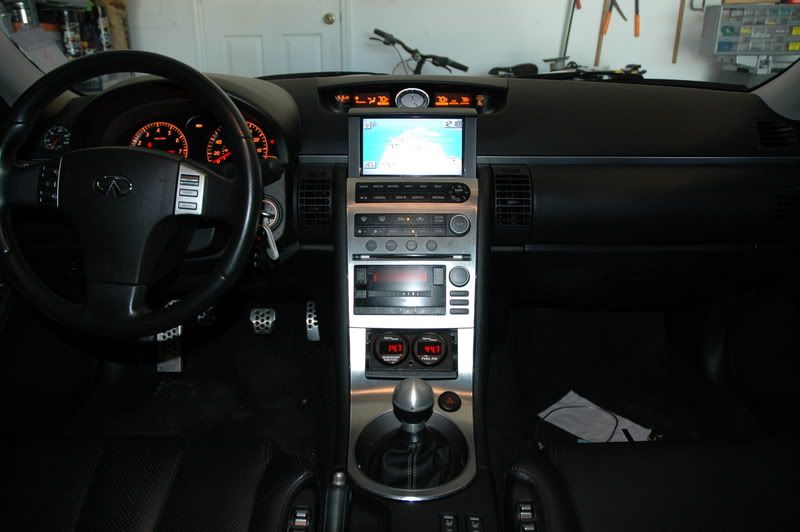


or mount in cubbie above AC unit.
 
Reply
Old Jun 21, 2012 | 10:36 PM
  #25  
bb1314's Avatar
Registered User
iTrader: (4)
Joined: Dec 2007
Posts: 1,364
Likes: 18
From: Rockville, MD
Curious about this! So like my Android phone (HTC EVO 4G) has a "car mode" which is an interface specific for when you use the phone in the car as a GPS. There isn't equivalent for the Android based tablets?
 
Reply
Old Jun 21, 2012 | 10:47 PM
  #26  
luger303's Avatar
Registered User
Joined: Oct 2010
Posts: 690
Likes: 23
From: Denver
damn you are a crafty individual!!!
 
Reply
Old Jun 22, 2012 | 09:19 AM
  #27  
viceversa's Avatar
Thread Starter
|
Registered User
iTrader: (27)
Joined: Jun 2008
Posts: 2,227
Likes: 23
From: SAN DIEGO
Originally Posted by bb1314
Curious about this! So like my Android phone (HTC EVO 4G) has a "car mode" which is an interface specific for when you use the phone in the car as a GPS. There isn't equivalent for the Android based tablets?
sure there is. but I prefer not to be tied down to some front application which is very limited. Much more flexibility in using the home screen launcher and customizing it with widgets, bigger icons and whatever else you can think of.
 
Reply
Old Jun 24, 2012 | 08:35 AM
  #28  
devlmaycry's Avatar
Registered User
iTrader: (2)
Joined: Apr 2010
Posts: 20
Likes: 0
For the people wanting to mount it in the factory gps spot, you can crack most of the tablet cases open and remove the screen and guts from the case and stuff them in the gps screen spot. That is as long as the screen is 7" or so, and if you never plan on removing the tablet again.
 
Reply
Old Jun 26, 2012 | 01:12 AM
  #29  
wonton1017's Avatar
Registered User
Joined: Nov 2009
Posts: 111
Likes: 6
Nice, always wanted to do this, but I have no experience at all in this...

WTB full kit excluding the tablet
 
Reply
Old Jul 5, 2012 | 09:00 AM
  #30  
viceversa's Avatar
Thread Starter
|
Registered User
iTrader: (27)
Joined: Jun 2008
Posts: 2,227
Likes: 23
From: SAN DIEGO
Post 2 updated with more info about the current audio configuration
 
Reply


You have already rated this thread Rating: Thread Rating: 0 votes,  average.


All times are GMT -4. The time now is 12:44 AM.