


***DIY ~ 03 - 07 V35 Navigation update


Thread Starter
|
Registered User
Joined: Apr 2013
Posts: 276
Likes: 6
From: Toronto
 ***DIY ~ 03 - 05 V35 Navigation update
Hey everyone,
Here is a DIY on the navigation update. I'm making one because I couldn't seem to find a DIY specific to the update. (Just random questions here and there in different threads about it).
So for those of you who have the OEM navigation system and are sick and tired of being led into dead end roads, lakes or even places that no longer exist (gas stations, restaurants, etc.) well here's how to fix all that.
Let me first say that you do not need to go to the dealership to do this simple process as they will definitely take advantage of you and charge you a ridiculous amount just to do it.
So start by visiting this site and entering in your credentials:
http://www.navigation.com/is-bin/INT...thAmerica-Site
There is a promo going on so if you hurry you can catch it and save $50.
So once you get your stuff in the mail you should have all this:
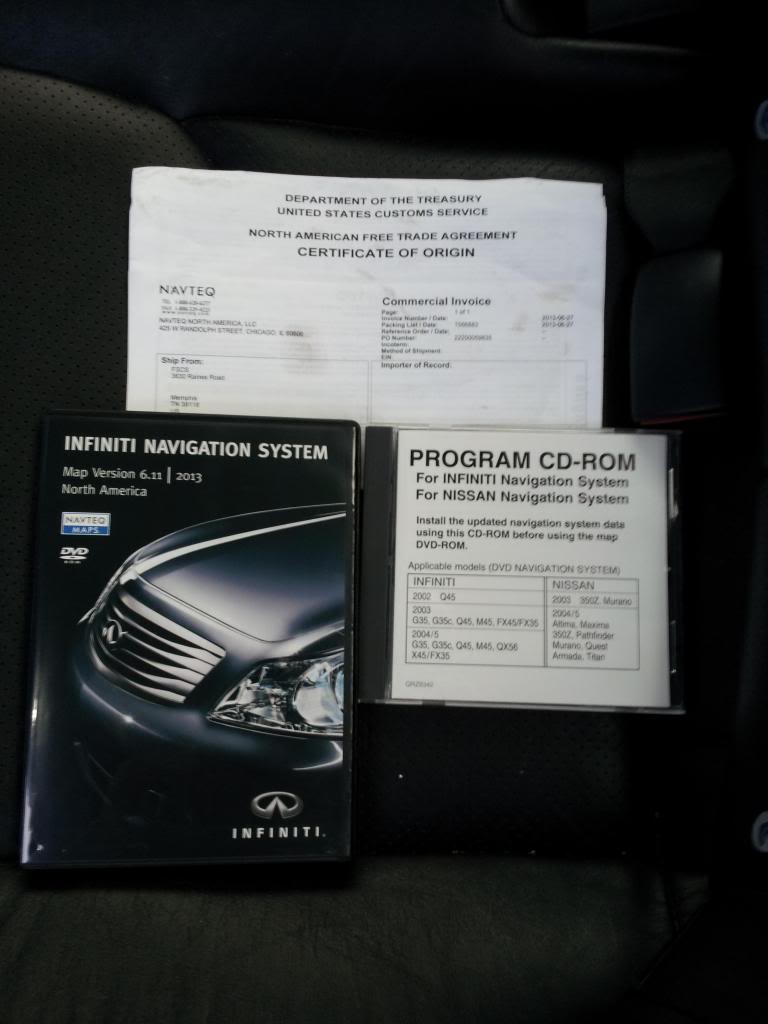
(Don't mind the picture of the V36, this disc is compatible with our cars)
Then you open up your upper glove box compartment and eject the old disc from the DVD-ROM and then put in the yellow disc.
Here is the old disc that was in my '04 G35:
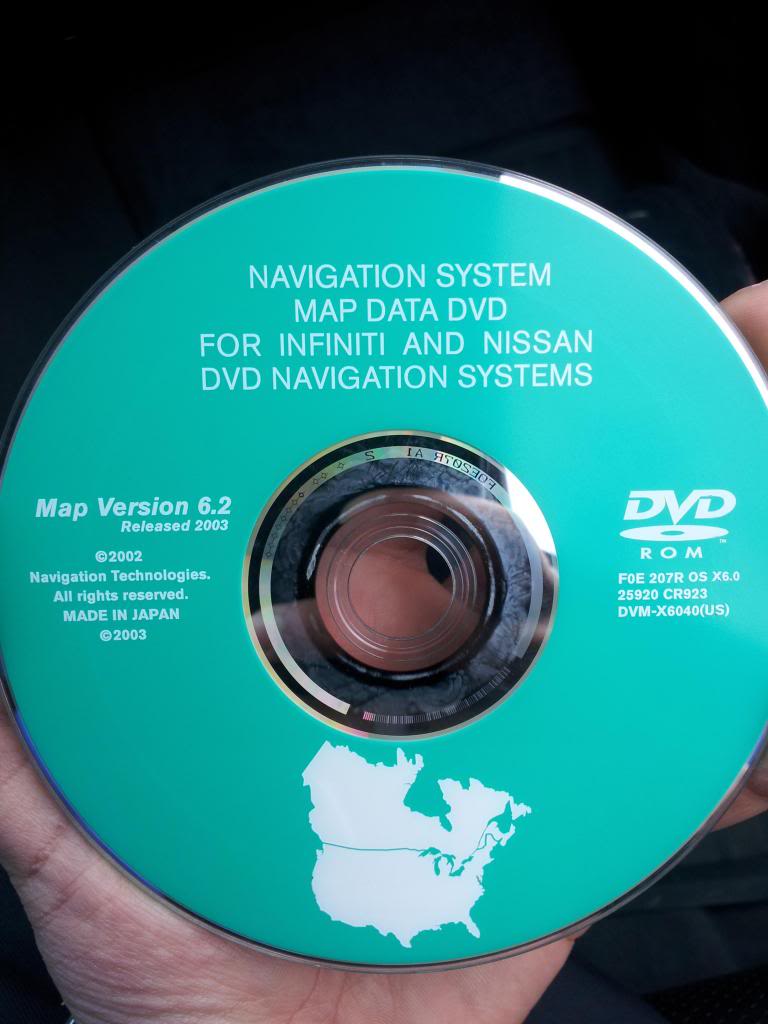
(A lot of stuff can change in 10 years.... )
)
And here is the yellow disc that you put into the DVD-ROM:

Do not put this yellow disc in the CD player. There are warning labels on the instruction manual not to because it will play a really loud sound and hurt your ears and/or break your speakers.
Let the yellow disc run for about 3 minutes and then you will hear an audible beep sound telling you that it's done. So you then eject that disc and insert this purple one:

This disc is what replaces your old disc and stays in your DVD-ROM at all times. Once you have that in you'll immediately notice that the GPS is showing an incorrect current location. (Mine said I was right by the Los Angeles International Airport. I live in Toronto) Do not panic because the GPS still needs to figure out where in the world you are. The instruction manual said to drive around for about 20 to 30 minutes for it to figure it out but it literally took less than 2 minutes for mine to adjust.
Here is a picture of the instruction manual:
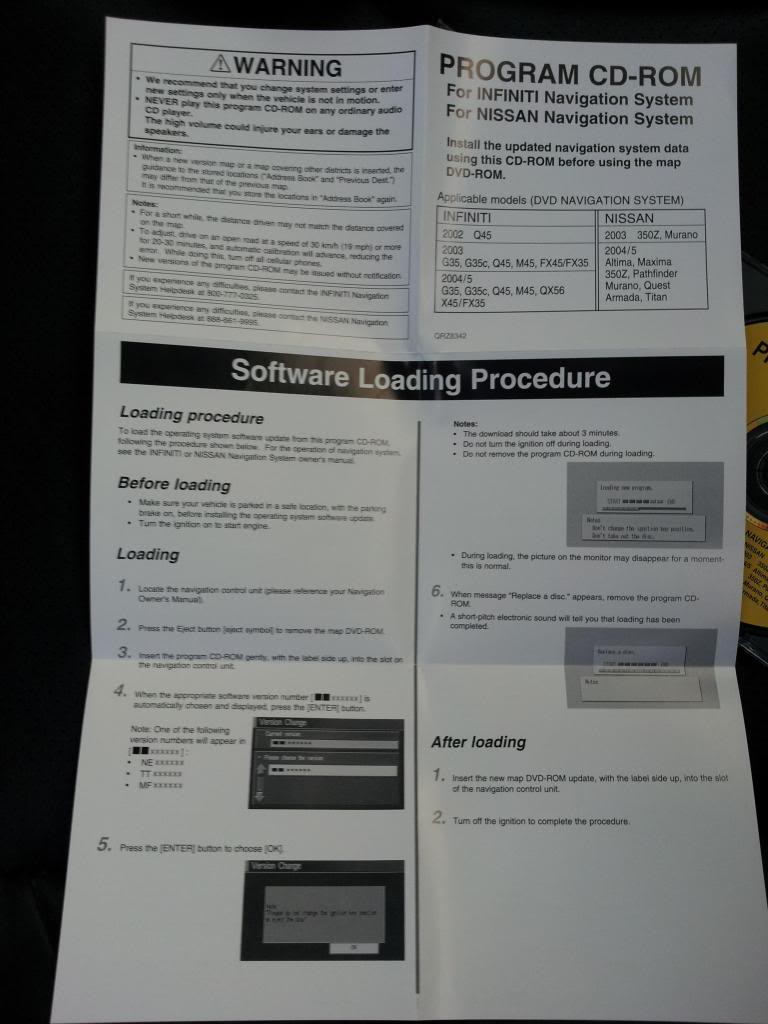
and BOOM!! You're done
After the update, it seems like the graphics of the nav got a little bit better with color and quality. Don't get me wrong, the graphics still suck but it seems like it just got a little tiny bit better. Then again it could just be my imagination. Either way I love the OEM nav and hope you guys found this DIY helpful and enjoy your updated nav too!
I'm not sure if this whole process is the same for other Infiniti models like the FX, M, Q, etc. but if it is, then maybe someone can move this thread to the proper location so it can help everyone. Thanks!
Here is a DIY on the navigation update. I'm making one because I couldn't seem to find a DIY specific to the update. (Just random questions here and there in different threads about it).
So for those of you who have the OEM navigation system and are sick and tired of being led into dead end roads, lakes or even places that no longer exist (gas stations, restaurants, etc.) well here's how to fix all that.
Let me first say that you do not need to go to the dealership to do this simple process as they will definitely take advantage of you and charge you a ridiculous amount just to do it.
So start by visiting this site and entering in your credentials:
http://www.navigation.com/is-bin/INT...thAmerica-Site
There is a promo going on so if you hurry you can catch it and save $50.
So once you get your stuff in the mail you should have all this:

(Don't mind the picture of the V36, this disc is compatible with our cars)
Then you open up your upper glove box compartment and eject the old disc from the DVD-ROM and then put in the yellow disc.
Here is the old disc that was in my '04 G35:

(A lot of stuff can change in 10 years....
)And here is the yellow disc that you put into the DVD-ROM:

Do not put this yellow disc in the CD player. There are warning labels on the instruction manual not to because it will play a really loud sound and hurt your ears and/or break your speakers.
Let the yellow disc run for about 3 minutes and then you will hear an audible beep sound telling you that it's done. So you then eject that disc and insert this purple one:

This disc is what replaces your old disc and stays in your DVD-ROM at all times. Once you have that in you'll immediately notice that the GPS is showing an incorrect current location. (Mine said I was right by the Los Angeles International Airport. I live in Toronto) Do not panic because the GPS still needs to figure out where in the world you are. The instruction manual said to drive around for about 20 to 30 minutes for it to figure it out but it literally took less than 2 minutes for mine to adjust.
Here is a picture of the instruction manual:

and BOOM!! You're done
After the update, it seems like the graphics of the nav got a little bit better with color and quality. Don't get me wrong, the graphics still suck but it seems like it just got a little tiny bit better. Then again it could just be my imagination. Either way I love the OEM nav and hope you guys found this DIY helpful and enjoy your updated nav too!
I'm not sure if this whole process is the same for other Infiniti models like the FX, M, Q, etc. but if it is, then maybe someone can move this thread to the proper location so it can help everyone. Thanks!
Last edited by G_DiRTY5; Jul 6, 2013 at 12:05 PM. Reason: Incorrect model years for DIY


Registered User
Joined: Jan 2008
Posts: 520
Likes: 26
From: Sioux Falls SD
Might want to update your subject to 03-05 instead of through 07. 2006 is when infiniti significantly improved the DVD system and the newer setup does not require the separate update disk. You just slap in the latest map DVD and go.

Thread Starter
|
Registered User
Joined: Apr 2013
Posts: 276
Likes: 6
From: Toronto
Also if I wanna play my music really loud but still be able to get clear directions to my destination I'll input the address into the nav because it turns the volume down and tells me where I need to go.
For me the nav is just a back up for when my phone is low on battery or maxing out on data usage. Plus it makes the interior look good imo.

What version are we on for the 2006-2007 models? I have 7.1
I don't even use my OEM navi. I use a suction cup Garmin, or my iPhone. Way easier to use and program.
I'm spoiled my the Navi in my Benz. Just speak where you want to go and done. iPhone still easier if you want to say "directions to nearest Dunkin Donuts" though
I don't even use my OEM navi. I use a suction cup Garmin, or my iPhone. Way easier to use and program.
I'm spoiled my the Navi in my Benz. Just speak where you want to go and done. iPhone still easier if you want to say "directions to nearest Dunkin Donuts" though

Registered User
Joined: Jul 2013
Posts: 11
Likes: 0
Update
Curious if anyone has tried copying their update DVD for a "back-up" copy, you know just in case?
If Dirty5 wants to try it I'll test for him to make sure it works.
If Dirty5 wants to try it I'll test for him to make sure it works.
Trending Topics
Thread Starter
|
Registered User
Joined: Apr 2013
Posts: 276
Likes: 6
From: Toronto
Lol I don't mind trying to burn a copy for you and seeing if it works in your car. Are you anywhere near Toronto by any chance?
(Say G-Dirty5 really fast)


Registered User
Joined: Jan 2008
Posts: 520
Likes: 26
From: Sioux Falls SD
You guys don't need to copy each others disks, and I certainly wouldn't be paying someone for a copy of anything. These things are floating around in the world of torrents free for the taking. You just need to have an understanding of bittorrent along with a stack of Verbatim dual layer disks. Of course if you end up making use of the updated DVD, you should purchase a legal copy. You should also never jaywalk and always drive the speed limit. Bases covered.
Thread Starter
|
Registered User
Joined: Apr 2013
Posts: 276
Likes: 6
From: Toronto
No prob.
Man you guys are making my username sound like a nasty sexual position. It's G-Dirty5... you know like G-Thirty5?!
^ Yes.... yes, of course... that's why I bought it.
Man you guys are making my username sound like a nasty sexual position. It's G-Dirty5... you know like G-Thirty5?!
You guys don't need to copy each others disks, and I certainly wouldn't be paying someone for a copy of anything. These things are floating around in the world of torrents free for the taking. You just need to have an understanding of bittorrent along with a stack of Verbatim dual layer disks. Of course if you end up making use of the updated DVD, you should purchase a legal copy. You should also never jaywalk and always drive the speed limit. Bases covered.




Thread
Thread Starter
Forum
Replies
Last Post
DEMoLITIoN
Audio/Video/Electronics
8
Apr 20, 2016 06:57 PM
