


Canon Color Accent Feature


Thread Starter
|
Registered User
Joined: Aug 2005
Posts: 561
Likes: 0
From: Chicago
Originally Posted by Blackjack
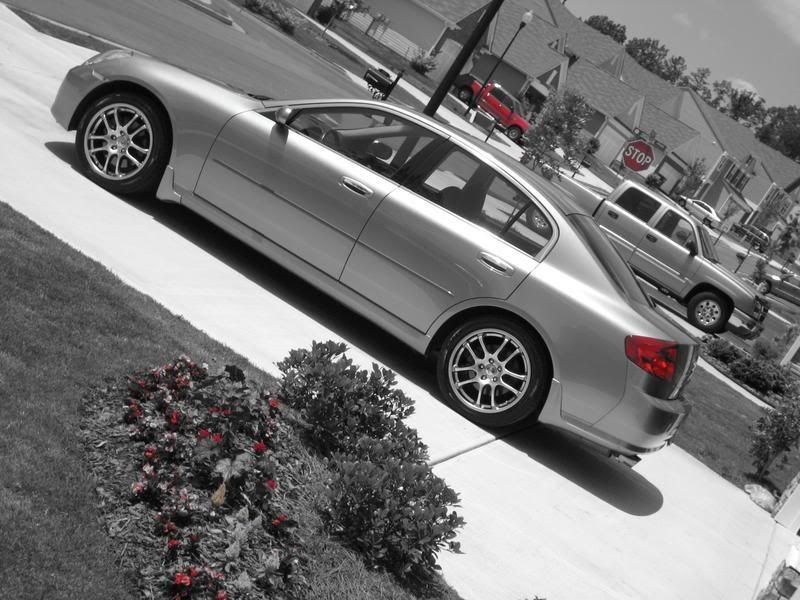
I've used mine as well... Here's one of the first one's I took where I accented the red. Wasn't much red in the picture, but it looks kinda cool.

Registered User
Joined: May 2005
Posts: 1,343
Likes: 6
From: on the beach
Originally Posted by blueSKYLINE
So far I love it, I switched to it from the SD500 and thought other than the MP and bigger display there wouldn't be much difference but I keep discovering more and more new features that they added to the 900
I believe the 900 has image stabilization like my 700 does. I think that alone makes a huge difference.



Registered User
Joined: Jan 2005
Posts: 1,335
Likes: 0
Originally Posted by Tony Yeung
that looks awesome!
Anyone know how a person without this feature can do something like this in PS?
Anyone know how a person without this feature can do something like this in PS?
Heres what you do:
1. Convert the photo to black and white. Image -> Desaturate
2. Select the History tool on the left menu bar.
3. Just start brushing the area you want to restore color to.
Tips:
Be sure to left off the mouse every once in a while so that you can undo any mistakes.
Use a small sized brush for good accuracy ~10 pt.

Now does the camera actually take the picture like that or do you have to load it onto the computer and then edit it?
If the camera takes the pictures like that...thats pretty damn awesome!
If the camera takes the pictures like that...thats pretty damn awesome!

Originally Posted by tiblot
easy, thats how i do my cutouts
Heres what you do:
1. Convert the photo to black and white. Image -> Desaturate
2. Select the History tool on the left menu bar.
3. Just start brushing the area you want to restore color to.
Tips:
Be sure to left off the mouse every once in a while so that you can undo any mistakes.
Use a small sized brush for good accuracy ~10 pt.
Heres what you do:
1. Convert the photo to black and white. Image -> Desaturate
2. Select the History tool on the left menu bar.
3. Just start brushing the area you want to restore color to.
Tips:
Be sure to left off the mouse every once in a while so that you can undo any mistakes.
Use a small sized brush for good accuracy ~10 pt.

Thread Starter
|
Registered User
Joined: Aug 2005
Posts: 561
Likes: 0
From: Chicago
Originally Posted by Nismo G
that first picture you took of the lilly is amazing. How much was your camera?
currently $379.95 on amazon.com
Which IMHO is an amazing deal considering that 3 weeks ago I got it from the same site for $430, so I guess the price is going down pretty quickly
Thread Starter
|
Registered User
Joined: Aug 2005
Posts: 561
Likes: 0
From: Chicago
Originally Posted by Nismo G
Now does the camera actually take the picture like that or do you have to load it onto the computer and then edit it?
If the camera takes the pictures like that...thats pretty damn awesome!
If the camera takes the pictures like that...thats pretty damn awesome!
Thread Starter
|
Registered User
Joined: Aug 2005
Posts: 561
Likes: 0
From: Chicago
Originally Posted by accordfreak
is this under the manual mode?
Registered User
Joined: Jan 2005
Posts: 1,335
Likes: 0
Originally Posted by blueSKYLINE
yes it is, and what is kind of cool is that once you select your base color and then you look at the screen it shows everything around you black and white except that color too, so you can pretty much have an idea of how things would look if all was b&w except your chosen color.