Picture Share Pics of your or others' rides!

Another Rig Shot

Thread Tools
 
Search this Thread
 
Rate Thread
 
Old Dec 20, 2008 | 04:53 PM
  #16  
bigc's Avatar
Wings Nation
iTrader: (59)
Joined: Feb 2007
Posts: 7,931
Likes: 626
From: SoCal
Premier Member

baaallliiinnnnn!!!
 
Reply
Old Dec 20, 2008 | 05:00 PM
  #17  
Johnmikins's Avatar
Registered User
iTrader: (4)
Joined: Mar 2007
Posts: 2,775
Likes: 25
From: Long Beach Trick!
Tight...very tight!
 
Reply
Old Dec 20, 2008 | 05:26 PM
  #18  
CandlestickPark's Avatar
Thread Starter
|
ill Sedan
Staff Alumni
iTrader: (87)
Joined: Jun 2007
Posts: 23,261
Likes: 2,688
From: Long Beach, SoCal
Premier Member

Originally Posted by aHeroForEternity
I like this one. The only thing I'd do is adjust the white balance. The ground looks yucky.
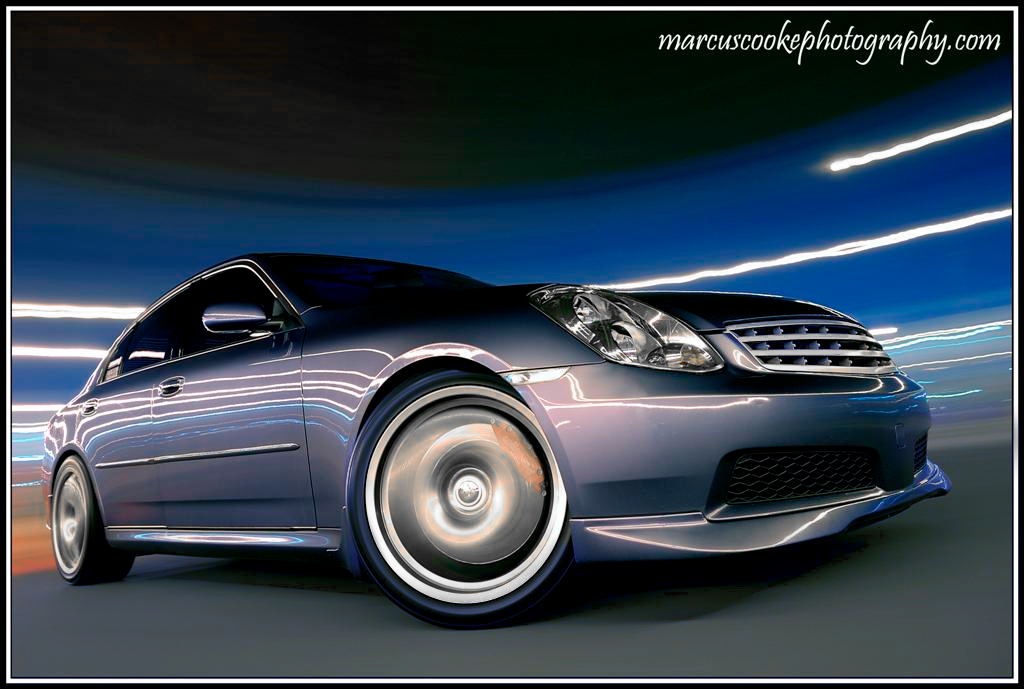
Thanks Cal. I adjusted the White balance quite a bit from the image that came out of the camera (entire image was pretty orange/red from the lighting that was present), but I wasn't able to get the ground to change to a normal asphalt color
 
Reply
Old Dec 20, 2008 | 07:00 PM
  #19  
Calvin's Avatar
Overglorified Altima
iTrader: (65)
Joined: Jun 2006
Posts: 53,506
Likes: 187
From: Chicago
Originally Posted by CandlestickPark
Thanks Cal. I adjusted the White balance quite a bit from the image that came out of the camera (entire image was pretty orange/red from the lighting that was present), but I wasn't able to get the ground to change to a normal asphalt color
Hope you don't mind, but I took a stab at it. My monitor isn't calibrated, so it may not look the same on your end as it does on mine. But it looks just about right on my side.

Original


My Edit:


What do you think? How does it look on your monitor? Your headlights, grille, wheels, and asphalt looked yellow on my end, so I played with those a bit and now they look about right. Then again, my monitor isn't calibrated so that doesn't mean too much. But that's why I'm asking how it looks on your side.
 
Reply
Old Dec 20, 2008 | 07:42 PM
  #20  
Capthook's Avatar
Registered User
iTrader: (6)
Joined: Jun 2005
Posts: 1,090
Likes: 1
From: ATL
Great looking Pic! You every coming to ATL?????
 
Reply
Old Dec 20, 2008 | 10:00 PM
  #21  
CandlestickPark's Avatar
Thread Starter
|
ill Sedan
Staff Alumni
iTrader: (87)
Joined: Jun 2007
Posts: 23,261
Likes: 2,688
From: Long Beach, SoCal
Premier Member

Originally Posted by aHeroForEternity
Hope you don't mind, but I took a stab at it. My monitor isn't calibrated, so it may not look the same on your end as it does on mine. But it looks just about right on my side.

What do you think? How does it look on your monitor? Your headlights, grille, wheels, and asphalt looked yellow on my end, so I played with those a bit and now they look about right. Then again, my monitor isn't calibrated so that doesn't mean too much. But that's why I'm asking how it looks on your side.
Don't mind at all Cal, looks great, that edit really fixed the photo. The grill, wheels and and asphalt looked off on my end too, I just didn't know what to do to fix it. Thanks again man!
 
Reply
Old Dec 20, 2008 | 10:13 PM
  #22  
CandlestickPark's Avatar
Thread Starter
|
ill Sedan
Staff Alumni
iTrader: (87)
Joined: Jun 2007
Posts: 23,261
Likes: 2,688
From: Long Beach, SoCal
Premier Member

Cal, just figured out how to make the edit your did in Capture NX (RAW editing program I use) when I was working on another rig shot from this evening. Looks much better, thanks for the heads up man!
 
Reply
Old Dec 20, 2008 | 10:15 PM
  #23  
SouthBayGSedan's Avatar
Registered User
iTrader: (2)
Joined: Oct 2007
Posts: 192
Likes: 0
From: Gardena
Looks awesome Marcus
 
Reply
Old Dec 20, 2008 | 10:17 PM
  #24  
ttrank's Avatar
Grocery getter
iTrader: (57)
Joined: Jul 2005
Posts: 27,305
Likes: 190
From: Phoenix
Premier Member


That's all I have to say...
 
Reply
Old Dec 21, 2008 | 12:40 AM
  #25  
Wannabe6MT's Avatar
-MN G Crew-
Staff Alumni
iTrader: (10)
Joined: May 2007
Posts: 21,010
Likes: 205
From: Fargo ND/Eden Prairie MN
Premier Member

I made this pic my desktop background
 
Reply
Old Dec 21, 2008 | 12:52 AM
  #26  
CandlestickPark's Avatar
Thread Starter
|
ill Sedan
Staff Alumni
iTrader: (87)
Joined: Jun 2007
Posts: 23,261
Likes: 2,688
From: Long Beach, SoCal
Premier Member

Originally Posted by Wannabe6MT
I made this pic my desktop background

Noiiiice! That's pretty cool Janik
 
Reply
Old Dec 21, 2008 | 02:31 AM
  #27  
Wannabe6MT's Avatar
-MN G Crew-
Staff Alumni
iTrader: (10)
Joined: May 2007
Posts: 21,010
Likes: 205
From: Fargo ND/Eden Prairie MN
Premier Member

Lol your probably thinking to yourself. "Pretty sweet, now get that helmet back on" haha

jk

but yea, im excited because im getting a front lip for christmas ! and this pic looks soooo sick.
 
Reply
Old Dec 21, 2008 | 03:10 AM
  #28  
xx7sephiroth7xx's Avatar
Registered User
iTrader: (16)
Joined: Jun 2006
Posts: 4,408
Likes: 22
From: Oakland
G
Originally Posted by CandlestickPark
Don't mind at all Cal, looks great, that edit really fixed the photo. The grill, wheels and and asphalt looked off on my end too, I just didn't know what to do to fix it. Thanks again man!
Did you try to use the Replace Color tool under Adjustments in Photoshop?
 
Reply
Old Dec 21, 2008 | 08:13 AM
  #29  
Calvin's Avatar
Overglorified Altima
iTrader: (65)
Joined: Jun 2006
Posts: 53,506
Likes: 187
From: Chicago
Originally Posted by xx7sephiroth7xx
Did you try to use the Replace Color tool under Adjustments in Photoshop?
Originally Posted by CandlestickPark
Cal, just figured out how to make the edit your did in Capture NX (RAW editing program I use) when I was working on another rig shot from this evening. Looks much better, thanks for the heads up man!
Kevin - layers are your best friend.
 
Reply
Old Dec 21, 2008 | 08:39 AM
  #30  
CandlestickPark's Avatar
Thread Starter
|
ill Sedan
Staff Alumni
iTrader: (87)
Joined: Jun 2007
Posts: 23,261
Likes: 2,688
From: Long Beach, SoCal
Premier Member

Originally Posted by xx7sephiroth7xx
Did you try to use the Replace Color tool under Adjustments in Photoshop?
Yup I sure did, and couldn't get it to work. What did work was changing the White Balance by setting the Grey Point (a tool I had never messed with before), I usually set the Color Temperature. I'll post my re-edit when I'm done with it.
 
Reply


You have already rated this thread Rating: Thread Rating: 0 votes,  average.


All times are GMT -4. The time now is 09:00 AM.