


iSimple non-factory ipod integration in 2007 G35 (Sirius/NON-nav)


Thread Starter
|
Registered User
Joined: Sep 2007
Posts: 654
Likes: 8
From: NY
iSimple non-factory ipod integration in 2007 G35 (Sirius/NON-nav)
I recently bought and had an installer put inhttp://cgi.ebay.com/2007-07-INFINITI-G35-SEDAN-iPOD-DIRECT-INPUT-ADAPTER_W0QQitemZ260405387677QQcmdZViewItemQQptZOther_MP3_Player_Accessories?hash=item3ca15ee19d ipod integration kit and am very happy with the results.
For a while, I was looking for iPod integration but was put off by sellers that sold their factory integration kits at a markup and would not include the PGHNI2 harness required to connect my Sirius satellite to the input adapter. I also wanted to have a way to control some of the ipod functions via the steering wheel controls and wanted to be able to use my iPhone 2G with it.
There are a few sellers on eBay that sell this kit but the linked person seemed to have the best feedback, free shipping and he included the PGHNI2 harness for free. I used bing.com search with "laptop" as search term and got 8% cashback, bringing the total price to $120 shipped. I brought the kit to a Long Island based installer who told me it took him less than 1 hour to install the kit (and that included the time he needed to go online to iSimple site and get instuctions of an Infiniti installation at the kit only had Nissan ones). I have the Infiniti instruction printouts and can scan these in.
I asked that the installer run the ipod connector through the glove box rather than the console as I wanted to save the console space for other things/wires. He left enough length on ipod connection jack wire for me able to run it to the console if I so wished. SAT button would toggle between the iPod integration (aux1 - on screen and not to be confused with the AUX button on the console, which I use for my Boyo backup camera ) and Sirius Satellite. Another aux2 input was connected to a 3.5 jack wire so I could use other (non-ipod players) if I wanted to.
Function: iPhone 2g running 3.0.1 firmware connected flawlessly, was charging and displayed the tag information on screen (think similar to the Satellite radio info: artist and the name of the song). Unfortunately, I could not use the steering wheel controls to change songs - the steering wheel would only toggle between artists, albums, etc. but I had to use the tune **** to change songs but I tend to use playlists a lot so it was not a biggie. I also had to use the tune buttons to fastforward. Sound quality was equivalent to using the Apple composite cable through the RCA port in the console. The only issue that I found was that satellite radio had a slight (maybe 1-2 seconds at most) lag prior to locking on to a station, but it was not that big of a deal. My installer mentioned there were additional inputs to connect a DVD player or HD radio to the unit. To be perfectly honest I don't even know what HD radio is but here is another option for those who would want it.
I decided that it was a hassle to constantly connect and disconnect my iPhone and wanted more music storage space, so I bought a used 120 GB ipod classic 7GEN but will not have the time to load it up yet with music.
Given how well it works without affecting my existing addons (Sirius Sat, backup camera, still available RCA (AUX) port), the cost of the adapter & install ran me under $200 (vs more than that for the Nissan factory kit + separate harness), there is not much to complain about.
For a while, I was looking for iPod integration but was put off by sellers that sold their factory integration kits at a markup and would not include the PGHNI2 harness required to connect my Sirius satellite to the input adapter. I also wanted to have a way to control some of the ipod functions via the steering wheel controls and wanted to be able to use my iPhone 2G with it.
There are a few sellers on eBay that sell this kit but the linked person seemed to have the best feedback, free shipping and he included the PGHNI2 harness for free. I used bing.com search with "laptop" as search term and got 8% cashback, bringing the total price to $120 shipped. I brought the kit to a Long Island based installer who told me it took him less than 1 hour to install the kit (and that included the time he needed to go online to iSimple site and get instuctions of an Infiniti installation at the kit only had Nissan ones). I have the Infiniti instruction printouts and can scan these in.
I asked that the installer run the ipod connector through the glove box rather than the console as I wanted to save the console space for other things/wires. He left enough length on ipod connection jack wire for me able to run it to the console if I so wished. SAT button would toggle between the iPod integration (aux1 - on screen and not to be confused with the AUX button on the console, which I use for my Boyo backup camera
) and Sirius Satellite. Another aux2 input was connected to a 3.5 jack wire so I could use other (non-ipod players) if I wanted to. Function: iPhone 2g running 3.0.1 firmware connected flawlessly, was charging and displayed the tag information on screen (think similar to the Satellite radio info: artist and the name of the song). Unfortunately, I could not use the steering wheel controls to change songs - the steering wheel would only toggle between artists, albums, etc. but I had to use the tune **** to change songs but I tend to use playlists a lot so it was not a biggie. I also had to use the tune buttons to fastforward. Sound quality was equivalent to using the Apple composite cable through the RCA port in the console. The only issue that I found was that satellite radio had a slight (maybe 1-2 seconds at most) lag prior to locking on to a station, but it was not that big of a deal. My installer mentioned there were additional inputs to connect a DVD player or HD radio to the unit. To be perfectly honest I don't even know what HD radio is but here is another option for those who would want it.
I decided that it was a hassle to constantly connect and disconnect my iPhone and wanted more music storage space, so I bought a used 120 GB ipod classic 7GEN but will not have the time to load it up yet with music.
Given how well it works without affecting my existing addons (Sirius Sat, backup camera, still available RCA (AUX) port), the cost of the adapter & install ran me under $200 (vs more than that for the Nissan factory kit + separate harness), there is not much to complain about.
All 2007 sedans are sat ready. The harness location varies a little, depending on other options the car has, but it will be behind the top trunk liner somewhere.
https://g35driver.com/forums/audio-v...ml#post2812370
https://g35driver.com/forums/audio-v...ml#post2812370
Thread Starter
|
Registered User
Joined: Sep 2007
Posts: 654
Likes: 8
From: NY
All 2007 sedans are sat ready. The harness location varies a little, depending on other options the car has, but it will be behind the top trunk liner somewhere.
https://g35driver.com/forums/audio-v...ml#post2812370
https://g35driver.com/forums/audio-v...ml#post2812370

Registered User
Joined: Jun 2009
Posts: 273
Likes: 0
All 2007 sedans are sat ready. The harness location varies a little, depending on other options the car has, but it will be behind the top trunk liner somewhere.
https://g35driver.com/forums/audio-v...ml#post2812370
https://g35driver.com/forums/audio-v...ml#post2812370
Registered User
Joined: Jun 2009
Posts: 273
Likes: 0
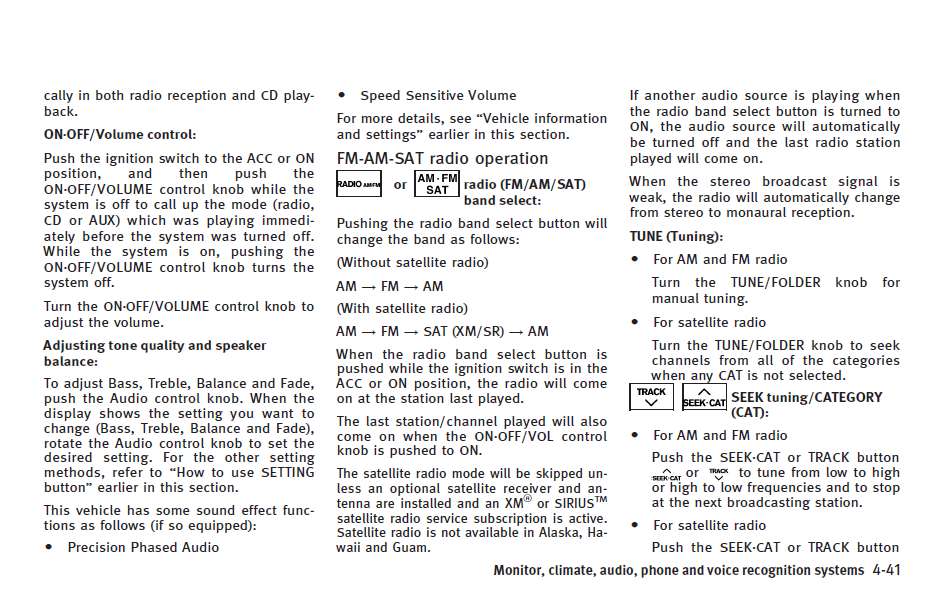
waiiiiiiiittttt......is this button that there talking about my car is suppose to have that little tiny button that says scan*cat?
Trending Topics
Here is mine. I used my factory Sat harness for my iPod but as you can see it still says XM on the screen.


Last edited by rpm&my_G35; Dec 7, 2009 at 09:26 AM. Reason: added image from the 07 owners manual

Registered User
Joined: Nov 2009
Posts: 33
Likes: 0
On an 07+, Non-nav sedan, there is no Sat button. You use the Radio button to cycle through the AM,FM & Sat selection and then choose a station. As I said, they are all prewired for Sat.
Here is mine. I used my factory Sat harness for my iPod but as you can see it still says XM on the screen.
Attachment 114447 Attachment 114448 Attachment 114449
Here is mine. I used my factory Sat harness for my iPod but as you can see it still says XM on the screen.
Attachment 114447 Attachment 114448 Attachment 114449
https://g35driver.com/forums/audio-v...ml#post2812370
"There are three controls on the console...forget the Volume, it works on the radio as well as the steering wheel. the three controls are:
1)Seek-Cat (Right Side of clock, left of Tune and above Track, a button not a ****)
2)Track (below Seek-Cat)
3)Tune (right of Seek-Cat and Track)
Here is how mine works. When the iPod is playing:
Press the Seek-Cat (you may have to press it twice to wake it from a slumber...not rapidly)
After you press the Seek-Cat you can press it or the Track button to rotate through the iPod mode. The iPod modes in order are:
Playlist
Artist
Album
Song
genre
Compose
cancel
Setup
Pressing the Seek-Cat toggles FORWARD through each mode each time you press it (ie Playlist, Artist, Album.....Setup)
Pressing the Track toggles BACKWARD through each mode each time you press it (ie Playlist,...Setup, Cancel.......Artist)
Once you are in the mode you want to use; for example you want to search by Artist, so you scroll through the modes as listed above until you are on Artist:
-Rotate the Tune button one click to the right..This selects the mode.
-Once you have selected the mode you go back to the Seek-Cat and Track buttons to scroll and find the Artist.
-Pressing the Seek-Cat will toggle from top to bottom in alpha (Allman Brothers, Bad Company, The Who, ZZ TOP),
-Pressing the Track button will toggle from bottom to top in alpha (ZZ Top, the Who, Bad Company, Allman Brothers).
Once you are on the Artist,
-Turn the Tune **** clockwise and you would select the Artist.
-Once you select the artist it should start playing. You would then use the Tune to go forward or back through the tracks."
"There are three controls on the console...forget the Volume, it works on the radio as well as the steering wheel. the three controls are:
1)Seek-Cat (Right Side of clock, left of Tune and above Track, a button not a ****)
2)Track (below Seek-Cat)
3)Tune (right of Seek-Cat and Track)
Here is how mine works. When the iPod is playing:
Press the Seek-Cat (you may have to press it twice to wake it from a slumber...not rapidly)
After you press the Seek-Cat you can press it or the Track button to rotate through the iPod mode. The iPod modes in order are:
Playlist
Artist
Album
Song
genre
Compose
cancel
Setup
Pressing the Seek-Cat toggles FORWARD through each mode each time you press it (ie Playlist, Artist, Album.....Setup)
Pressing the Track toggles BACKWARD through each mode each time you press it (ie Playlist,...Setup, Cancel.......Artist)
Once you are in the mode you want to use; for example you want to search by Artist, so you scroll through the modes as listed above until you are on Artist:
-Rotate the Tune button one click to the right..This selects the mode.
-Once you have selected the mode you go back to the Seek-Cat and Track buttons to scroll and find the Artist.
-Pressing the Seek-Cat will toggle from top to bottom in alpha (Allman Brothers, Bad Company, The Who, ZZ TOP),
-Pressing the Track button will toggle from bottom to top in alpha (ZZ Top, the Who, Bad Company, Allman Brothers).
Once you are on the Artist,
-Turn the Tune **** clockwise and you would select the Artist.
-Once you select the artist it should start playing. You would then use the Tune to go forward or back through the tracks."
Registered User
Joined: Nov 2009
Posts: 33
Likes: 0
https://g35driver.com/forums/audio-v...ml#post2812370
"There are three controls on the console...forget the Volume, it works on the radio as well as the steering wheel. the three controls are:
1)Seek-Cat (Right Side of clock, left of Tune and above Track, a button not a ****)
2)Track (below Seek-Cat)
3)Tune (right of Seek-Cat and Track)
Here is how mine works. When the iPod is playing:
Press the Seek-Cat (you may have to press it twice to wake it from a slumber...not rapidly)
After you press the Seek-Cat you can press it or the Track button to rotate through the iPod mode. The iPod modes in order are:
Playlist
Artist
Album
Song
genre
Compose
cancel
Setup
Pressing the Seek-Cat toggles FORWARD through each mode each time you press it (ie Playlist, Artist, Album.....Setup)
Pressing the Track toggles BACKWARD through each mode each time you press it (ie Playlist,...Setup, Cancel.......Artist)
Once you are in the mode you want to use; for example you want to search by Artist, so you scroll through the modes as listed above until you are on Artist:
-Rotate the Tune button one click to the right..This selects the mode.
-Once you have selected the mode you go back to the Seek-Cat and Track buttons to scroll and find the Artist.
-Pressing the Seek-Cat will toggle from top to bottom in alpha (Allman Brothers, Bad Company, The Who, ZZ TOP),
-Pressing the Track button will toggle from bottom to top in alpha (ZZ Top, the Who, Bad Company, Allman Brothers).
Once you are on the Artist,
-Turn the Tune **** clockwise and you would select the Artist.
-Once you select the artist it should start playing. You would then use the Tune to go forward or back through the tracks."
"There are three controls on the console...forget the Volume, it works on the radio as well as the steering wheel. the three controls are:
1)Seek-Cat (Right Side of clock, left of Tune and above Track, a button not a ****)
2)Track (below Seek-Cat)
3)Tune (right of Seek-Cat and Track)
Here is how mine works. When the iPod is playing:
Press the Seek-Cat (you may have to press it twice to wake it from a slumber...not rapidly)
After you press the Seek-Cat you can press it or the Track button to rotate through the iPod mode. The iPod modes in order are:
Playlist
Artist
Album
Song
genre
Compose
cancel
Setup
Pressing the Seek-Cat toggles FORWARD through each mode each time you press it (ie Playlist, Artist, Album.....Setup)
Pressing the Track toggles BACKWARD through each mode each time you press it (ie Playlist,...Setup, Cancel.......Artist)
Once you are in the mode you want to use; for example you want to search by Artist, so you scroll through the modes as listed above until you are on Artist:
-Rotate the Tune button one click to the right..This selects the mode.
-Once you have selected the mode you go back to the Seek-Cat and Track buttons to scroll and find the Artist.
-Pressing the Seek-Cat will toggle from top to bottom in alpha (Allman Brothers, Bad Company, The Who, ZZ TOP),
-Pressing the Track button will toggle from bottom to top in alpha (ZZ Top, the Who, Bad Company, Allman Brothers).
Once you are on the Artist,
-Turn the Tune **** clockwise and you would select the Artist.
-Once you select the artist it should start playing. You would then use the Tune to go forward or back through the tracks."
It charges the iPod. It controls and plays music through the car head unit and volume control works from the steering wheel. The steering wheel controls can still switch between Radio, CD and the iPod as well.
Perhaps the OP could post some pictures of the LCD screen and iPod while it's in use in order to help you decide. By his description, it sounds almost the same as mine which you can see in post #8 above.
Cheers