


DigtalWheelz screen problem


Joined: May 2005
Posts: 1,464
Likes: 2
From: Raleigh, NC
DigtalWheelz screen problem
this was originally in my install thread, but I wanted to make sure people saw it so I could get as much feedback as possible from those who have used the screen. I am 99.9% sure it's something I've missed or doing wrong, I am still very impressed with the product and would recommend it to everyone still. That being said...
As promised, pictures and video of my problem. the first is the screen shut. You'll notice the black electrical tape holding the left side of the metal cubby lid plate in place because the screw will not screw: http://www.rtpnet.com/screen/DSCN1460.JPG
lid up, screen down, from the front: http://www.rtpnet.com/screen/DSCN1461.JPG
lid up screen down from the top: http://www.rtpnet.com/screen/DSCN1462.JPG
looking down the back of the screen with it opened. You can see how the magnet barely makes contact. Moving the magnet around does not help this problem: http://www.rtpnet.com/screen/DSCN1464.JPG
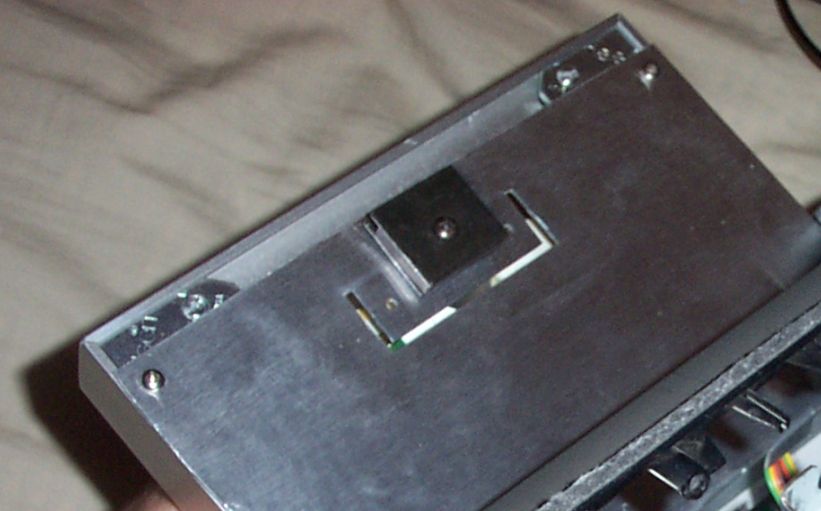
close up of the lid metal plate: http://www.rtpnet.com/screen/DSCN1466.JPG
you can see how the screw and magnet hit all over this part of the plate, but it does not hold the screen up: http://www.rtpnet.com/screen/DSCN1467.JPG
right side of metal plate: http://www.rtpnet.com/screen/DSCN1468.JPG
left side of metal plate: http://www.rtpnet.com/screen/DSCN1469.JPG
video of screen opening and then my best attempt at showing how the magnet touches (and does not hold) the screen when looking down from above: http://www.rtpnet.com/screen/DSCN1463.MOV (13mb quicktime required) note: I moved the magnet to every single hole location on the back of the screen with no change in holding ability.
Video of screen closing, opening again and my best attempt to show how the magnet touches the metal plate, and provides no holding strength (shown from the passenger side, looking in): http://www.rtpnet.com/screen/DSCN1465.MOV (21mb, quicktime required) note: I moved the magnet to every single hole location on the back of the screen with no change in holding ability.
As promised, pictures and video of my problem. the first is the screen shut. You'll notice the black electrical tape holding the left side of the metal cubby lid plate in place because the screw will not screw: http://www.rtpnet.com/screen/DSCN1460.JPG
lid up, screen down, from the front: http://www.rtpnet.com/screen/DSCN1461.JPG
lid up screen down from the top: http://www.rtpnet.com/screen/DSCN1462.JPG
looking down the back of the screen with it opened. You can see how the magnet barely makes contact. Moving the magnet around does not help this problem: http://www.rtpnet.com/screen/DSCN1464.JPG
close up of the lid metal plate: http://www.rtpnet.com/screen/DSCN1466.JPG
you can see how the screw and magnet hit all over this part of the plate, but it does not hold the screen up: http://www.rtpnet.com/screen/DSCN1467.JPG
right side of metal plate: http://www.rtpnet.com/screen/DSCN1468.JPG
left side of metal plate: http://www.rtpnet.com/screen/DSCN1469.JPG
video of screen opening and then my best attempt at showing how the magnet touches (and does not hold) the screen when looking down from above: http://www.rtpnet.com/screen/DSCN1463.MOV (13mb quicktime required) note: I moved the magnet to every single hole location on the back of the screen with no change in holding ability.
Video of screen closing, opening again and my best attempt to show how the magnet touches the metal plate, and provides no holding strength (shown from the passenger side, looking in): http://www.rtpnet.com/screen/DSCN1465.MOV (21mb, quicktime required) note: I moved the magnet to every single hole location on the back of the screen with no change in holding ability.

Registered User
Joined: Sep 2005
Posts: 63
Likes: 0
magnet will not hold try this
short but sweet
$ 1.95 @ home depot
7/8 or 22 mm screw bumpers ,they come in a 4 pack
shepard part number = 9131
SKU 0 39003 09131 9
holds like a .....
$ 1.95 @ home depot
7/8 or 22 mm screw bumpers ,they come in a 4 pack
shepard part number = 9131
SKU 0 39003 09131 9
holds like a .....
Last edited by lawrence; Apr 11, 2006 at 12:00 AM.
Joined: May 2005
Posts: 1,464
Likes: 2
From: Raleigh, NC
Originally Posted by lawrence
short but sweet
$ 1.95 @ home depot
7/8 or 22 mm screw bumpers ,they come in a 4 pack
shepard part number = 9131
SKU 0 39003 09131 9
holds like a .....
$ 1.95 @ home depot
7/8 or 22 mm screw bumpers ,they come in a 4 pack
shepard part number = 9131
SKU 0 39003 09131 9
holds like a .....


Your missing the metal plates on the magnet. It should of come with 2 metal pieces that direct the force of the magnet and touch the metal plate, without these, the magnet simply won't pull in the right direction.
Joined: May 2005
Posts: 1,464
Likes: 2
From: Raleigh, NC
How should these be oriented/installed? The directions make no mention of this nor do any of the pictures 
Trending Topics

Joined: May 2005
Posts: 1,464
Likes: 2
From: Raleigh, NC
Yeah, I saw that picture yesterday. I tried enlarging it, printing it, but it's a horrible picture. I *guess* the magnet is sandwhiched between the two pieces of metal? With the "extra" bit of the metal pieces facing the "top" side of the screen? When the directions make no mention of the metal pieces you would think that the abnormality on the top edge of the magnet is just that, an abnormality, and not actually the metal pieces sandwhiching the magnet and the magnet being slightly shorter. . .
Joined: May 2005
Posts: 1,464
Likes: 2
From: Raleigh, NC
Originally Posted by god_of_cpu
Your missing the metal plates on the magnet. It should of come with 2 metal pieces that direct the force of the magnet and touch the metal plate, without these, the magnet simply won't pull in the right direction.

I have the magnet with the two pieces of metal on it attached to my screen but it doesn't hold that well. Like if I hit the gas hard it will come lose. Which hole do you recommend screwing the magnet into? Is there anything else I can try?

The magnet will hold very strongly if it is at the right height.
I also initially had this problem. I flipped the magnet 180 degrees and it sat up a little higher, but not quite 100% solid.
So I moved the magnet up a little by extending the screw hole "up" with a dremel to make this completely adjustable.
Chuck - you might want to consider a vertical "slot" rather than just a screw hole so that there is some room to play after the install.
I also initially had this problem. I flipped the magnet 180 degrees and it sat up a little higher, but not quite 100% solid.
So I moved the magnet up a little by extending the screw hole "up" with a dremel to make this completely adjustable.
Chuck - you might want to consider a vertical "slot" rather than just a screw hole so that there is some room to play after the install.


Thread
Thread Starter
Forum
Replies
Last Post
Thebaws11
Engine, Drivetrain & Forced-Induction
3
Jul 2, 2021 11:36 AM
Mad A
Not G35 Related
4
Dec 8, 2015 01:45 PM