


gps idea for non-nav sedans

Registered User
Joined: Oct 2007
Posts: 128
Likes: 3
From: brooklyn, ny
hey bro, sorry I missed your PM till now, one thing to know is not all RGB is created equal, from what I remember the RGB that nissan uses is a dual sync rgb, which is rare & much harder to find a converter to work well with. ripplinghurst was playing with this for a while & even bought a converter but couldn't get it to sync right at all... someone else found some kind of pro converter that claimed to work & I bought one but never had the chance to play with it... I'll try to find some more info for you... nice project you got going there, ever consider mounting your stock screen overhead instead?

Thread Starter
|
Registered User
Joined: Oct 2009
Posts: 82
Likes: 7
Thanks - I've done an exhausting search on the internet about the rgbs and rgbhv. The shop manual says that the horizontal and vertical sync signals are an output from the monitor, and the rgb sync is an input.
These two photos that I have found prove that it can be done. The guys who did it, though, have been stingy with their install method.

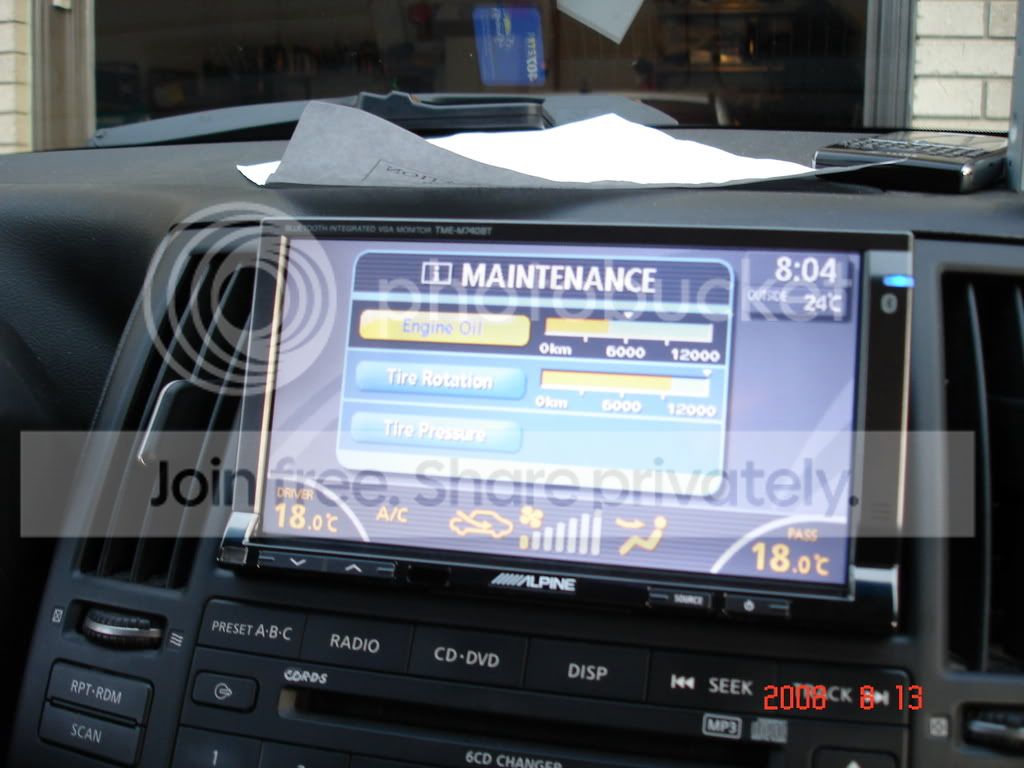
These two photos that I have found prove that it can be done. The guys who did it, though, have been stingy with their install method.

Registered User
Joined: Nov 2010
Posts: 7
Likes: 0
I dont know if this will be helpful at all but check this out. http://www.mp3car.com/lcd-display/11...estions-7.html
Thread Starter
|
Registered User
Joined: Oct 2009
Posts: 82
Likes: 7
I've got the gps brain mounted on the passenger kick panel. There is barely enough room for it next to the a/c fan. I also connected two power wires to the fuse box with an "add a fuse" link. One wire provides power when the ignition is on. The other wire is connected to the right bus for constant power (which is required by the gps).
I did a quick test of the screen. The video trigger didn't work. I couldn't get a video signal through the rear camera input either. I think I need to connect the alpine remote wire to the video trigger and the kce-900e. I had to stop, though. Once again, the temperature was over 100 degrees F outside.


I did a quick test of the screen. The video trigger didn't work. I couldn't get a video signal through the rear camera input either. I think I need to connect the alpine remote wire to the video trigger and the kce-900e. I had to stop, though. Once again, the temperature was over 100 degrees F outside.

Registered User
Joined: Jan 2007
Posts: 842
Likes: 50
From: Dutchess County, NY
ok, so i've done a ton of googling and thinking and remembering stuff from college and random websites that i didn't think i would need again lol....ok here we go...
for starters, the Horizontal and Vertical Sync are only used in Aux mode (armrest video input) so just forget about those, they're not necessary.
the RGB Ys signal...as far as i can get from the interwebs and the AV manual only changes outputs in the aux mode (otherwise it's constant at 5V), and the shop manual says that the purpose of the signal is to "transmit the display area of RGB image displayed by AV control unit to the display unit". another description i found online through extensive googling says that the Ys signal can be used to superimpose an analog RGB signal on top of a video signal. now in aux mode the aux image and aux image sync both come in on different pins, and are not handled by this part of the head unit circuitry.
ok, simply put i don't think you're going to need it (the RGB Ys). i initially wanted to think that the purpose is to tell the display unit where to show the volume bars and climate control info when you're in aux mode, since making any adjustments will temporarily display the info on the screen. i don't think that is correct though....it seems more likely that the purpose of the Ys signal is to tell the monitor how much of the stock stereo image to display (size on an x-y axis or plain old pixel count), because no matter what mode you're in, changing the fan speed/temperature or volume displays the same at the bottom of the screen (if i remember correctly).
now i'll admit i could be dead wrong on both ideas but i'm still confident this signal is not necessary for you to port the image to your alpine unit because simply put this signal has something to do with the size of the image and since your alpine does not have an input for it it must have it's own scaling circuitry to detect and properly display images over the entire size of the attached display (which i would expect since it has multiple video inputs), so again, i don't think you need this at all.
from what i can see all you will need is the existing RGBS signals. the issue you have now (which isn't a big deal) is that you need to ensure you get a converter that can accept a separate sync signal since you are not using RsGB or RGsB, etc. i believe the SCAN DO and others are capable of accepting this. you will obviously need to convert the existing signal to either composite or S-video for the alpine brain to accept. S-video is probably marginally better.
for starters, the Horizontal and Vertical Sync are only used in Aux mode (armrest video input) so just forget about those, they're not necessary.
the RGB Ys signal...as far as i can get from the interwebs and the AV manual only changes outputs in the aux mode (otherwise it's constant at 5V), and the shop manual says that the purpose of the signal is to "transmit the display area of RGB image displayed by AV control unit to the display unit". another description i found online through extensive googling says that the Ys signal can be used to superimpose an analog RGB signal on top of a video signal. now in aux mode the aux image and aux image sync both come in on different pins, and are not handled by this part of the head unit circuitry.
ok, simply put i don't think you're going to need it (the RGB Ys). i initially wanted to think that the purpose is to tell the display unit where to show the volume bars and climate control info when you're in aux mode, since making any adjustments will temporarily display the info on the screen. i don't think that is correct though....it seems more likely that the purpose of the Ys signal is to tell the monitor how much of the stock stereo image to display (size on an x-y axis or plain old pixel count), because no matter what mode you're in, changing the fan speed/temperature or volume displays the same at the bottom of the screen (if i remember correctly).
now i'll admit i could be dead wrong on both ideas but i'm still confident this signal is not necessary for you to port the image to your alpine unit because simply put this signal has something to do with the size of the image and since your alpine does not have an input for it it must have it's own scaling circuitry to detect and properly display images over the entire size of the attached display (which i would expect since it has multiple video inputs), so again, i don't think you need this at all.
from what i can see all you will need is the existing RGBS signals. the issue you have now (which isn't a big deal) is that you need to ensure you get a converter that can accept a separate sync signal since you are not using RsGB or RGsB, etc. i believe the SCAN DO and others are capable of accepting this. you will obviously need to convert the existing signal to either composite or S-video for the alpine brain to accept. S-video is probably marginally better.
Last edited by RemmyZero; Aug 17, 2011 at 01:03 PM.
Registered User
Joined: Jan 2007
Posts: 842
Likes: 50
From: Dutchess County, NY
also, will that monitor automatically turn on when you apply power to the brain in the car?
based on what i saw in the manual you will have to manually turn it on every time, but there are ways around that too.
based on what i saw in the manual you will have to manually turn it on every time, but there are ways around that too.
Registered User
Joined: Oct 2007
Posts: 128
Likes: 3
From: brooklyn, ny
yes, was the scan do, here's a thread:
http://www.mp3car.com/lcd-display/11...questions.html
hope it helps
http://www.mp3car.com/lcd-display/11...questions.html
hope it helps
Thread Starter
|
Registered User
Joined: Oct 2009
Posts: 82
Likes: 7
I think you're right Remmyzero. I read the same article that described the RGB area signal as a high speed switch for superimposition of video and RGB. And my shop manual says it only changes when AUX image is displayed.
I tried another test with the KCE-900E. It's just not working for me. I get a blank screen. So, I'm looking at other RGBS 15khz converters. I'll report back in a week or so when I get another converter.
I tried another test with the KCE-900E. It's just not working for me. I get a blank screen. So, I'm looking at other RGBS 15khz converters. I'll report back in a week or so when I get another converter.
Thread Starter
|
Registered User
Joined: Oct 2009
Posts: 82
Likes: 7
I was using the alpine kce-900e. It is orginally designed to convert rgb nav signal to standard video for older style alpine monitors. I just tested it to see if it would convert my alpine nav to composite video. It wouldn't even do that. It's useless.
I did run the stock signal directly into the rgb connection of my alpine monitor. It worked, but the screen did flash occasionally. Could have been because I "spliced" the rgb signal from stock with the stock monitor still connected. Either way, it's a dead end.
I am going to try a jrok rgb converter. This is my last attempt. If it doesn't work, I'm throwing in the towel.
I did run the stock signal directly into the rgb connection of my alpine monitor. It worked, but the screen did flash occasionally. Could have been because I "spliced" the rgb signal from stock with the stock monitor still connected. Either way, it's a dead end.
I am going to try a jrok rgb converter. This is my last attempt. If it doesn't work, I'm throwing in the towel.
Registered User
Joined: Jan 2007
Posts: 842
Likes: 50
From: Dutchess County, NY
ok i didn't realize you were using that one. i just looked at the manual for it and are you sure you have it powered properly? do you know what voltage it was looking for? it looks like it gets a voltage from the nav unit for 5V, check out this page and it has the pinout (which i'm assuming you already have if you hard-wired to it). and i just realized that i should ask if you have it grounded. it can't be floating, it has to have a ground on it. you may have done all this but i figure a second peer-check can't hurt!
http://www.the12volt.com/installbay/...198&TPN=1&PN=1
the jrok converter looks nifty, it might be worth trying. where are you getting the 5V for the power on the chip? if you don't mind would you PM me with the price when you have time?
i really think the KCE900 should work just fine....not sure why you're having trouble. it could be something with the composite sync but i'm not sure....
http://www.the12volt.com/installbay/...198&TPN=1&PN=1
the jrok converter looks nifty, it might be worth trying. where are you getting the 5V for the power on the chip? if you don't mind would you PM me with the price when you have time?
i really think the KCE900 should work just fine....not sure why you're having trouble. it could be something with the composite sync but i'm not sure....
Last edited by RemmyZero; Sep 3, 2011 at 09:21 AM. Reason: *added question on grounding.
Thread Starter
|
Registered User
Joined: Oct 2009
Posts: 82
Likes: 7
Thanks Remmy - the kce-900e had connections that were slightly different from the tme-s370 monitor I have. It had rgb in, guide cont, disp cont, and remote wire. The monitor had remote out, and m cont. The remote out from the monitor was like the old power antenna wire. I tried different connections, but it never worked. The wire colors never matched. The remote in for the kce-900e almost seemed to be for a nav remote control device.
Anyway, the jrok looks promising. It will be shipped tuesday. I wanted v3.1 , but they only make v4.1 now. I got it from gatercade for $95. I was thinking of using the rgb area 5v signal to power it. I'm open to suggestions, though.
Anyway, the jrok looks promising. It will be shipped tuesday. I wanted v3.1 , but they only make v4.1 now. I got it from gatercade for $95. I was thinking of using the rgb area 5v signal to power it. I'm open to suggestions, though.
Registered User
Joined: Jan 2007
Posts: 842
Likes: 50
From: Dutchess County, NY
well i think that 5V signal may work just fine although i'd be curious to see if it fluctuates at all and the manual doesn't mention. so yeah, good idea, i would try it but if it doesn't work then i would recommend going to a computer online store like mp3car and using something like these:
http://store.mp3car.com/Carnetix_CNX..._p/pwr-016.htm
anything for USB that you can hardwire to the car will give you 5V so that might be your best bet in the end. even using a USB cigarette lighter adapter and stripping the wires on a USB cable to power it might work in a pinch.
http://store.mp3car.com/Carnetix_CNX..._p/pwr-016.htm
anything for USB that you can hardwire to the car will give you 5V so that might be your best bet in the end. even using a USB cigarette lighter adapter and stripping the wires on a USB cable to power it might work in a pinch.
Thread Starter
|
Registered User
Joined: Oct 2009
Posts: 82
Likes: 7

ok - I got the jrok rgb converter. I attatched it to the nav2go harness, and I put the converter in a small project box to protect it. I'll try it out tomorrow. If it works, great. If not, the alpine screen gets mounted over the ash tray.
Registered User
Joined: Jan 2007
Posts: 842
Likes: 50
From: Dutchess County, NY
mmmm perty.....i hope it works. i would truly be baffled if it didn't. this has to be easier than we think. is there any info in the owners manual about the scan/refresh rate on the alpine monitor? that would be the key if it still is blinking or fuzzy.