


Bluetooth Microphone prolems


Thread Starter
|
Registered User
Joined: Dec 2009
Posts: 115
Likes: 0
I ended up buying a Pioneer double din head unit, and people are still complaining "I can't hear you" so maybe it is this over priced phone I bought... I have had nothing but bad luck as far as bluetooth is concerned, so I just live with it.



Should work fine.
Here's where I put the garmin microphone and have had no complaints:

Thread Starter
|
Registered User
Joined: Dec 2009
Posts: 115
Likes: 0
I did not have good luck with that, but.... I believe that it has a lot to do with the phones brand of bluetooth chip being compatible with whatever it is pairing with.
Motorolla and Blackberry seem work best with most other stuff, but it is a trial and error process.
Just my experience tho, although the splicing of the microphone should work OK, I did not say it was a failure, just "not right".
Motorolla and Blackberry seem work best with most other stuff, but it is a trial and error process.
Just my experience tho, although the splicing of the microphone should work OK, I did not say it was a failure, just "not right".
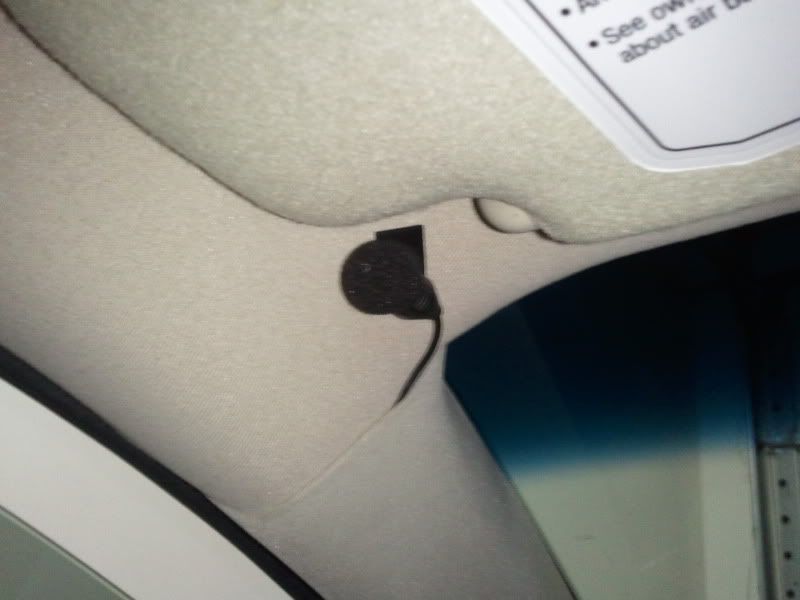
I put mine in the middle, since you only have turbulent air from the top of the car near the microphone, not the top and sides.
Plus my radios both have voice control of iPod and stuff, so it's good to have it hear both driver and passenger for voice commands.
I've considered hooking up a microphone to the computer and driving around with the mic in different spots and measuring for the quietest spot, but it's a bit of work and I'd need to be a passenger in my own car.
Plus my radios both have voice control of iPod and stuff, so it's good to have it hear both driver and passenger for voice commands.
I've considered hooking up a microphone to the computer and driving around with the mic in different spots and measuring for the quietest spot, but it's a bit of work and I'd need to be a passenger in my own car.

Thread
Thread Starter
Forum
Replies
Last Post
1Typhoon
Audio, Video & Electronics
9
Sep 25, 2015 08:45 PM
AuAltima3.5
Audio/Video/Electronics
4
Sep 13, 2015 11:48 AM
beevanhuynh
Audio, Video & Electronics
1
Jul 14, 2015 09:06 AM


