


Official Norcal picture-share thread

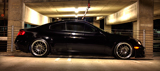
R
Thanks, Chris!
So, I got a plug-in for Photoshop called Fractalius and ran a couple of my photos through. This is what I ended up with:


The first one is my new desktop pic!!!
So, I got a plug-in for Photoshop called Fractalius and ran a couple of my photos through. This is what I ended up with:
The first one is my new desktop pic!!!
Last edited by RawFusion; Dec 31, 2008 at 10:22 PM.
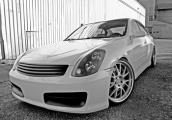


Here is my contribution for the new year. Just got my SLR and been only playing around with it for about a week. Its a lot of fun though and I still got a lot to learn. Looking forward for constructive criticism from the experts of NorCal photographers 


<a href="http://www.flickr.com/photos/10828629@N06/3159935905/" title="3159799995_40875327c8_o by g4dc, on Flickr"><img src="http://farm4.static.flickr.com/3121/3159935905_2fa6ee5717_o.jpg" width="978" height="1251" alt="3159799995_40875327c8_o" /></a>
great pics Matt!!
you have the eye!
great pics Matt!!
you have the eye!
thanks Chris and Danny. LOL at Danny's comment. I was surprised that I caught the squirrel at that exact moment. Still a lot too learn though and Gene's pictures are still 

Former G35driver Vendor
iTrader: (3)
Joined: Jul 2004
Posts: 2,296
Likes: 0
From: Berkeley CA, Diamond Bar CA
awesome start. looks like you already got the basics of the camera pretty down pretty well... pics are super sharp. the last pic looks like one of the ipod backgrounds . what equipment are you using?
. what equipment are you using?
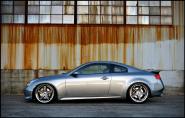

Thanks Gene. Im using Nikon D80 with 15-55mm or 70-300mm Nikon lense. Loving it so far and Im tempted to get a faster lense and/or 15-200mm VR. Any tips on how to do postprocessing using photoshop/aperture? What setting do you tweak usually after taking pics?
Thanks.
Thanks.
Former G35driver Vendor
iTrader: (3)
Joined: Jul 2004
Posts: 2,296
Likes: 0
From: Berkeley CA, Diamond Bar CA
leaving for the airport soon but here's a few
- shoot pics underexposed to get the faster shutter speed and sharper image. then bump up the exposure in photoshop/lightroom. it's harder the other way around because if you take a pic overexposed, you blow out the highlights and the details are more difficult to recover.
- bump up contrast, clarity, vibrance, and saturation (levels depends on the picture). you'll get this from playing around with them enough
- minor sharpening: just enough while avoiding extra noise and halo's around objects against the background. you can balance it out with the noise reduction tools or programs like noise ninja.
- i'm a big fan of vignetting... helps to draw attention to the subject. BUT it doesn't work on every picture, so use it wisely.
example of all of the above shown here... gave it a little pop. hope you dont mind, Matt!

- shoot pics underexposed to get the faster shutter speed and sharper image. then bump up the exposure in photoshop/lightroom. it's harder the other way around because if you take a pic overexposed, you blow out the highlights and the details are more difficult to recover.
- bump up contrast, clarity, vibrance, and saturation (levels depends on the picture). you'll get this from playing around with them enough
- minor sharpening: just enough while avoiding extra noise and halo's around objects against the background. you can balance it out with the noise reduction tools or programs like noise ninja.
- i'm a big fan of vignetting... helps to draw attention to the subject. BUT it doesn't work on every picture, so use it wisely.
example of all of the above shown here... gave it a little pop
. hope you dont mind, Matt!
Last edited by Kyosho; Jan 3, 2009 at 10:57 PM.
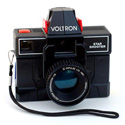
Registered User
iTrader: (7)
Good tips, Gene. I find it funny that my first step is the complete opposite of yours. I usually overexpose a little and bring it down in post. But as you pointed out that leaves the problem of blown highlights and blurriness. But I usually do this in sunlight.
here's a couple ex:


here's a couple ex:
I dont mind at all, Gene. Thanks for the great advice. Your post processed picture definitely has a lot pop in it. How do you do vignetting? Also I notice that you can isolate certain colors, mind sharing the trick? I will try this in my next pictures taking
Nice pics Jake! Funny that I havent taken my car pics since I got this camera...
Nice pics Jake! Funny that I havent taken my car pics since I got this camera...
R
In Camera Raw: Look for the Lens Correction tab on the right side of the window. The tab icon kinda looks like this: |( )))| When you see it you'll know what I mean.
In Photoshop: Filter >> Distort >> Lens Correction. Uncheck "Show Grid" for an easier time.
Many ways to do this. The easiest way in Photoshop is to do it in Camera Raw. Instead of picking the Lens Correction tab pick the HSL/Grayscale tab then, when there, pick the Saturation tab. Drag slider to the left (-100) for every color you don't want leaving the one (or more) color you do want at 0.
In Photoshop: Filter >> Distort >> Lens Correction. Uncheck "Show Grid" for an easier time.
Many ways to do this. The easiest way in Photoshop is to do it in Camera Raw. Instead of picking the Lens Correction tab pick the HSL/Grayscale tab then, when there, pick the Saturation tab. Drag slider to the left (-100) for every color you don't want leaving the one (or more) color you do want at 0.