


Wrathernaut's Double-Din Installation FAQ, Shopping and Resource List


Registered User
Joined: Apr 2016
Posts: 42
Likes: 1
There was some left out, yes, because the door jam was so tight to try and work in, I couldn't do that and hold the camera, and I felt it was obvious and straightforward enough steps that it'd be ok without them.
If somebody needed that work done and came to me and was willing to handle the camera to get good shots of it, I'd re-do the video.
If somebody needed that work done and came to me and was willing to handle the camera to get good shots of it, I'd re-do the video.
Also on the pass side do you unbolt the computer/ other wiring to get your hand up to that molex or is there some kind of finesse i'm lacking?




Joined: Nov 2008
Posts: 7,991
Likes: 1,050
From: Pennsylvania


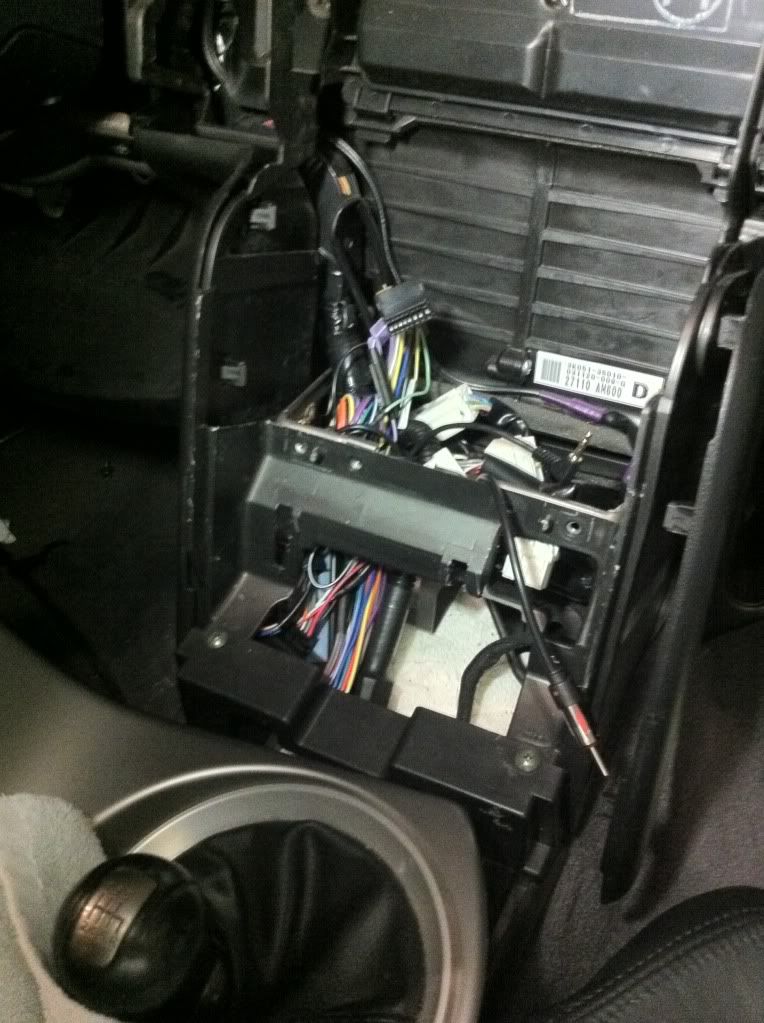
Guys and gals, I need your help desperately: I can't seem to put my SPH-DA120 and JDM DD trim back in because I keep running into clearance issues behind it.
I must have plugged in and had to disconnect all 12 connections at least 10 times now. Each time, I clean up the wiring and free up more space but I am running out of ideas. I think that I may be the only person that's had this problem. At this point, the only way I can free up more space is by removing the PAC ROEM-NIS2 and the large bundles of cables connected to it elsewhere. Any other suggestions?
I must have plugged in and had to disconnect all 12 connections at least 10 times now. Each time, I clean up the wiring and free up more space but I am running out of ideas. I think that I may be the only person that's had this problem. At this point, the only way I can free up more space is by removing the PAC ROEM-NIS2 and the large bundles of cables connected to it elsewhere. Any other suggestions?

Registered User
Joined: May 2016
Posts: 4
Likes: 0
i just got a 2005 G35 Coupe with Bose, and Im a bit confused about which harness to use. according to Bestbuy ill need the 70-7550 harness, along with the PAC LOCPRO4(LP6-4) and the metra kit for the double din headunit. is what they sold me correct? any insight would be appreciated Thanks 
EDIT: wont be getting the steering wheel controls installed ATM, will be getting it installed later down the road
EDIT: wont be getting the steering wheel controls installed ATM, will be getting it installed later down the road
Joined: Nov 2008
Posts: 7,991
Likes: 1,050
From: Pennsylvania
i just got a 2005 G35 Coupe with Bose, and Im a bit confused about which harness to use. according to Bestbuy ill need the 70-7550 harness, along with the PAC LOCPRO4(LP6-4) and the metra kit for the double din headunit. is what they sold me correct? any insight would be appreciated Thanks
EDIT: wont be getting the steering wheel controls installed ATM, will be getting it installed later down the road
EDIT: wont be getting the steering wheel controls installed ATM, will be getting it installed later down the road
I wouldn't put off the steering wheel controls. The unit recommended is about $40 - just put off the installation until you can do it all at once, rather than take apart the dash a second time in a few weeks.

Registered User
Joined: Jul 2015
Posts: 311
Likes: 23
do the battery test. put both speaker wire ends to a 1.5V battery. if the speaker cone is sucked in, the wire on the battery + side is the negative. swap the wires and the speaker cone will pop out. This does no damage to your speakers.

Registered User
Joined: Jun 2015
Posts: 8
Likes: 0
I hate to sound like an idiot, but I've read through quite a few posts and haven't been able to figure out where the M39 harness is on a 2003 g35 coupe. I haven't gotten into the dash yet, I'd like to figure it all out before I rip the car apart and get stuck.
Please let me know!
Also, on the back of the axxess aswc-1 I understand where the wires are plugged into on the car side, but how does it interface with the stereo? Is it via the 3.5mm jack?
Edit*** all installed, m39 harness is one of the ones that's plugged into the stock radio.
Also, my pioneer avh-x2800 wouldn't turn on if the antenna wasn't plugged in, so if you're getting issues make sure you plug in the antenna.
Dimmer isnt working though.
Please let me know!
Also, on the back of the axxess aswc-1 I understand where the wires are plugged into on the car side, but how does it interface with the stereo? Is it via the 3.5mm jack?
Edit*** all installed, m39 harness is one of the ones that's plugged into the stock radio.
Also, my pioneer avh-x2800 wouldn't turn on if the antenna wasn't plugged in, so if you're getting issues make sure you plug in the antenna.
Dimmer isnt working though.
Last edited by chubbza5; Jun 3, 2016 at 10:26 AM.
Registered User
Joined: Jun 2015
Posts: 8
Likes: 0
Guys and gals, I need your help desperately: I can't seem to put my SPH-DA120 and JDM DD trim back in because I keep running into clearance issues behind it.
I must have plugged in and had to disconnect all 12 connections at least 10 times now. Each time, I clean up the wiring and free up more space but I am running out of ideas. I think that I may be the only person that's had this problem. At this point, the only way I can free up more space is by removing the PAC ROEM-NIS2 and the large bundles of cables connected to it elsewhere. Any other suggestions?
I must have plugged in and had to disconnect all 12 connections at least 10 times now. Each time, I clean up the wiring and free up more space but I am running out of ideas. I think that I may be the only person that's had this problem. At this point, the only way I can free up more space is by removing the PAC ROEM-NIS2 and the large bundles of cables connected to it elsewhere. Any other suggestions?
Registered User
Joined: Jun 2015
Posts: 8
Likes: 0
NAV no longer working, WILL PAY FOR FIX!
Hey I figure you're the expert here and wanted to ask you directly. I followed your guide to the letter, with the exception of the speed sensor and reverse trigger since I won't be using backup camera. Used all the parts you recommended to retain the Bose amp in our 2003 g35 coupe.
The issue is, the nav screen isn't working now, at all.
When the key is set to on, the stock DVD for nav spins up, then emits two short beeps. I can remove the maps DVD fine, reinserts fine. I reconnected everything plug wise, remembered the grounding strap on the NAV screen and remembered the large nav plug.
There are two unused white connectors that were used in the stock radio, m39 which I used to tap steering wheel controls (BTW power doesn't work) and one other. Do these need to be utilized or anything?
I triple checked the ribbon cables were still inserted, checked that I didn't accidentally loosen the connections on the DVD drive while taking glove box out, and all plugs (a/C and nav controls, and nav main connector are firmly in place.) I even disconnected (-) battery cable hoping to have it relearn it's peripherals with no luck.
I feel bad because this is my girlfriend's car and it appears to her that I broke it.
Please if you have any info I really would appreciate it. I've searched a lot and the conclusion everyone has when experiencing a dead NAV screen is a bad resistor in the DVD unit or something like that, but I refuse to accept that a hardware failure just coincidentally took place at the exact same time I went and basically rewired the central nervous system of the A/V system in the car. It has always worked 100% until I replaced the stock radio (experiencing dreaded stuck a/c, dead radio symptoms) with a nice Pioneer DD unit.
I would be willing to pay you if we can get this resolved, I just don't like giving her something that's not 100% I've been in the car audio game for a decade and have put in 50k systems, so some POS NAV screen from '03 isn't going to stop me.
I looked at the power diagrams and it doesn't look like anything was interrupted, I can't understand the rest of them well enough to say whether the system was affected or not by removing the stock head unit.
The issue is, the nav screen isn't working now, at all.
When the key is set to on, the stock DVD for nav spins up, then emits two short beeps. I can remove the maps DVD fine, reinserts fine. I reconnected everything plug wise, remembered the grounding strap on the NAV screen and remembered the large nav plug.
There are two unused white connectors that were used in the stock radio, m39 which I used to tap steering wheel controls (BTW power doesn't work) and one other. Do these need to be utilized or anything?
I triple checked the ribbon cables were still inserted, checked that I didn't accidentally loosen the connections on the DVD drive while taking glove box out, and all plugs (a/C and nav controls, and nav main connector are firmly in place.) I even disconnected (-) battery cable hoping to have it relearn it's peripherals with no luck.
I feel bad because this is my girlfriend's car and it appears to her that I broke it.
Please if you have any info I really would appreciate it. I've searched a lot and the conclusion everyone has when experiencing a dead NAV screen is a bad resistor in the DVD unit or something like that, but I refuse to accept that a hardware failure just coincidentally took place at the exact same time I went and basically rewired the central nervous system of the A/V system in the car. It has always worked 100% until I replaced the stock radio (experiencing dreaded stuck a/c, dead radio symptoms) with a nice Pioneer DD unit.
I would be willing to pay you if we can get this resolved, I just don't like giving her something that's not 100% I've been in the car audio game for a decade and have put in 50k systems, so some POS NAV screen from '03 isn't going to stop me.
I looked at the power diagrams and it doesn't look like anything was interrupted, I can't understand the rest of them well enough to say whether the system was affected or not by removing the stock head unit.