


Wrathernaut's Double-Din Installation FAQ, Shopping and Resource List


Registered User
Joined: Dec 2002
Posts: 79
Likes: 0
From: MD
I was researching which HU to get over the past couple of weeks.
After reading the reviews/suggestions and opinions on G35driver and other forums I started to look at the Pioneers. Amazon had the 920BT as one of their 24 hour sales last week. That seemed to be a perfect balance for price/features for me ($499 after the rebate). Looking forward to using the iPod integration instead of my radio tuner...
Still doing research on the other components and will be putting up a post for opinions. Thanks again.
After reading the reviews/suggestions and opinions on G35driver and other forums I started to look at the Pioneers. Amazon had the 920BT as one of their 24 hour sales last week. That seemed to be a perfect balance for price/features for me ($499 after the rebate). Looking forward to using the iPod integration instead of my radio tuner...
Still doing research on the other components and will be putting up a post for opinions. Thanks again.


This May have been answered but i cant find it does the Metra kit for the 03-04 DD come with the climate control unit? or do you have to buy the JDM one?
thanks,
Thomas
thanks,
Thomas

Yes, the metra kit comes with climate controls. You only need the JDM a/c controller if you get the JDM DD finisher.


Wrathernaut Hey first of all thank you for sharing all these useful info, I got everything that I need and also bought a used metra kit, however my pioneer double din is a bit small to fit, is it supposed to come with trim ring? Not sure but that's what I was researching for. If this is in fact what I need then where can I buy this?? Thanks

Joined: Nov 2008
Posts: 7,999
Likes: 1,050
From: Pennsylvania

Yeah, new metra kits have a little trim to fill any gap.
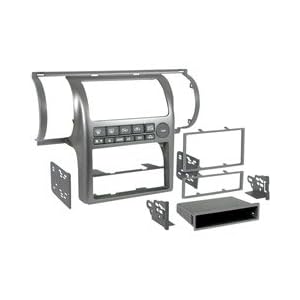
You can pick up used for installing the JDM kit and use it with your metra kit as well.
You can pick up used for installing the JDM kit and use it with your metra kit as well.


Registered User
Joined: Oct 2003
Posts: 1
Likes: 3
Just installed the AVIC-X920BT
I just finished installing the X920BT in my 2003 G35 Sedan with Bose. I have never done anything like this and with all of the great information here and on line, everything is working great. I took several weeks to read everything I could and watch all the videos that were posted all over the place. When it came time to do the install, I already had a good plan. I had not soldered anything for over 25 years (since high school Industrial Arts) but it all came back quickly.
I bought the unit from Amazon for $499.99, plus an additional $100 rebate. They had a one day sale just after Thanksgiving. I tried to get Crutchfield to match the deal, but they would not budge. And with all the on line resources, I didn't think I needed their custom drawings.
I used the shopping list posted here. And I did use the Metra Trim Kit. I already ordered and received it before I read about the JDL. The Metra is kind of cheap, but it worked very well and the AC controls worked great without modifications. I only had to cut out the single DIN support to fully open the Double DIN slot. I used a Dremel Tool to try to keep it neat. That worked well.
I spent an evening soldering the cable harnesses together. And that left me with just 4 wires when installing the unit. I soldered all of the connections and used shrink wrap to project them.
I used the available references and this was my wiring plan.
PAC-ROEM-NIS2 (R)
Pioneer Harnesses (P)
PAC-SWI-PS (S)
G35 4 Wire Harness (G)
Ignition/Switched Red (R), Red (P), Red (S)
Amp Trigger, Power Antenna, Antenna Blue/White (R), Blue (R), Blue/White (P)
Illumination/Dimmer Orange (R), Orange/White (P)
Ground Black (R), Black (P), Black (S), See bypass below for additional wires to be joined to Ground.
Right Rear (-) Purple/Black (R), Violet/Black (P)
Left Rear (-) Green/Black (R), Green/Black (P)
Right Front (-) Gray/Black (R), Gray/Black (P)
Left Front (-) White/Black (R), White/Black (P)
Battery Yellow(R), Yellow (P)
Right Rear High Level (+) Purple (R), Violet (P)
Left Rear High Level (+) Green (R), Green (P)
Right Front High Level (+) Gray (R), Gray (P)
Left Front High Level (+) White (R), White (P)
The bypass.....First move the yellow wire one pin over on the harness that has a mess of RCA plugs. There are many links and videos on this. Then join both the Yellow wire (P) and the Light Green Parking Brake Wire (P) to the rest of the Black Ground wires. I also recommend soldering an additional lead to the ground cluster so that it can later be attached to the last wire that goes to ground on the harness in the car.
Now you have to solder a few resistors in place in preparation for final wiring in the car. The vehicle specific instructions for this made it simple.
Attach both a 47ohm and 150 ohm in parallel to the white wire (S)
The last four wires need to be done inside the car. I did this after disassembling the consoles and removing the factory unit.
When you are installing in the car you will cut the plug off the factory harness with 4 wires: Red, Green, Yellow and White/Green.
Connect the Red wire (G) to the 47 ohm Resistor (S)
Connect the Green wire (G) to the 150 ohm Resistor (S)
Connect the Yellow wire (G) to the ground cluster noted above
Connect the White/Green (G) wire to the Pink (P) wire. This is the vehicle speed sensor
The only wire I did not connect was the Violet/White (P) Reverse Gear signal. I could not find the wire to tap into for this. I read that it was the purple wire on the driver side floorboard, but nothing was obvious. In case I figured it out later, I connected a wire to this wire in the cable harness and ran it over to the fuse box, where a clump of wires were. If I can ever find out where this is, I will attach it later.
I spent the next day in the car. There are number of videos that show how to do this so I will not go into detail. Be sure to disconnect the battery before you work on the glove boxes. But after I dropped the glove boxes, I reconnected the Yellow air bag cables. These must be connected if you turn the engine to on, or you will have to reset the air bag circuit. It is easy, but a pain, and this is an easy way to avoid this. I reconnected the battery to put the transmission in neutral to remove the center console. Then disconnected it again.
After everything was removed, I soldered the last 4 wires noted above. Then I connected the harnesses to test the radio.
Here is where it got interesting. It worked great. Sound was loud and when I was cranking up the volume, the speakers went quiet and then the radio power went off. I thought I blew a fuse, but I checked everything 3 times over and nothing was blow. Then I tried to start the engine...it would not start. I thought I really messed something up...I walked away and came back a couple of hours later. Then I checked the obvious. The battery was dead!!! My timing for testing the radio was perfect. That extra draw on the battery took it down completely.
I should not that I did forget to turn my lights off and secure the dome light in the car and while I prepared everything. I think this helped, along with a battery that was 5 years old. I charged it up and everything was working fine.
Don't forget to test the AC Unit too.
I ran the GPS antenna across under dash and attached it to a cable bundle above where the upper glove box goes in. I then ran it up under the trim on the right side of the dash and mounted it there. I ran the microphone to the drive side under dash too and mounted it on the visor clip.
The IPOD cable was a little more involved. I removed the rear center console an used the dremel tool to cut out a hole in the front of the storage bin next to the 12volt plug. Before re-installing the rear center console, I had to cut a similar hole into the trim piece that was fixed in the center. I then ran the IPOD cable under the center console and to the center storage bin.
Now the fun part. If you have not already noticed it, there are a lot of cables. I tried and tried and could not get the radio in. There was just no way to do it. I pushed the PAC SWI PS controller under the center console and got that out of the way, but the cable bundle and the ROEM was just too much. I gave up for the night. In the morning I got some Velcro and attached the ROEM above all the cables to storage bin. This got a big piece out of the way, but I still needed more room....I cut off the multitude of RCA plugs that would never use anyway and terminated the wires with electrical tape. I should have shrink wrapped them, but I took a short cut. One more try to install the head unit...it worked. This is without a doubt the hardest part of the whole installation. But I got through it
An hour later and putting everything back in, I was on my way.
Good luck to everyone...Take your time, don't panic. You are sure to encounter something you didn't anticipate, but if you do, check the boards and on line searches. You should find the answers there.
I bought the unit from Amazon for $499.99, plus an additional $100 rebate. They had a one day sale just after Thanksgiving. I tried to get Crutchfield to match the deal, but they would not budge. And with all the on line resources, I didn't think I needed their custom drawings.
I used the shopping list posted here. And I did use the Metra Trim Kit. I already ordered and received it before I read about the JDL. The Metra is kind of cheap, but it worked very well and the AC controls worked great without modifications. I only had to cut out the single DIN support to fully open the Double DIN slot. I used a Dremel Tool to try to keep it neat. That worked well.
I spent an evening soldering the cable harnesses together. And that left me with just 4 wires when installing the unit. I soldered all of the connections and used shrink wrap to project them.
I used the available references and this was my wiring plan.
PAC-ROEM-NIS2 (R)
Pioneer Harnesses (P)
PAC-SWI-PS (S)
G35 4 Wire Harness (G)
Ignition/Switched Red (R), Red (P), Red (S)
Amp Trigger, Power Antenna, Antenna Blue/White (R), Blue (R), Blue/White (P)
Illumination/Dimmer Orange (R), Orange/White (P)
Ground Black (R), Black (P), Black (S), See bypass below for additional wires to be joined to Ground.
Right Rear (-) Purple/Black (R), Violet/Black (P)
Left Rear (-) Green/Black (R), Green/Black (P)
Right Front (-) Gray/Black (R), Gray/Black (P)
Left Front (-) White/Black (R), White/Black (P)
Battery Yellow(R), Yellow (P)
Right Rear High Level (+) Purple (R), Violet (P)
Left Rear High Level (+) Green (R), Green (P)
Right Front High Level (+) Gray (R), Gray (P)
Left Front High Level (+) White (R), White (P)
The bypass.....First move the yellow wire one pin over on the harness that has a mess of RCA plugs. There are many links and videos on this. Then join both the Yellow wire (P) and the Light Green Parking Brake Wire (P) to the rest of the Black Ground wires. I also recommend soldering an additional lead to the ground cluster so that it can later be attached to the last wire that goes to ground on the harness in the car.
Now you have to solder a few resistors in place in preparation for final wiring in the car. The vehicle specific instructions for this made it simple.
Attach both a 47ohm and 150 ohm in parallel to the white wire (S)
The last four wires need to be done inside the car. I did this after disassembling the consoles and removing the factory unit.
When you are installing in the car you will cut the plug off the factory harness with 4 wires: Red, Green, Yellow and White/Green.
Connect the Red wire (G) to the 47 ohm Resistor (S)
Connect the Green wire (G) to the 150 ohm Resistor (S)
Connect the Yellow wire (G) to the ground cluster noted above
Connect the White/Green (G) wire to the Pink (P) wire. This is the vehicle speed sensor
The only wire I did not connect was the Violet/White (P) Reverse Gear signal. I could not find the wire to tap into for this. I read that it was the purple wire on the driver side floorboard, but nothing was obvious. In case I figured it out later, I connected a wire to this wire in the cable harness and ran it over to the fuse box, where a clump of wires were. If I can ever find out where this is, I will attach it later.
I spent the next day in the car. There are number of videos that show how to do this so I will not go into detail. Be sure to disconnect the battery before you work on the glove boxes. But after I dropped the glove boxes, I reconnected the Yellow air bag cables. These must be connected if you turn the engine to on, or you will have to reset the air bag circuit. It is easy, but a pain, and this is an easy way to avoid this. I reconnected the battery to put the transmission in neutral to remove the center console. Then disconnected it again.
After everything was removed, I soldered the last 4 wires noted above. Then I connected the harnesses to test the radio.
Here is where it got interesting. It worked great. Sound was loud and when I was cranking up the volume, the speakers went quiet and then the radio power went off. I thought I blew a fuse, but I checked everything 3 times over and nothing was blow. Then I tried to start the engine...it would not start. I thought I really messed something up...I walked away and came back a couple of hours later. Then I checked the obvious. The battery was dead!!! My timing for testing the radio was perfect. That extra draw on the battery took it down completely.
I should not that I did forget to turn my lights off and secure the dome light in the car and while I prepared everything. I think this helped, along with a battery that was 5 years old. I charged it up and everything was working fine.
Don't forget to test the AC Unit too.
I ran the GPS antenna across under dash and attached it to a cable bundle above where the upper glove box goes in. I then ran it up under the trim on the right side of the dash and mounted it there. I ran the microphone to the drive side under dash too and mounted it on the visor clip.
The IPOD cable was a little more involved. I removed the rear center console an used the dremel tool to cut out a hole in the front of the storage bin next to the 12volt plug. Before re-installing the rear center console, I had to cut a similar hole into the trim piece that was fixed in the center. I then ran the IPOD cable under the center console and to the center storage bin.
Now the fun part. If you have not already noticed it, there are a lot of cables. I tried and tried and could not get the radio in. There was just no way to do it. I pushed the PAC SWI PS controller under the center console and got that out of the way, but the cable bundle and the ROEM was just too much. I gave up for the night. In the morning I got some Velcro and attached the ROEM above all the cables to storage bin. This got a big piece out of the way, but I still needed more room....I cut off the multitude of RCA plugs that would never use anyway and terminated the wires with electrical tape. I should have shrink wrapped them, but I took a short cut. One more try to install the head unit...it worked. This is without a doubt the hardest part of the whole installation. But I got through it
An hour later and putting everything back in, I was on my way.
Good luck to everyone...Take your time, don't panic. You are sure to encounter something you didn't anticipate, but if you do, check the boards and on line searches. You should find the answers there.


Joined: Nov 2008
Posts: 7,999
Likes: 1,050
From: Pennsylvania
It seems like a lot of installs went down this weekend, I think I helped three via PMs, plus you seems to have taken care of yours without any direct help.
If you have pictures of the install, don't be shy about posting them.
If you have pictures of the install, don't be shy about posting them.
Thanks nnylec for the details on your install. Is there a wiring guide/video out there on how to make the wiring harness connections? I have seen the ones for the dash removal and the steering wheel programming, but I haven't found anything that goes through how to wire up everything.
Joined: Nov 2008
Posts: 7,999
Likes: 1,050
From: Pennsylvania
There's a reason why there's no guide.
It's red wire to red wire.
Orange wire to Orange wire.
Yellow wire to yellow wire...
You get the idea.
There exceptions are the ones that there are guides on, plus the VSS wire and the reverse signal if you're putting a camera in.
It's red wire to red wire.
Orange wire to Orange wire.
Yellow wire to yellow wire...
You get the idea.
There exceptions are the ones that there are guides on, plus the VSS wire and the reverse signal if you're putting a camera in.
Registered User
Joined: Dec 2002
Posts: 79
Likes: 0
From: MD
I'm in the same boat as nnylec and really appreciate the detailed post. I'm trying to make sure I have everything set and planned beforehand to minimize the problems that will occur.
I'll be sure to share my experience once I've got it done. I'm pretty excited about it since this is something new.
I'm also looking forward to treating my Bose HU like the 'Office Space' guys did their laser printer.
I'll be sure to share my experience once I've got it done. I'm pretty excited about it since this is something new.
I'm also looking forward to treating my Bose HU like the 'Office Space' guys did their laser printer.
