When you click on links to various merchants on this site and make a purchase, this can result in this site earning a commission. Affiliate programs and affiliations include, but are not limited to, the eBay Partner Network.
So I ordered the USA Spec PA15-INFI today, since I know my 06 coupe has XM working. I'm honestly terrible at this stuff and would normally pay a dude to hook something like this up. But from reading these posts, I'm hopeful that a noob like me can figure it out. I just had a couple of questions before I attempt the install.
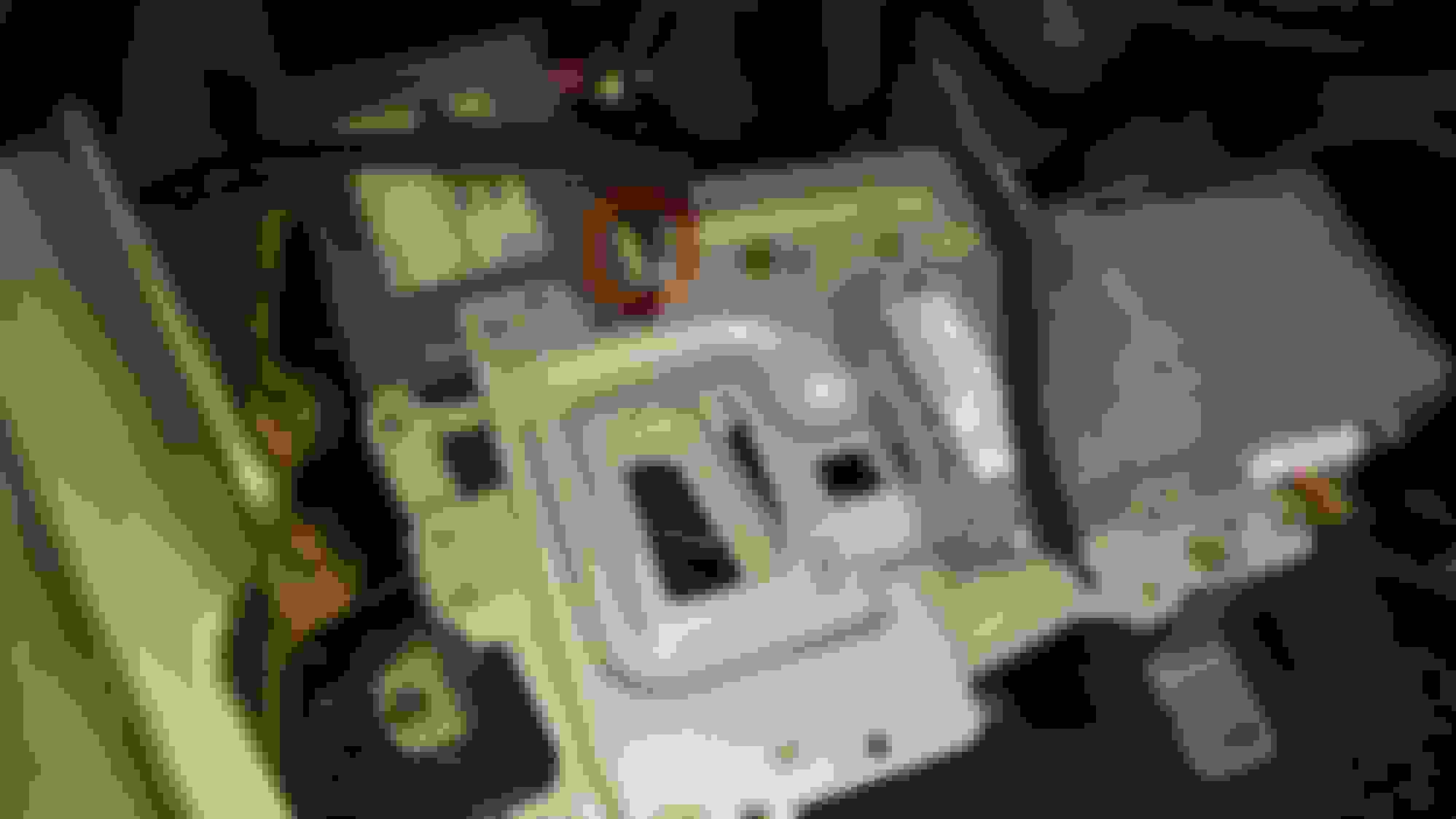
When I pulled open the trunk liner and lower left compartment, I don't see any exposed cables for me to attach the PA15-INFI module. I do see an XM radio module already connected. Will I need to disconnect the XM module to use the PA15-INFI, or does it somehow plug in to the XM module?
Once I connect the PA-15-INFI module, how do I snake the wire in to the car? I didn't see any openings for me to get the wire in... so not too sure what to do here.
Also, how do I ground the device?
Sorry if these questions seem incredibly dumb, I'm just worried I'll screw up my system even more if I do this install myself.
The USA spec has male and female plugs on the business end that connects to the satellite tuner. You just unplug the white male plug I've circled in red and plug in the USA spec. Then stick the just removed plug into the USA spec female plug. You'll see when you get it.
As far as routing the cable into the cabin, there is a G35Driver DIY you need to search up. It's not terribly difficult, and much depends on how "invisible" you want your routing to be.
Hi guys I have a 06 g35 coupe which does not have sat but is equipped with the Bose and oem navi and I ordered the pa15 Infiniti, I found the pre wired sat wire in the trunk and hooked it up to that. My radio only has radio cd paty and display buttons. I have hooked up the ground wire as well but when I press the radio or cd button the USA spec still does not work. Can someone help me with what settings I should have my dip on. Thanks
Hi guys I have a 06 g35 coupe which does not have sat but is equipped with the Bose and oem navi and I ordered the pa15 Infiniti, I found the pre wired sat wire in the trunk and hooked it up to that. My radio only has radio cd paty and display buttons. I have hooked up the ground wire as well but when I press the radio or cd button the USA spec still does not work. Can someone help me with what settings I should have my dip on. Thanks
Have read all these threads and still having an issue. Before I return this unit, hoping for feedback, even if its send it back for the NIS version. Purchased the INFI unit.
So i have an 06 sedan. Standard radio. Non Bose. Does not have Sat or PTY buttons. I have hooked up the INFI unit and it has power as my phone has connected to it. The problem is how/can you get it to the sat mode to hear via Bluetooth. When you hit the radio button, all you see is FM1,2 and AM1,2. I have an android phone.
Something to add. Before I connected the harness, when I cycle the radio button I see the FM/AM but also see a SR1 and SR2. But once I connect the BT45 it goes away. I checked the ground and its solid.
One thing I noticed, in the center console there is a IPOD plug the PO wired. Wonder if something is plugged into the radio causing this.