


Pioneer AVH-P8400BH


ooo ok
just to be clear..
tell me if im correct and if this is possible ..
1- SWL & swr red and white - for amp for subs
2- RC IN (brown) - for rear view camera
3- W.R - for steering control ?
4- mic - for bluetooth mic
5- usb for - CD-IU201S ipod / iphone
6- 2nd usb male to female - to connect usb drive or small external hard drive.
7- RIN WIN VIN - for my composite to 3.5mm jack for my sidekick 4g tv out display
8- Vout for tvs in the back
anything else you would recomen or add for a nice feature or wat not ?
thank you for your help
just to be clear..
tell me if im correct and if this is possible ..
1- SWL & swr red and white - for amp for subs
2- RC IN (brown) - for rear view camera
3- W.R - for steering control ?
4- mic - for bluetooth mic
5- usb for - CD-IU201S ipod / iphone
6- 2nd usb male to female - to connect usb drive or small external hard drive.
7- RIN WIN VIN - for my composite to 3.5mm jack for my sidekick 4g tv out display
8- Vout for tvs in the back
anything else you would recomen or add for a nice feature or wat not ?
thank you for your help


to stereobase1, rafaelsandoval1
Hi Edriss and Rafael,
If you don't mind I'm going to send you some references of my head unit that might help your master installer.
Here are the issues that need to be resolved
1. Head unit must sit flush here is a video of the unit working while sitting flush. He mentioned it wouldn't work... here is my proof it does. pic is attached
If you notice in the attached pics the H/U is flush with the top. The way your master installer did it it is flush at the bottom.
The trim kit I gave you:

needs to modified by your master installer
2. There is no radio signal. This needs to be fixed. I gave you Metra 40-NI10 - AM/FM Antenna adapter this should be used in conjunction with existing g35 wiring. Here is some advice from the G35 Driver Forum.
"Wrathernaut",
. "On the harness that connects to the factory harness, there's a wire that will be marked as "Power antenna" or "Antenna amp", that needs to be connected to the wire on the Pioneer that's marked "Power Antenna" or "Remote"."
and
"There's a wire coming from the harness that plugs directly into your headunit.
It says "REMOTE" or "POWER ANT" or "REMOTE AMP". It's probably blue with a white stripe.
You connect this wire with the wire from the Metra 70-7550 or Metra 70-75511 harness which says "POWER ANT" or "ANT AMP". It is blue with a white stripe or plain blue. If you have the Bose system, both the blue and blue with white stripe wires need to be connected to the wire I mentioned that comes from the headunit's harness."
3. Can you please program the steering wheel control to mute. Here is a video on how to program
Thank You
Thread Starter
|
Registered User
Joined: Aug 2011
Posts: 335
Likes: 22
From: Big Island
Radio flush - Make sure you're using the correct connection points in the factory harness. If you are and the radio does not sit like the one shown on post #47 of this thread, you will need to drill new holes. Or just leave it not flush.
Radio signal - If you're referring to FM/AM signal, you need to connect the power antenna line; this turns on the FM amplifier. Without it, you will have poor radio reception. You can either connect it along with the rest of your remote lines, or you can connect it to a switchable 12v+ - an easy one to use is the cigarette lighter power.
Radio signal - If you're referring to FM/AM signal, you need to connect the power antenna line; this turns on the FM amplifier. Without it, you will have poor radio reception. You can either connect it along with the rest of your remote lines, or you can connect it to a switchable 12v+ - an easy one to use is the cigarette lighter power.
I attached a pic of post #47 on the E-mail I sent out to the Stereobase which is on post #113. The installers left a half inch of the H/U sticking out. Top Teke thanks for the tip with the power line,
Wrathernaut's write up helped a ton also
see looks like doo doo.
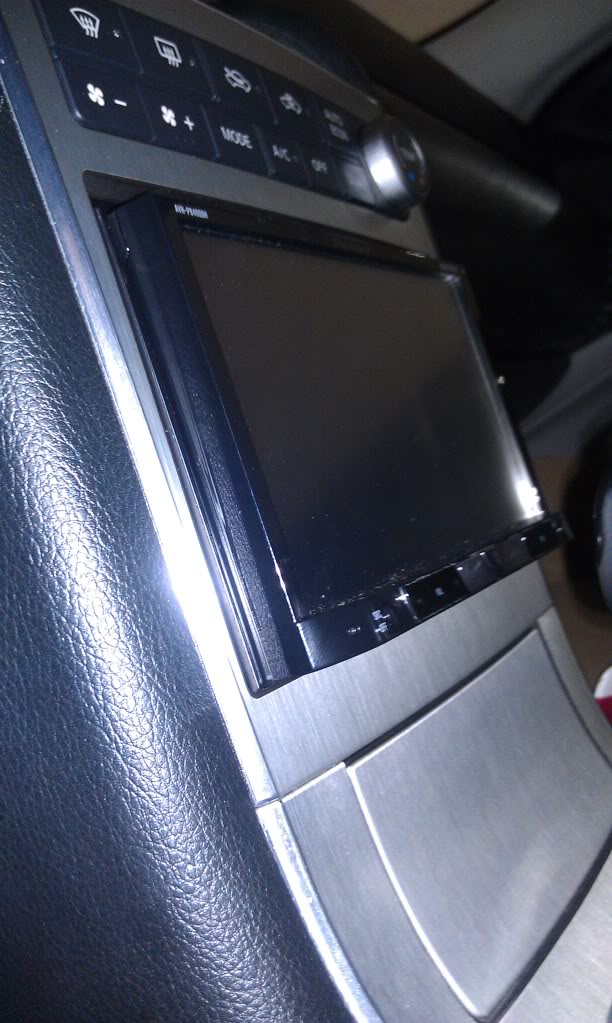
Wrathernaut's write up helped a ton also
see looks like doo doo.
Thread Starter
|
Registered User
Joined: Aug 2011
Posts: 335
Likes: 22
From: Big Island
Yep that does. Sometimes people think that the face plate won't clear the DD space or that the switch at the bottom of the faceplate needs to be accessible from that position, so they do that. But you're right - it clears just fine and you don't need to access the switch because the faceplate is motorized. Only thing I had to modify was the Scosche trim, it was a little tight. Otherwise it's a straight swap.

I just wired my reverse camera. It's been installed for a while but not detecting reverse, had to turn it on manually. In my '04 Sedan, the wire was orange. I tried the purple wire that other threads say, it didn't work. I tested it with a multimeter and got no readings. So I popped off the taillight cover on the underside of the trunk like I was going to change out the taillights and my wire was orange. Tested the orange, worked like a charm. These are the wires bundled next to the kick panel (I didn't want to run the wire under the carpet all the way to the back).



All this looks great. I'm actually in the market for one of these and this seems to fit my needs. Sorry for the noob like post. What will I need to achieve this setup besides the HU and DD? Mind you, I'll be looking at the AVH P4400BH without navigation
Last edited by TIAN; Apr 28, 2012 at 03:45 PM.
Thread Starter
|
Registered User
Joined: Aug 2011
Posts: 335
Likes: 22
From: Big Island
You can go with one of the Pioneer reverse cams (BC-5 is a common choice) for simple plug-and-play, but any reverse cam will do.
All you need to connect is
All you need to connect is
- Yellow RCA to HU reverse cam video in
- Purple/white HU reverser trigger to something powered by the vehicles reverse trigger - either the purple or orange leads referred to in this thread
- Reverse cam's ( - ) negative ground to the ground of your choice
Last edited by Top Teke; Apr 29, 2012 at 01:50 AM.
I had a stereo shop install my Pioneer AVH-P8400BH, another install session scheduled this week to fix the issue with the weak antenna signal, and with the help of forum members we have already determined the solution to this problem.
Another issue I discovered is static noise which seems to be present while playing music, or while nothing is playing , and even when the unit is paused. When the EQ is set to flat the noise seems to go away even with the volume turned all the way up.
Has anyone encountered the same problem with their Pioneer AVH-P8400BH?
What is the common solution to this static noise?
Is this something I can suggest to the installer?
Having grounds in different locations can cause static or whine because they are not at the same impedance.(ground loop) Make sure that you have sanded all of your chassis connections down well, I would go back through them. You should also look into doing the big three. That is chassis to battery (neg), engine block to chassis (or battery) (neg) and battery positive to alternator. upgrading these wires with 1/0 and sanding the connections at the same time usually helps and allows a little more juice to flow to the amps. Back on the main route though, make sure your head unit is grounded to the chassis and sanded well rather than through the harness, this will help sometimes.
or maybe check the wiring of the speakers with this?
Thanks.
Another issue I discovered is static noise which seems to be present while playing music, or while nothing is playing , and even when the unit is paused. When the EQ is set to flat the noise seems to go away even with the volume turned all the way up.
Has anyone encountered the same problem with their Pioneer AVH-P8400BH?
What is the common solution to this static noise?
Is this something I can suggest to the installer?
Having grounds in different locations can cause static or whine because they are not at the same impedance.(ground loop) Make sure that you have sanded all of your chassis connections down well, I would go back through them. You should also look into doing the big three. That is chassis to battery (neg), engine block to chassis (or battery) (neg) and battery positive to alternator. upgrading these wires with 1/0 and sanding the connections at the same time usually helps and allows a little more juice to flow to the amps. Back on the main route though, make sure your head unit is grounded to the chassis and sanded well rather than through the harness, this will help sometimes.
or maybe check the wiring of the speakers with this?
Thanks.