


How to Add Auxiliary or iPod Input to the Factory Radio





Joined: Nov 2008
Posts: 7,999
Likes: 1,050
From: Pennsylvania

Okay. May i start by saying this thread is LOADED with info. Great job. However im still a little confused about the aux adapter. Only because when i looked up the adapters that were listed, almost all of them said in order to work i needed to have the button on my radio that says "CAT" to use it. But i have the base model coupe (05' 6mt). No bose, no sat radio. So which adapter can i use???


Registered User
Joined: Jun 2014
Posts: 4
Likes: 0
Thank You sir. Are these fm modulators or direct aux input?

Registered User
Joined: Mar 2012
Posts: 3
Likes: 0
Hello all. I've done the PAC install (can't remember the model number, but I believe it's the one with two AUX inputs) and have had it for almost two years now, but am tired of how quiet the system is compared to CDs/Radio. I know that this is to be expected, but I was just wondering if anyone has tried a volume booster, or know if it would help at all with this setup? I was looking at this one from Boostaroo. I have an 06 G35x Sedan with Bose and bluetooth btw.
http://boostaroo.com/store/12-Volt-R...o-R234-MC.html
http://boostaroo.com/store/12-Volt-R...o-R234-MC.html
Last edited by tbag69; Jul 24, 2014 at 12:43 PM. Reason: Forgot to put link.

Registered User
Joined: Jul 2014
Posts: 4
Likes: 1
Hello all, I'm having trouble installing the iSimple ISNI531. I have a '03 G35 automatic with nav. Radio has a SAT button but car does not have a SAT radio.
Let me start by saying that after I bought the aux unit I noticed the package says it supports G35 04-07. So this may be my mistake, however I thought the '03 radio is identical to the '04, so I tried anyway. In fact, my radio looks exactly like this: http://media.caranddriver.com/images...s-1280x782.jpg
The installation instructions weren't particularly detailed, but I loosened the radio from the dash, hooked up the aux unit with 1 connection to the radio (the only one that fit), and plugged in the wire to the aux unit, turned the car on. I did not mess with the dip-switches as there is a sticked over them and no corresponding instructions in the manual.
Pressing SAT yielded a "NO SAT" message. I tried pressing other buttons, pressing Tune/Seek right after pressing SAT, and a few others like FM/AM, CAT, etc.. Tried redoing this while my phone was playing music. Tried disconnecting and reconnecting twice. Nothing.
Anyone have any idea what is going on? Is the '03 radio different from the '04 which may mean this unit really isn't compatible with the '03? For those of you who have the same radio, can you please share how installed the aux unit?
Let me start by saying that after I bought the aux unit I noticed the package says it supports G35 04-07. So this may be my mistake, however I thought the '03 radio is identical to the '04, so I tried anyway. In fact, my radio looks exactly like this: http://media.caranddriver.com/images...s-1280x782.jpg
The installation instructions weren't particularly detailed, but I loosened the radio from the dash, hooked up the aux unit with 1 connection to the radio (the only one that fit), and plugged in the wire to the aux unit, turned the car on. I did not mess with the dip-switches as there is a sticked over them and no corresponding instructions in the manual.
Pressing SAT yielded a "NO SAT" message. I tried pressing other buttons, pressing Tune/Seek right after pressing SAT, and a few others like FM/AM, CAT, etc.. Tried redoing this while my phone was playing music. Tried disconnecting and reconnecting twice. Nothing.
Anyone have any idea what is going on? Is the '03 radio different from the '04 which may mean this unit really isn't compatible with the '03? For those of you who have the same radio, can you please share how installed the aux unit?
Joined: Nov 2008
Posts: 7,999
Likes: 1,050
From: Pennsylvania
Hello all, I'm having trouble installing the iSimple ISNI531. I have a '03 G35 automatic with nav. Radio has a SAT button but car does not have a SAT radio.
Let me start by saying that after I bought the aux unit I noticed the package says it supports G35 04-07. So this may be my mistake, however I thought the '03 radio is identical to the '04, so I tried anyway. In fact, my radio looks exactly like this: http://media.caranddriver.com/images...s-1280x782.jpg
The installation instructions weren't particularly detailed, but I loosened the radio from the dash, hooked up the aux unit with 1 connection to the radio (the only one that fit), and plugged in the wire to the aux unit, turned the car on. I did not mess with the dip-switches as there is a sticked over them and no corresponding instructions in the manual.
Pressing SAT yielded a "NO SAT" message. I tried pressing other buttons, pressing Tune/Seek right after pressing SAT, and a few others like FM/AM, CAT, etc.. Tried redoing this while my phone was playing music. Tried disconnecting and reconnecting twice. Nothing.
Anyone have any idea what is going on? Is the '03 radio different from the '04 which may mean this unit really isn't compatible with the '03? For those of you who have the same radio, can you please share how installed the aux unit?
Let me start by saying that after I bought the aux unit I noticed the package says it supports G35 04-07. So this may be my mistake, however I thought the '03 radio is identical to the '04, so I tried anyway. In fact, my radio looks exactly like this: http://media.caranddriver.com/images...s-1280x782.jpg
The installation instructions weren't particularly detailed, but I loosened the radio from the dash, hooked up the aux unit with 1 connection to the radio (the only one that fit), and plugged in the wire to the aux unit, turned the car on. I did not mess with the dip-switches as there is a sticked over them and no corresponding instructions in the manual.
Pressing SAT yielded a "NO SAT" message. I tried pressing other buttons, pressing Tune/Seek right after pressing SAT, and a few others like FM/AM, CAT, etc.. Tried redoing this while my phone was playing music. Tried disconnecting and reconnecting twice. Nothing.
Anyone have any idea what is going on? Is the '03 radio different from the '04 which may mean this unit really isn't compatible with the '03? For those of you who have the same radio, can you please share how installed the aux unit?
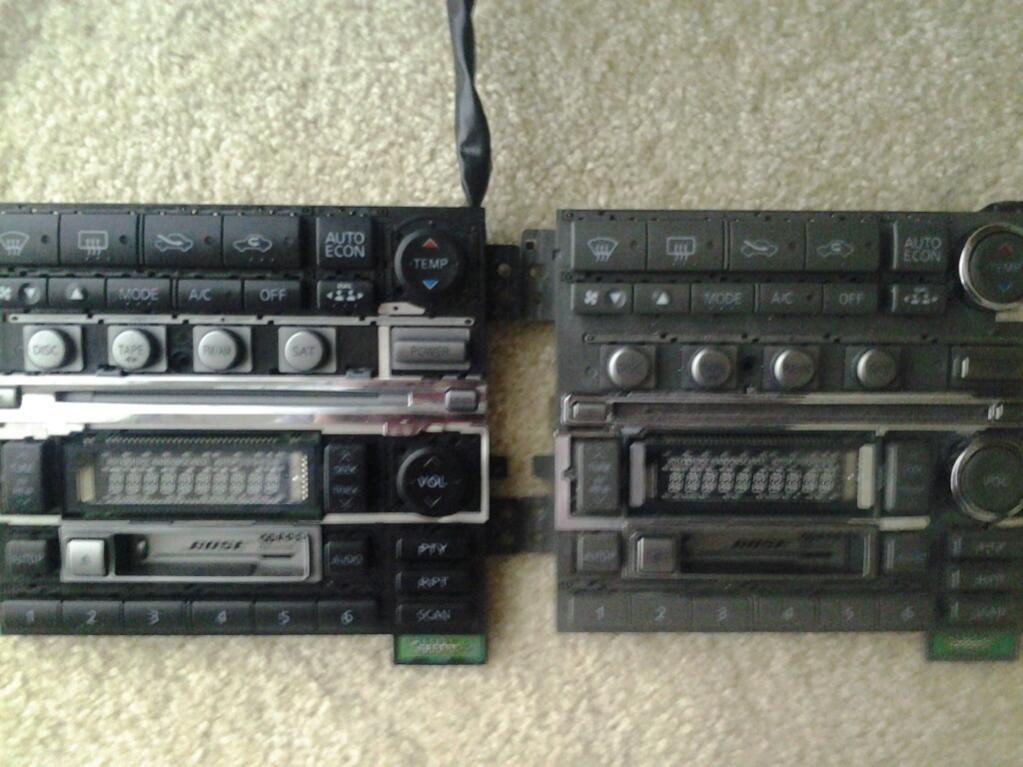
Early '03s (on the right) have a much smaller gap between the CD slot and the display, and a larger gap between the buttons than the late '03s to '04s:
Registered User
Joined: Jul 2014
Posts: 4
Likes: 1
The early '03 radios are not compatible with the aux input adapters that directly interface with the radio. Not sure if yours is early or not, but you can get a cassette adapter, or a wired FM modulator and they'll work with early '03 just fine.
Early '03s (on the right) have a much smaller gap between the CD slot and the display, and a larger gap between the buttons than the late '03s to '04s:
Early '03s (on the right) have a much smaller gap between the CD slot and the display, and a larger gap between the buttons than the late '03s to '04s:
Joined: Nov 2008
Posts: 7,999
Likes: 1,050
From: Pennsylvania
I'd personally go with a wired FM modulator, since that allows you to route the wires into the glovebox, above-radio compartment or center console instead of having that thing sticking out of the front of the radio. Sound quality with the wired modulator's I've used is good enough you'd probably not tell the difference unless you've got good speakers and the vehicle is stopped. Another route to look into is directly wiring a 3.5mm jack to the audio signal from the read head of the cassette deck - http://www.instructables.com/id/Mod-...-Ipod-%26-MP3/

Registered User
Joined: Apr 2013
Posts: 188
Likes: 17
From: Durty south
Android solution for the trunk harness?
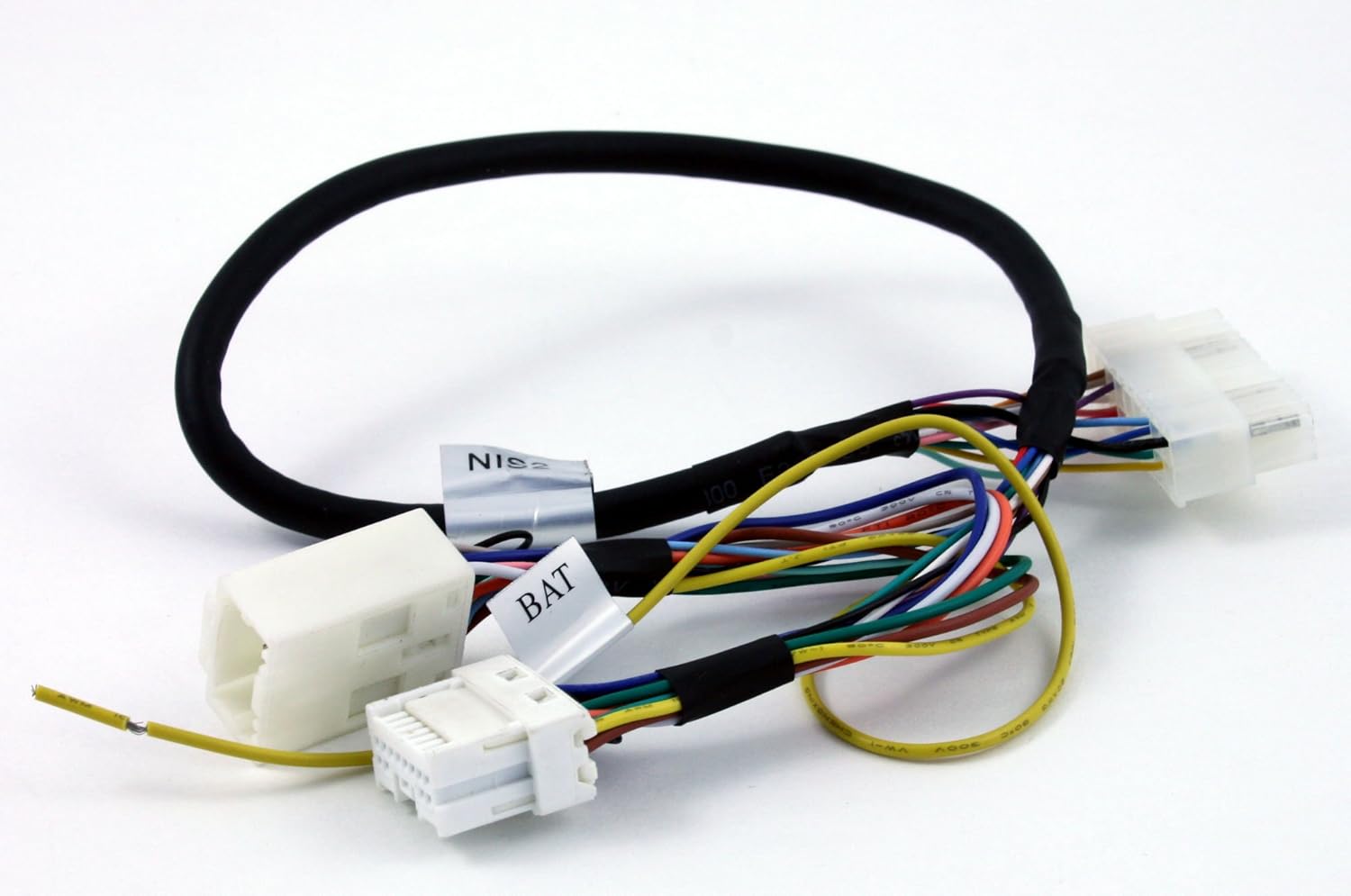
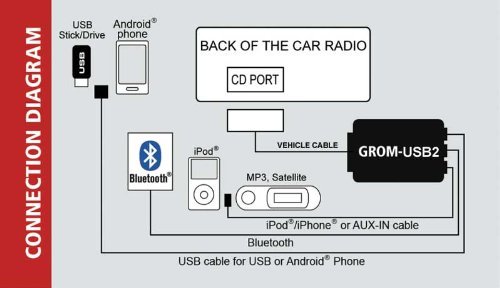
This connects to the trunk harness (I'm pretty sure from looking at the pictures) and has a USB for an android/USB stick, iPod/AUX-IN and bluetooth......I'm an iPhone hater and have been looking for an easy way to hook up the android.....does this look legit to all you audiophiles at there?? Also forgive my mis-understanding, but the AUX-IN is for my factory SAT to plug into?



Nice. does the radio display the file name and are you able to go to the nexxt track with the radio controls while using usb? I might switch from my PA15to that if so.
Wrather, I bet you dont know this one,,which two wires to cross or whatever if possible can be done to switch the short press seek input into the long press seek input? with the pa15 i have to hold the next track button on the wheel for 3 secs to get to the next track on the ipod.
Wrather, I bet you dont know this one,,which two wires to cross or whatever if possible can be done to switch the short press seek input into the long press seek input? with the pa15 i have to hold the next track button on the wheel for 3 secs to get to the next track on the ipod.
Joined: Nov 2008
Posts: 7,999
Likes: 1,050
From: Pennsylvania
Nice. does the radio display the file name and are you able to go to the nexxt track with the radio controls while using usb? I might switch from my PA15to that if so.
Wrather, I bet you dont know this one,,which two wires to cross or whatever if possible can be done to switch the short press seek input into the long press seek input? with the pa15 i have to hold the next track button on the wheel for 3 secs to get to the next track on the ipod.
Wrather, I bet you dont know this one,,which two wires to cross or whatever if possible can be done to switch the short press seek input into the long press seek input? with the pa15 i have to hold the next track button on the wheel for 3 secs to get to the next track on the ipod.
It's not an issue of wiring. The steering wheel controls merely output a certain voltage when a button is pressed, it's entirely up to the adapter that is reading that output to decide what to do with it. The buttons might as well just be saying "OOOO" and your device is programmed to skip tracks when it hears "OOO". Holding the button down just has the car say "OOOOOOOOOOOOOOOOOOOOOOOOOOOOOOOOOOOO" and the device is programmed to fast forward so long as that "OOOOOOOOO" keeps going. So if you want the button to perform a different function, it's up to the adapter. You could change wiring and make an "OOOO" button become an "AAAA" button, but our cars just have two remote wires, so the signals are limited to three different "volumes" of the "OOOO" and "AAAA".

