


How to Add Auxiliary or iPod Input to the Factory Radio





Joined: Nov 2008
Posts: 7,999
Likes: 1,050
From: Pennsylvania

It goes through the headunit. If you can turn the radio on and listen to FM/AM, the ISNI571 should work fine. Just keep hitting the radio/SAT/CAT button, whichever it is that your year/trim has on the plastic.


 this sucks....


All you need is the sat harness, no sat receiver needed.
??? Am I supposed to have an extra plug left over? Well maybe it didnt work cause I didnt ground the ground wire.
Yea I totally derped out here.
Yea I totally derped out here.
Last edited by JKL1031; Dec 22, 2013 at 09:02 PM.
Joined: Nov 2008
Posts: 7,999
Likes: 1,050
From: Pennsylvania
You have the plug that goes to the factory satellite adapter that won't plug into anything unless you've also got the factory satellite radio.

Registered User
Joined: Nov 2013
Posts: 19
Likes: 0
I'm hoping someone can help me with the PA15-INFI I just received today. Before I purchased the PA15-INFI I checked in the trunk to make sure the white connecter was there and it is. So when I received the PA15 today I connected it as instructed. However, when I turn the car and and press SAT the LCD displays NO SAT. What does that mean? Did I connect something wrong? I tried the different DIP switch possibilities and all of them returned NO SAT. Please help!
Edit: I have a SAT button if it matters
Edit 2: Nevermind, didn't have it grounded!! Now to find a screw that will hold the ground in place...
Edit: I have a SAT button if it matters
Edit 2: Nevermind, didn't have it grounded!! Now to find a screw that will hold the ground in place...
Last edited by greenythebeast; Dec 26, 2013 at 07:18 PM.

Registered User
Joined: Jan 2014
Posts: 16
Likes: 2
Android Alternative
Some great information in this thread. Thanks for all of your expertise Wrathernaut!
I've found another alternative for those who want to maintain factory Bluetooth, use an Android device, and want to add an auxiliary input to their factory radio. Grom Audio, mentioned in the first post, also makes a device that isn't catering to iOS.
The (GROM-AND2-NIS02) installs behind the factory radio, and provides both 3.5mm and USB interface. I'm using this setup in my '06 Coupe with good success. This device also allows for use of the steering wheel controls, and lists id3 tag info on the radio display, (when using the USB input.) Since i hate cables dangling, I use a separate Bluetooth receiver that plugs in to the 3.5mm AUX jack. This allows A2DP audio streaming while also allowing the factory Bluetooth to connect for voice calls. Really a pretty slick unit.
Check out this link for specs and more information.
http://www.gromaudio.com/store/andro...interface.html
I've found another alternative for those who want to maintain factory Bluetooth, use an Android device, and want to add an auxiliary input to their factory radio. Grom Audio, mentioned in the first post, also makes a device that isn't catering to iOS.
The (GROM-AND2-NIS02) installs behind the factory radio, and provides both 3.5mm and USB interface. I'm using this setup in my '06 Coupe with good success. This device also allows for use of the steering wheel controls, and lists id3 tag info on the radio display, (when using the USB input.) Since i hate cables dangling, I use a separate Bluetooth receiver that plugs in to the 3.5mm AUX jack. This allows A2DP audio streaming while also allowing the factory Bluetooth to connect for voice calls. Really a pretty slick unit.
Check out this link for specs and more information.
http://www.gromaudio.com/store/andro...interface.html

Registered User
Joined: Nov 2013
Posts: 161
Likes: 14
From: Houston, TX
Some great information in this thread. Thanks for all of your expertise Wrathernaut!
I've found another alternative for those who want to maintain factory Bluetooth, use an Android device, and want to add an auxiliary input to their factory radio. Grom Audio, mentioned in the first post, also makes a device that isn't catering to iOS.
The (GROM-AND2-NIS02) installs behind the factory radio, and provides both 3.5mm and USB interface. I'm using this setup in my '06 Coupe with good success. This device also allows for use of the steering wheel controls, and lists id3 tag info on the radio display, (when using the USB input.) Since i hate cables dangling, I use a separate Bluetooth receiver that plugs in to the 3.5mm AUX jack. This allows A2DP audio streaming while also allowing the factory Bluetooth to connect for voice calls. Really a pretty slick unit.
Check out this link for specs and more information.
http://www.gromaudio.com/store/andro...interface.html
I've found another alternative for those who want to maintain factory Bluetooth, use an Android device, and want to add an auxiliary input to their factory radio. Grom Audio, mentioned in the first post, also makes a device that isn't catering to iOS.
The (GROM-AND2-NIS02) installs behind the factory radio, and provides both 3.5mm and USB interface. I'm using this setup in my '06 Coupe with good success. This device also allows for use of the steering wheel controls, and lists id3 tag info on the radio display, (when using the USB input.) Since i hate cables dangling, I use a separate Bluetooth receiver that plugs in to the 3.5mm AUX jack. This allows A2DP audio streaming while also allowing the factory Bluetooth to connect for voice calls. Really a pretty slick unit.
Check out this link for specs and more information.
http://www.gromaudio.com/store/andro...interface.html
Some great information in this thread. Thanks for all of your expertise Wrathernaut!
I've found another alternative for those who want to maintain factory Bluetooth, use an Android device, and want to add an auxiliary input to their factory radio. Grom Audio, mentioned in the first post, also makes a device that isn't catering to iOS.
The (GROM-AND2-NIS02) installs behind the factory radio, and provides both 3.5mm and USB interface. I'm using this setup in my '06 Coupe with good success. This device also allows for use of the steering wheel controls, and lists id3 tag info on the radio display, (when using the USB input.) Since i hate cables dangling, I use a separate Bluetooth receiver that plugs in to the 3.5mm AUX jack. This allows A2DP audio streaming while also allowing the factory Bluetooth to connect for voice calls. Really a pretty slick unit.
Check out this link for specs and more information.
http://www.gromaudio.com/store/andro...interface.html
I've found another alternative for those who want to maintain factory Bluetooth, use an Android device, and want to add an auxiliary input to their factory radio. Grom Audio, mentioned in the first post, also makes a device that isn't catering to iOS.
The (GROM-AND2-NIS02) installs behind the factory radio, and provides both 3.5mm and USB interface. I'm using this setup in my '06 Coupe with good success. This device also allows for use of the steering wheel controls, and lists id3 tag info on the radio display, (when using the USB input.) Since i hate cables dangling, I use a separate Bluetooth receiver that plugs in to the 3.5mm AUX jack. This allows A2DP audio streaming while also allowing the factory Bluetooth to connect for voice calls. Really a pretty slick unit.
Check out this link for specs and more information.
http://www.gromaudio.com/store/andro...interface.html
Joined: Nov 2008
Posts: 7,999
Likes: 1,050
From: Pennsylvania
Some great information in this thread. Thanks for all of your expertise Wrathernaut!
I've found another alternative for those who want to maintain factory Bluetooth, use an Android device, and want to add an auxiliary input to their factory radio. Grom Audio, mentioned in the first post, also makes a device that isn't catering to iOS.
The (GROM-AND2-NIS02) installs behind the factory radio, and provides both 3.5mm and USB interface. I'm using this setup in my '06 Coupe with good success. This device also allows for use of the steering wheel controls, and lists id3 tag info on the radio display, (when using the USB input.) Since i hate cables dangling, I use a separate Bluetooth receiver that plugs in to the 3.5mm AUX jack. This allows A2DP audio streaming while also allowing the factory Bluetooth to connect for voice calls. Really a pretty slick unit.
Check out this link for specs and more information.
http://www.gromaudio.com/store/andro...interface.html
I've found another alternative for those who want to maintain factory Bluetooth, use an Android device, and want to add an auxiliary input to their factory radio. Grom Audio, mentioned in the first post, also makes a device that isn't catering to iOS.
The (GROM-AND2-NIS02) installs behind the factory radio, and provides both 3.5mm and USB interface. I'm using this setup in my '06 Coupe with good success. This device also allows for use of the steering wheel controls, and lists id3 tag info on the radio display, (when using the USB input.) Since i hate cables dangling, I use a separate Bluetooth receiver that plugs in to the 3.5mm AUX jack. This allows A2DP audio streaming while also allowing the factory Bluetooth to connect for voice calls. Really a pretty slick unit.
Check out this link for specs and more information.
http://www.gromaudio.com/store/andro...interface.html

Registered User
Joined: Jan 2014
Posts: 16
Likes: 2
Sorry for the late reply to your question. No, I didn't take pics of the installation. It really is pretty straight-forward though. My only "tweak" to the installation was that I fabricated a flush-mount USB/AUX bulkhead jack in the ashtray.
Here's a link to the extension that I installed from Amazon.com.
Here's a link to the extension that I installed from Amazon.com.

Joined: Nov 2008
Posts: 7,999
Likes: 1,050
From: Pennsylvania
Sorry for the late reply to your question. No, I didn't take pics of the installation. It really is pretty straight-forward though. My only "tweak" to the installation was that I fabricated a flush-mount USB/AUX bulkhead jack in the ashtray.
Here's a link to the extension that I installed from Amazon.com.
Amazon.com: Xtenzi USB & 3.5mm AUX extension Flush Mount 2 Meter Cable , 1/8 AUX Car Bike Boat Motercycle Lead By Xtenzi: Car Electronics
Here's a link to the extension that I installed from Amazon.com.
Amazon.com: Xtenzi USB & 3.5mm AUX extension Flush Mount 2 Meter Cable , 1/8 AUX Car Bike Boat Motercycle Lead By Xtenzi: Car Electronics
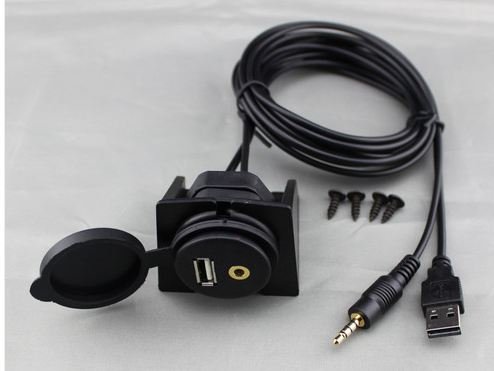
Wow, it's pretty much identical to what I did with the factory socket, except I used five cents worth of hot melt glue instead of $30 (list price of $80???? WTF?) doing it.
Registered User
Joined: Jan 2014
Posts: 16
Likes: 2
Amazon.com