When you click on links to various merchants on this site and make a purchase, this can result in this site earning a commission. Affiliate programs and affiliations include, but are not limited to, the eBay Partner Network.
Check the trunk for the harness and go with the PA15-INFI if you've got one, but depending where you want to route your iPod connector, you're going to be taking apart some of the interior anyway.
Thanks. Just so I'm clear if I have the harness in the trunk and I get the pa15-infi I can just plug it into the harness in the trunk and route a cord wherever that I can plug my iPod into then hit the SAT button on my radio and have full control of the iPod through my radio and steering wheel controls? Thanks
Thanks. Just so I'm clear if I have the harness in the trunk and I get the pa15-infi I can just plug it into the harness in the trunk and route a cord wherever that I can plug my iPod into then hit the SAT button on my radio and have full control of the iPod through my radio and steering wheel controls? Thanks
But really want Bluetooth. I am not super keen on dash install though. I am wondering if I can make use of the cable from that kit and pair it with a GROM USB/Bluetooth adapter?
But really want Bluetooth. I am not super keen on dash install though. I am wondering if I can make use of the cable from that kit and pair it with a GROM USB/Bluetooth adapter?
Thanks,
xnappo
The GROM is made to connect to the back of the radio, so it won't match up with the harness in the trunk. You'll have to remove the radio to get to the back of it to install the GROM.
The GROM is made to connect to the back of the radio, so it won't match up with the harness in the trunk. You'll have to remove the radio to get to the back of it to install the GROM.
I installed a GROM so I could hopefully use the Android side of things, but the unit didn't work when I got it. Ended up just going with the USA spec one and use the aux on that to get in the radio. I hope the GROM isn't known for that.
The GROM is made to connect to the back of the radio, so it won't match up with the harness in the trunk. You'll have to remove the radio to get to the back of it to install the GROM.
I ended up hacking the hell out of this, but got what I wanted
I already had a bluetooth to FM adapter that also had AUX out, and a Nissan IPod adapter. I just opened up the IPod cable NOT cutting it, and split the two gray wires inside that are the actual audio. I added female RCA adapters to it, then tapped 12V off the unused SAT port on the Nissan adapter. Connected that all to the bluetooth -> aux out guy, connected my old IPod to trick a connection.
The whole setup cost me about $97 . Took about 30 mins to install . I dropped everything behind the gear shifter. Now i have full bluetooth streaming and voice . The knivio bt is powered from car charger which i plan to move to center console in future . I disabled my factory bluetooth since it was not as clear for calls as this new one. The music can be controlled from 3 small buttons on kinivo unit which i mounted as shown in pic . I registered just to say how helpful this thread is . Ty again
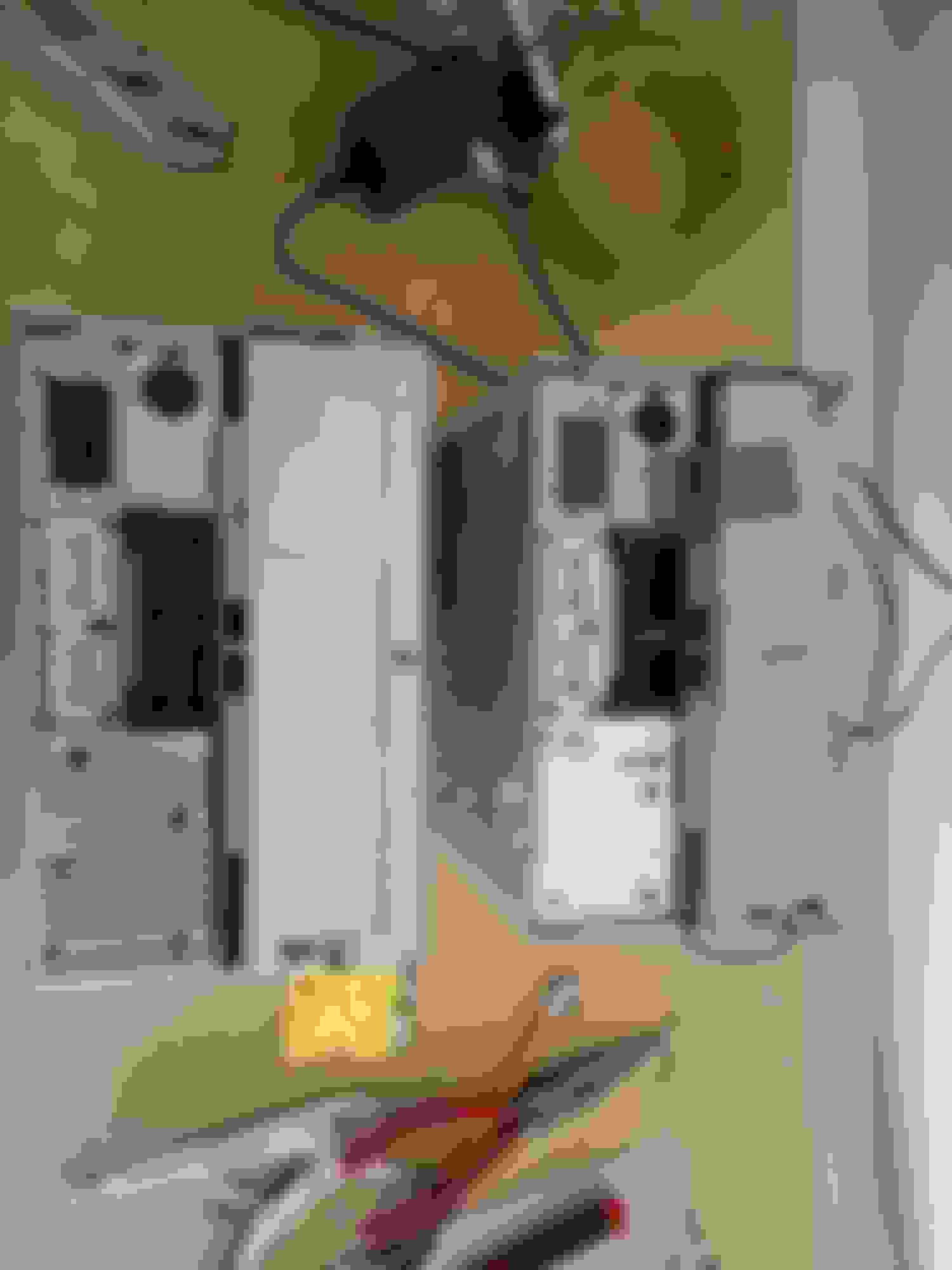
I have a 2004 G35 sedan (built April 2004), Bose with Sat button and connector in the trunk, no Sat receiver, but the iSimple Dualink ISNI531 cable harness has the 10-pin and 12-pin connectors while my satellite connector is 16-pins. The radio connector does not fit either. I'm surprised this has not been mentioned here, and I can find no mention of a 16-pin connector anywhere on the web. Is there a different product I need? Left connector is the ISNI531 harness and right connector is in the trunk.
I have a 2004 G35 sedan (built April 2004), Bose with Sat button and connector in the trunk, no Sat receiver, but the iSimple Dualink ISNI531 cable harness has the 10-pin and 12-pin connectors while my satellite connector is 16-pins. The radio connector does not fit either. I'm surprised this has not been mentioned here, and I can find no mention of a 16-pin connector anywhere on the web. Is there a different product I need? Left connector is the ISNI531 harness and right connector is in the trunk.
Read the very first post explaining all about aux adapter types. it says right there two type of adapters for our g35's first is nissan type which plugs behind the stereo and second type is infinito type which plugs in the sat harness in the trunk. The isimple dual link is nissan type it wont fit in trunk adapter. You must plug it directly behind the stereo. I installed it and it fit perfectly.Follow wrathernaut's stereo removal guide and diy is very easy.
Last edited by Wrathernaut; Jun 21, 2015 at 12:46 PM.
Reason: misspell
Read the very first post explaining all about aux adapter types. it says right there two type of adapters for our g35's first is nissan type which plugs behind the stereo and second type is infinito type which plugs in the sat harness in the trunk. The isimple dual link is nissan type it wont fit in trunk adapter. You must plug it directly behind the stereo. I installed it and it fit perfectly.Follow wrathernaut's stereo removal guide and diy is very easy.
I'm afraid I wasn't clear enough when I said, "The radio connector does not fit either." I meant that when the install technician had the radio out of the dash none of the connectors would fit. The radio connector that came with the ISNI531 is 10 pin and the satellite connector is 12 pin. I didn't get a picture of the connectors at the back of the radio, but the trunk satellite connector is 16 pins. I don't want to take the dash apart again until I have the correct connectors to make it work. Why is this so difficult? Wrathernaut's DDin DIY thread talks about the Metra 70-7550 and 70-7551 wiring harness, and it seems pretty clear to me that I would not be successful installing a new headunit for the same reason. I was not able to find this 16 pin connector on Metra's website, but it's pretty hard to work backwards to see what model that connector is used for. It doesn't come up with the 2004 G35 sedan.
1) You didn't actually get the right wiring harness with your ISNI531, it should look like this:
2) If it's not #1, your installer is not worth the money, and is trying to connect to the wrong plugs. There's several of them back there, but by simply counting the number of pins and matching them, it's virtually idiot-proof.
Because;
There's absolutely a 10-pin harness in there. Count the pins in the left black socket (toward the top of image). Does your installer have trouble counting to 12? That's the number of pins in the right white socket (bottom of image). There's a bose radio and a non-bose radio pictured here, just in case your installer tries to pull that card as to why they can't do their job.
Your pictures were very helpful, and my Bose radio is exactly the same. My son and I were easily able to find the top left and bottom right connections for the iSimple cable harness, so I don't know what that car stereo installer was looking at. However, the 16 pin connector is the bottom left which matches what we found in the trunk. And, with the iSimple connected we only get NO SAT. We tried every kind of button press combinations, AM/FM then SAT, both together, hold SAT while powering on, etc. It didn't matter if the radio assembly was bolted in and grounded or not, and there's no way to add another ground to the iSimple device. Perhaps it is a bad unit?
I might have to go buy the PA15-INFI, but I'm concerned whether it would have the 16 pin or 12 pin connector. It appears to me that it needs the 16 pin for the radio to sense it has a satellite receiver connected. I didn't ohm it out but I'm betting the 16 pin connector bottom left of the radio goes to the trunk. Maybe it would be safer to go with the PA15-NIS to avoid the NO SAT issue? Thanks for all your valuable help.
Ok guys so I read everything on here so have a good understanding... Now I just recently bought my car and it came with the iPod connection... Now I'm Not an apple user so I want the 3.5mm input... My guess is that I have the ISNI571 model... My question is can I add a 3.5mm jack to this module or do I have to buy a whole different one... This model says it comes with a 3.5mm jack but I don't see it anywhere on car.... I know I can take apart radio trim to check but was just trying to avoid wasting time
Your pictures were very helpful, and my Bose radio is exactly the same. My son and I were easily able to find the top left and bottom right connections for the iSimple cable harness, so I don't know what that car stereo installer was looking at. However, the 16 pin connector is the bottom left which matches what we found in the trunk. And, with the iSimple connected we only get NO SAT. We tried every kind of button press combinations, AM/FM then SAT, both together, hold SAT while powering on, etc. It didn't matter if the radio assembly was bolted in and grounded or not, and there's no way to add another ground to the iSimple device. Perhaps it is a bad unit?
I might have to go buy the PA15-INFI, but I'm concerned whether it would have the 16 pin or 12 pin connector. It appears to me that it needs the 16 pin for the radio to sense it has a satellite receiver connected. I didn't ohm it out but I'm betting the 16 pin connector bottom left of the radio goes to the trunk. Maybe it would be safer to go with the PA15-NIS to avoid the NO SAT issue? Thanks for all your valuable help.
Showing cables connected
The trunk connector is not a connection to the 16-pin on the rear of the radio.
Is it possible the same installer that couldn't count fried the unit?






 Aux plus bluetooth setup 2006 g35x with nav.