


DJ's G35 Car PC


Thread Starter
|
Registered User
Joined: Oct 2013
Posts: 10
Likes: 0
From: Alabama
DJ's G35 Car PC
I just purchased my non-nav G35 coupe in Oct and this was my first project. I liked the factory Bluetooth feature in my car and wanted to add navigation and the capability for videos etc. I was able to find a sweet deal on eBay for the whole radio with navigation buttons and screen for $175. The cd player didn't work but I didn't need to use it since I had mine already (The radio with nav's dimensions are slightly different that the non nav radio). I removed the factory screen and replaced it with my Lilliput 7' screen. I had to do some slight modifications in order to fit the screen and the DVI cable all in the screen housing. Since I didn't have the navigation wiring harness, I wired the motor for the screen to a reverse polarity switch and installed the switch to the left of my steering wheel. I removed the upper glove box, checked the dimensions and determined that I could fit the computer in it. In fact I was able to put the motherboard, 2 2.5 SSD's power supply and a usb hub all in the small compartment. The mother board was fanless, but I added a fan over the processor just in case. It took some modifications to the glove compartment box but I was able to get it to fit and work. I had to make changes to my design as I went along. It took me about 3-4 weeks to finish only because I was waiting for part. If I had all the correct parts and tools from the start it would have only taken about a week. Anyways I hope you like it. Feel free to ask any question, provide feedback or advice. Thanks!
Carputer Specs:
Intel DC2700DC MB 160GB SSD 40GB SSD
6GB Ram
M2 ATX 160w intelligent power supply
Windows XP Professional
Lilliput 7' Touchscreen monitor with HDMI and DVI input. Also has the backup camera mod ($169)
iSimple ISNI531 for iPod/ aux input
GPS receiver
Mini wifi adapter
Mini Bluetooth adapter
Mini OBD II Bluetooth receiver
Generic backup license plate camera
Running RoadRunner frontend (will eventually purchase Centrafuse)
GPS Software: Using free version of PC Navigator 12 and I also purchased Sygic Fleet
Carputer Specs:
Intel DC2700DC MB 160GB SSD 40GB SSD
6GB Ram
M2 ATX 160w intelligent power supply
Windows XP Professional
Lilliput 7' Touchscreen monitor with HDMI and DVI input. Also has the backup camera mod ($169)
iSimple ISNI531 for iPod/ aux input
GPS receiver
Mini wifi adapter
Mini Bluetooth adapter
Mini OBD II Bluetooth receiver
Generic backup license plate camera
Running RoadRunner frontend (will eventually purchase Centrafuse)
GPS Software: Using free version of PC Navigator 12 and I also purchased Sygic Fleet


Thread Starter
|
Registered User
Joined: Oct 2013
Posts: 10
Likes: 0
From: Alabama
I leave it open if I am using the extra USB ports but other than that it remains closed. I just put it in this weekend, so I'm going to monitor the CPU temp to make sure it's not getting to hot.
When I installed the fan, I was thinking there would be more room above it to expel the heat to but it is kind of tight in there.
When I installed the fan, I was thinking there would be more room above it to expel the heat to but it is kind of tight in there.
I put a car pc in my rsx back in '02. Even with an open custom enclosure in the trunk, I had alot of overheating issues. I know ULV components have changed ALOT in 10 years so I would love to see your results in that small enclosure.
Thread Starter
|
Registered User
Joined: Oct 2013
Posts: 10
Likes: 0
From: Alabama
I will be making an 8hr drive next week so that will be a good test on how it does. Will keep you posted.


Good parts list, 200 GB for a car PC is far greater than you should ever need.
You could cut a hole on the lower half and the top of the booklet holder in which you installed that board. Add a simple electric fan and call it a day.
You could cut a hole on the lower half and the top of the booklet holder in which you installed that board. Add a simple electric fan and call it a day.

You should buy a bose face plate from an OEM g35 that came with Navigation b/c it will help your navi-controls to sit flush.
Trending Topics


The rest of the install looks good, except for this switch:
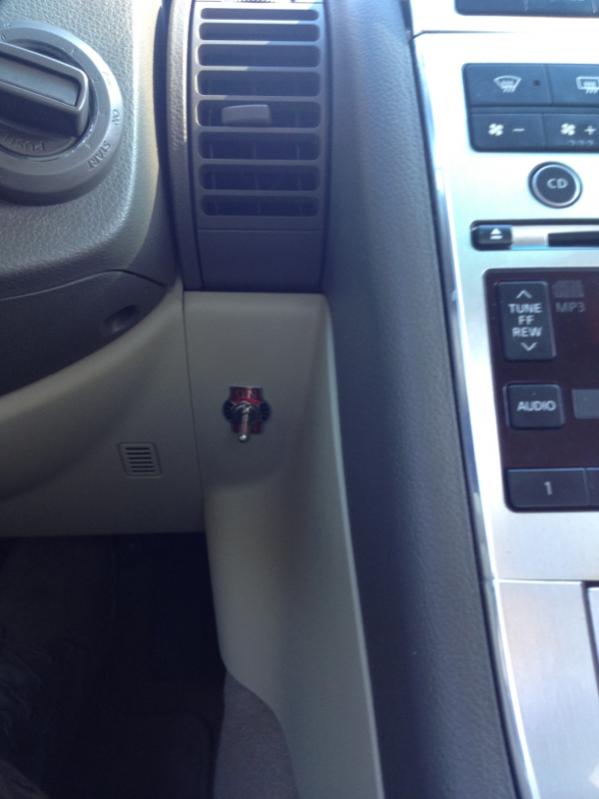
I hope you're going to replace that with something a little more discrete in the future.
Thread Starter
|
Registered User
Joined: Oct 2013
Posts: 10
Likes: 0
From: Alabama
Or you can just trim 1/8 inch from the top of the trim. I've done it several times because there wasn't double-din navigation trim available for a long trim - instructions can be found here: https://g35driver.com/forums/audio-v...-vehicles.html
The rest of the install looks good, except for this switch:
I hope you're going to replace that with something a little more discrete in the future.

Thread
Thread Starter
Forum
Replies
Last Post
vmcarbuyer
Buying, Selling & Leasing Discussion
9
Oct 12, 2019 12:42 PM
vstypicals
Buying, Selling & Leasing Discussion
6
Jul 20, 2015 10:55 PM


