


Install Backup Camera Using Stock Non Nav AV Harness?


Registered User
Joined: Jun 2010
Posts: 546
Likes: 6
From: soulcal (sd to la)
hey remmy,
i ordered the 'Night Vision Bar Camera BARCAM221'
I was wondering how you were going to run the wire to the camera. You would be drilling a hole somewhere on top of the license plate I presume? I want the wire to not be exposed. I will give it a look when it arrives. Let me know how you are doing this.
i ordered the 'Night Vision Bar Camera BARCAM221'
I was wondering how you were going to run the wire to the camera. You would be drilling a hole somewhere on top of the license plate I presume? I want the wire to not be exposed. I will give it a look when it arrives. Let me know how you are doing this.

Thread Starter
|
Registered User
Joined: Jan 2007
Posts: 842
Likes: 50
From: Dutchess County, NY
hey remmy,
i ordered the 'Night Vision Bar Camera BARCAM221'
I was wondering how you were going to run the wire to the camera. You would be drilling a hole somewhere on top of the license plate I presume? I want the wire to not be exposed. I will give it a look when it arrives. Let me know how you are doing this.
i ordered the 'Night Vision Bar Camera BARCAM221'
I was wondering how you were going to run the wire to the camera. You would be drilling a hole somewhere on top of the license plate I presume? I want the wire to not be exposed. I will give it a look when it arrives. Let me know how you are doing this.
i read in another thread that there is already a grommet somewhere in the license plate area that goes right into the trunk but i haven't actually looked. if there is none then i'll just drill a small hole to fit the wires through and i'll buy a rubber plug to seal it with from home depot or something. i'm sure i can do it without leaving the wires out. i *might* run the wires behind the license plate and drill 2 holes, one behind the plate then one going into the spare tire well or something. i'll let you know this weekend for sure.
Registered User
Joined: Jun 2010
Posts: 546
Likes: 6
From: soulcal (sd to la)
awesome! could you snap a few pics if its not too much to ask. Also, i'm thinking of tapping into one of the reverse light wires for power so its not always on. Do you know where that would be in the previous pictures you posted, like color wise. In your I am a real beginner and would appreciate any help  hope everything goes well for you!
hope everything goes well for you!
Last edited by samsizzle; Jul 13, 2010 at 10:22 PM.
Thread Starter
|
Registered User
Joined: Jan 2007
Posts: 842
Likes: 50
From: Dutchess County, NY
awesome! could you snap a few pics if its not too much to ask. Also, i'm thinking of tapping into one of the reverse light wires for power so its not always on. Do you know where that would be in the previous pictures you posted, like color wise. In your I am a real beginner and would appreciate any help hope everything goes well for you!
hope everything goes well for you!i will be sure to post plenty of details. i should also be installing my navigation carputer this weekend so i'll have to figure out where i'm going to hide everything behind the dash and stereo....

Registered User
Joined: Nov 2006
Posts: 247
Likes: 3
From: PR
I tried to install the VCI-NIS this weekend but have some questions:
1- the blue and green cables has a white one pair each. Where do I connect those?
2- The power from the camera (red/black) where do I connect those?
Iám stuck right now.
Thanks
1- the blue and green cables has a white one pair each. Where do I connect those?
2- The power from the camera (red/black) where do I connect those?
Iám stuck right now.
Thanks
Thread Starter
|
Registered User
Joined: Jan 2007
Posts: 842
Likes: 50
From: Dutchess County, NY
you're better off connecting the red and black directly to the wires going to the reverse lights in your trunk, otherwise you can run a power wire from the reverse wire on the head-unit back to the trunk and connect it to the red wire and then just use any ground in the trunk for the black wire.
ill post a thread on it tonight or tomorrow with pics.
i hope this helps a little....
EDIT***********
thread here:
https://g35driver.com/forums/v36-aud...-vci-nis2.html
Last edited by RemmyZero; Jul 18, 2010 at 10:20 PM.

Registered User
Joined: Nov 2010
Posts: 26
Likes: 0
From: Va beach
Im in the middle of install an audiovox 200w in my 2005 and I found this link below pretty useful for pics. It shows how to run the wires and which on it is on the harness(pinkishpurple). I used a rubber scocsh fish tool and it ran perfectly. i just have to connect my deck to a reverse wire as well...pioneer 920bt requires this for some reason. I figured it would just sense signal on the rca and turn on, but it doesnt until you connect that wire from the head unit.
http://www.nicoclub.com/archives/ins...i-g35-g37.html
http://www.nicoclub.com/archives/ins...i-g35-g37.html
Thread Starter
|
Registered User
Joined: Jan 2007
Posts: 842
Likes: 50
From: Dutchess County, NY
lookin real good smooth, that was originally what i was gonna do but the ebay dealer i was working with had sent me the wrong trunk trim so i just went with the license plate camera.
may i ask what camera you're using? and what's that box in the 4th photo? i'm having trouble making it out.....and it almost looks like in the first photo you're actually getting a real time trajectory display, am i correct or is that just an illusion from the photo?
may i ask what camera you're using? and what's that box in the 4th photo? i'm having trouble making it out.....and it almost looks like in the first photo you're actually getting a real time trajectory display, am i correct or is that just an illusion from the photo?

Registered User
Joined: Jan 2011
Posts: 51
Likes: 5
From: Anaheim, CA
Parts list
Hi, I posted a new thread with the parts list and some other pictures. Link - https://g35driver.com/forums/g35-sed...ml#post5704610

Registered User
Joined: Jul 2011
Posts: 2
Likes: 0
(2007 G35 sedan) I just installed a factory OEM camera within the chrome spoiler. Looks good so far.I noticed the plugs for the camera are there and there's one tan one for the keyless button,and one white that fits the camera connection on the spoiler.I also have the factory nav system with the tech package. Can anyone tell me what else will it take to get the backup camera to work?
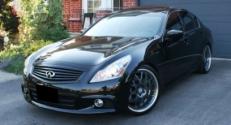
(2007 G35 sedan) I just installed a factory OEM camera within the chrome spoiler. Looks good so far.I noticed the plugs for the camera are there and there's one tan one for the keyless button,and one white that fits the camera connection on the spoiler.I also have the factory nav system with the tech package. Can anyone tell me what else will it take to get the backup camera to work?
Does the car also have Intelligent Cruise Control (ICC) and Adaptive Front lighting System (AFS)?
I'ts likely that you have the Nav pkg but do not have the Tech pkg.
I'm not sure exactly what else you would need (assuming it doesn't have the Tech pkg) but surely you would need some type of connection to the head unit. It may already be there since the camera wiring pre-exists and you have the Nav head unit.
http://infinitihelp.com/models/2007/...ifications.php

Thread
Thread Starter
Forum
Replies
Last Post
trulegend
Audio/Video/Electronics
1
Jul 31, 2015 03:37 PM
