


USA Spec Pa15-NIS


Does anyone know what you have to do to get the auxillary port to work? I tried using my Blackberry and Pandora and it would just play for a few seconds and then automatically change the fm channel and shut off.

Question for you guys, will i have to remove my shift **** (my car is a 6MT) when taking my dash apart to install the Pa15-NIS? The reason i'm concern is because i've read that you risk ruining your shift **** if you remove it.
i know that an automatic G35 shift **** can be removed with ease.
i know that an automatic G35 shift **** can be removed with ease.

My shift **** was a bugger to get off, but it does eventually.
You MUST use this tool or something like it to ensure the rod does not rotate. I don't know what happens if it does rotate but it doubt it's good! I made a little tick mark on the rod and the white fluff around it just to make sure. I call these adjustable pliers, I'm sure there are many other names.
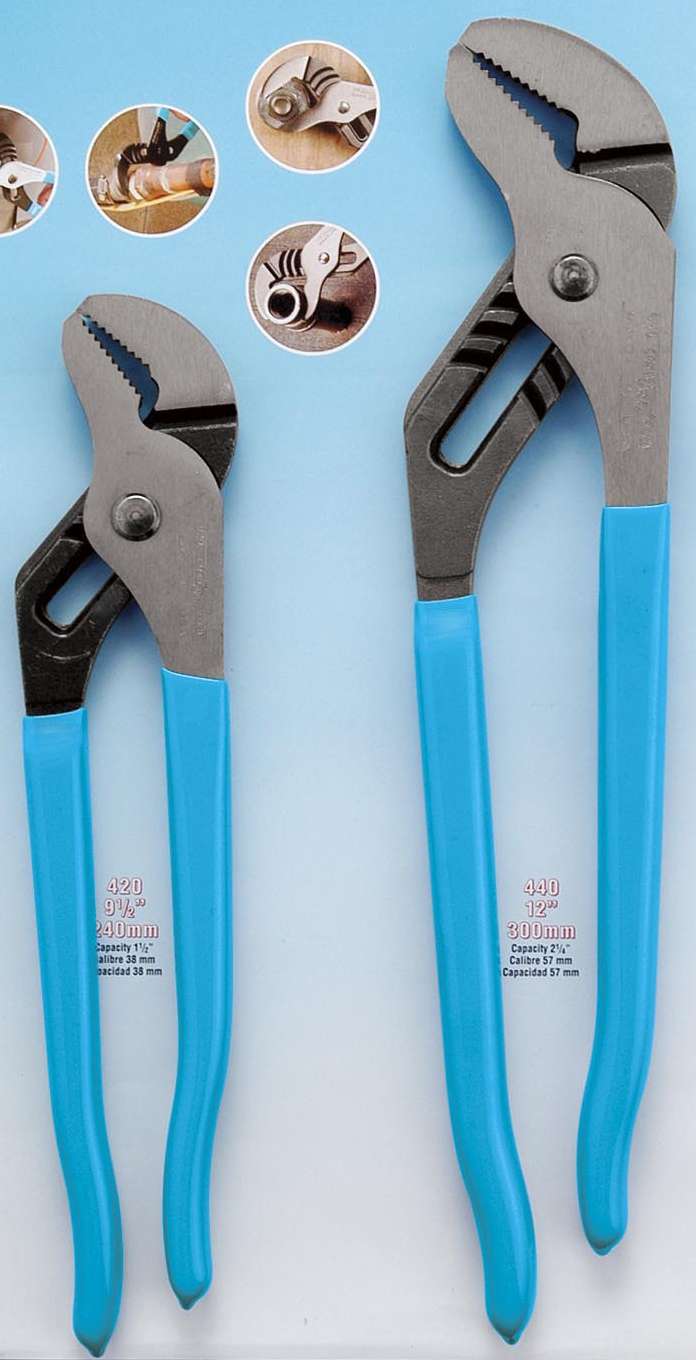
Some people use a towel so it doesn't scratch it...I said **** it just incase it slipped because man, I was reefin on this thing and if it slipped it would have been bad. Unscrew counter-clockwise and you'll be fine.
Also, you can use an adjustable wrench near the base of the shift **** (definitely use a towel here) but I just used my hand as I didn't want to gouge the crap out of it.
Be gentle taking off the interior pieces on either side of the headunit
You MUST use this tool or something like it to ensure the rod does not rotate. I don't know what happens if it does rotate but it doubt it's good! I made a little tick mark on the rod and the white fluff around it just to make sure. I call these adjustable pliers, I'm sure there are many other names.
Some people use a towel so it doesn't scratch it...I said **** it just incase it slipped because man, I was reefin on this thing and if it slipped it would have been bad. Unscrew counter-clockwise and you'll be fine.
Also, you can use an adjustable wrench near the base of the shift **** (definitely use a towel here) but I just used my hand as I didn't want to gouge the crap out of it.
Be gentle taking off the interior pieces on either side of the headunit
Question for you guys, will i have to remove my shift **** (my car is a 6MT) when taking my dash apart to install the Pa15-NIS? The reason i'm concern is because i've read that you risk ruining your shift **** if you remove it.
i know that an automatic G35 shift **** can be removed with ease.
i know that an automatic G35 shift **** can be removed with ease.


Registered User
Joined: Nov 2007
Posts: 246
Likes: 2
Its a combination of the switches on the box itself. The manual should show the correct combination for the use of the aux port.
So every time you want to use the aux port you need to change the dip switch settings?? If that's the case I sure am glad that my unit is still accessible...
Yes, i believe so. In order to have AUX option, your dip (#1) switch setting has to be set to on.
So i installed the Pa15-nis yesterday and i'm loving it so far!
I have a question for everybody though; In Folder mode, anyone having issues seeing the entire text such as artist or song name? When i hit the "DISP" button to scroll through the entire name, i find that it cuts off and doesn't show all of it. Is this normal? It's not too big of a deal for me since i prefer to use "Direct Mode" over "Folder Mode" but i was just wondering if maybe i installed it wrong or something?
My dip setting is as follows:
1-2-3-4
off, on, on, on.
Thanks in advance
I have a question for everybody though; In Folder mode, anyone having issues seeing the entire text such as artist or song name? When i hit the "DISP" button to scroll through the entire name, i find that it cuts off and doesn't show all of it. Is this normal? It's not too big of a deal for me since i prefer to use "Direct Mode" over "Folder Mode" but i was just wondering if maybe i installed it wrong or something?
My dip setting is as follows:
1-2-3-4
off, on, on, on.
Thanks in advance

Registered User
Joined: Jan 2007
Posts: 842
Likes: 50
From: Dutchess County, NY
i can't get mine to display the song name at all. i'm not too happy with the USA spec product at this point. i also tried the combination of all switches on from your post (tried it previously) but it renders my satellite radio unusable.
it also causes my satellite radio to not display the text info properly when i go back to using the sat. unbelievable no one can make a good ipod product.
it also causes my satellite radio to not display the text info properly when i go back to using the sat. unbelievable no one can make a good ipod product.
Last edited by RemmyZero; Sep 1, 2010 at 06:03 PM.
Registered User
Joined: Nov 2007
Posts: 246
Likes: 2
You're very welcome!
Pretty much, but if you're going to use the aux at one point or another you have to go back to that same box to hook up your lines anyways. You can just adjust the switch then. I just kept mine on and aux hooked up to my blackberry so I can use Pandora.
Try doing that installation procedure again. That might help. I think mine information scrolls.
Yea I'm not too happy with mine either. Its just a temporary thing until I do a full on double din unit.
So i installed the Pa15-nis yesterday and i'm loving it so far!
I have a question for everybody though; In Folder mode, anyone having issues seeing the entire text such as artist or song name? When i hit the "DISP" button to scroll through the entire name, i find that it cuts off and doesn't show all of it. Is this normal? It's not too big of a deal for me since i prefer to use "Direct Mode" over "Folder Mode" but i was just wondering if maybe i installed it wrong or something?
My dip setting is as follows:
1-2-3-4
off, on, on, on.
Thanks in advance
I have a question for everybody though; In Folder mode, anyone having issues seeing the entire text such as artist or song name? When i hit the "DISP" button to scroll through the entire name, i find that it cuts off and doesn't show all of it. Is this normal? It's not too big of a deal for me since i prefer to use "Direct Mode" over "Folder Mode" but i was just wondering if maybe i installed it wrong or something?
My dip setting is as follows:
1-2-3-4
off, on, on, on.
Thanks in advance
i can't get mine to display the song name at all. i'm not too happy with the USA spec product at this point. i also tried the combination of all switches on from your post (tried it previously) but it renders my satellite radio unusable.
it also causes my satellite radio to not display the text info properly when i go back to using the sat. unbelievable no one can make a good ipod product.
it also causes my satellite radio to not display the text info properly when i go back to using the sat. unbelievable no one can make a good ipod product.