


Wrathernaut's Double-Din Installation FAQ, Shopping and Resource List


Registered User
Joined: Jul 2009
Posts: 5
Likes: 0
Alright, so I did all of the removal work last night, dash, trim pieces, climate control unit, nav, etc.
I got the new Metra kit fitted with the Nav and put back together after filing it down some (thanks to the video help).
Tonight I'll be installing the radio and putting it back together I think. Nervous for this part as I am not an expert in soldering and have never installed an aftermarket radio. Will do my best to stay patient and just follow everything from here!
I got the new Metra kit fitted with the Nav and put back together after filing it down some (thanks to the video help).
Tonight I'll be installing the radio and putting it back together I think. Nervous for this part as I am not an expert in soldering and have never installed an aftermarket radio. Will do my best to stay patient and just follow everything from here!



Joined: Nov 2008
Posts: 7,991
Likes: 1,050
From: Pennsylvania

Alright, so I did all of the removal work last night, dash, trim pieces, climate control unit, nav, etc.
I got the new Metra kit fitted with the Nav and put back together after filing it down some (thanks to the video help).
Tonight I'll be installing the radio and putting it back together I think. Nervous for this part as I am not an expert in soldering and have never installed an aftermarket radio. Will do my best to stay patient and just follow everything from here!
I got the new Metra kit fitted with the Nav and put back together after filing it down some (thanks to the video help).
Tonight I'll be installing the radio and putting it back together I think. Nervous for this part as I am not an expert in soldering and have never installed an aftermarket radio. Will do my best to stay patient and just follow everything from here!

Joined: Nov 2008
Posts: 7,991
Likes: 1,050
From: Pennsylvania
Just apply a bit of soldering flux, twist half of them together, slide the heatshrink over that half, twist the other half of the wires together, then twist both halves together and solder. Slide the heatshrink over both halves and apply heat to the heatshrink.
Registered User
Joined: Jul 2009
Posts: 5
Likes: 0
Biggest pain in this install for me was shaving down the navigation control buttons to make the nav fit. However I am happy to say with the help of this thread, I now have a working radio and A/C. Thanks for all the great info!
Joined: Nov 2008
Posts: 7,991
Likes: 1,050
From: Pennsylvania
With the kit Crutchfield sent me, the red went to red, and the two blues on the kit went to the one blue on the Pioneer head unit. Was able to call them and they were SO helpful and knowledgable walking me through it by phone.
Biggest pain in this install for me was shaving down the navigation control buttons to make the nav fit. However I am happy to say with the help of this thread, I now have a working radio and A/C. Thanks for all the great info!
Biggest pain in this install for me was shaving down the navigation control buttons to make the nav fit. However I am happy to say with the help of this thread, I now have a working radio and A/C. Thanks for all the great info!
Originally Posted by http://www.pioneerelectronics.com/StaticFiles/Manuals/Car/DEH-X8500BS_OwnersManual100212.pdf
Blue/White
Connect to system control terminal of the power amp or auto-antenna relay control terminal (max. 300mA 12 V DC)
Connect to system control terminal of the power amp or auto-antenna relay control terminal (max. 300mA 12 V DC)

Registered User
Joined: Jun 2014
Posts: 4
Likes: 0
Basic Harness Question
Common Install Issues and How to Avoid Them
[I am trying to install the AVH-4000NEX in an 03 coupe with stock bose amp/speaker setup. Have the JDM a/c working.
Have bought the ASWC-1 & PAC ROEM-NIS2 and see the wiring chart on page 1 of the sticky, but am looking for help on what I am supposed to splice the (relevant) PAC 18pin connector wires to?
What connector goes into the back of the HU - am I missing some harness piece?
And how does one identify the other corresponding vehicle wires that are supposed to splice to the wires in the PAC harness that don't go into the HU.
I have the same question related to the Access device.
sorry if this fundamental question has been answered but I can't find it, I've looked.
[I am trying to install the AVH-4000NEX in an 03 coupe with stock bose amp/speaker setup. Have the JDM a/c working.
Have bought the ASWC-1 & PAC ROEM-NIS2 and see the wiring chart on page 1 of the sticky, but am looking for help on what I am supposed to splice the (relevant) PAC 18pin connector wires to?
What connector goes into the back of the HU - am I missing some harness piece?
And how does one identify the other corresponding vehicle wires that are supposed to splice to the wires in the PAC harness that don't go into the HU.
I have the same question related to the Access device.
sorry if this fundamental question has been answered but I can't find it, I've looked.
Joined: Nov 2008
Posts: 7,991
Likes: 1,050
From: Pennsylvania
Common Install Issues and How to Avoid Them
[I am trying to install the AVH-4000NEX in an 03 coupe with stock bose amp/speaker setup. Have the JDM a/c working.
Have bought the ASWC-1 & PAC ROEM-NIS2 and see the wiring chart on page 1 of the sticky, but am looking for help on what I am supposed to splice the (relevant) PAC 18pin connector wires to?
What connector goes into the back of the HU - am I missing some harness piece?
And how does one identify the other corresponding vehicle wires that are supposed to splice to the wires in the PAC harness that don't go into the HU.
I have the same question related to the Access device.
sorry if this fundamental question has been answered but I can't find it, I've looked.
[I am trying to install the AVH-4000NEX in an 03 coupe with stock bose amp/speaker setup. Have the JDM a/c working.
Have bought the ASWC-1 & PAC ROEM-NIS2 and see the wiring chart on page 1 of the sticky, but am looking for help on what I am supposed to splice the (relevant) PAC 18pin connector wires to?
What connector goes into the back of the HU - am I missing some harness piece?
And how does one identify the other corresponding vehicle wires that are supposed to splice to the wires in the PAC harness that don't go into the HU.
I have the same question related to the Access device.
sorry if this fundamental question has been answered but I can't find it, I've looked.

Registered User
Joined: Jan 2007
Posts: 9
Likes: 0
From: Chicago
I want to first give a big thanks to Wrathernaut for the great information.
I had rarely posted on the forum, and not in many years, but I returned when my OEM radio started going haywire. I had no idea there was so much info here.
The install has gone perfectly so far, except for a little confusion with the SWC.
I have a 2005 6MT Sedan w/Bose w/Factory Nav. With the info here, I've managed to install the following:
-JDM Nav Trim with Dual-Zone
-Pioneer AVH-4000NEX (yes, because of the promised CarPlay)
-Boyo VTL275HDL Rear Camera
-SiriusXM SXV200 Tuner
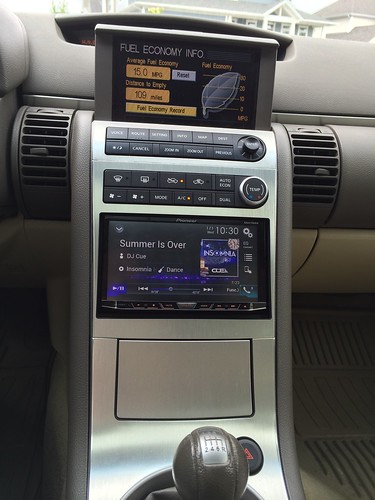
I used the Metra 40-NI10, Metra Axxess ASWC-1, and PAC ROEM-NIS2.
I ended up with 2 harnesses left over, and this is the one that looks like the right plug:
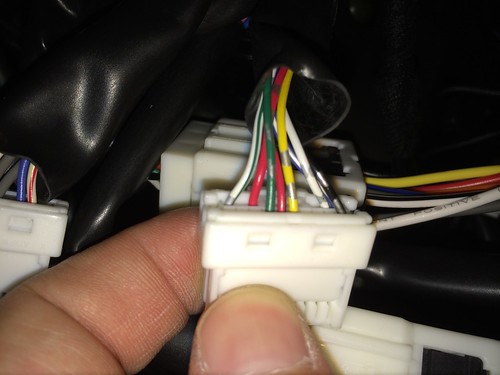
I'm confused because the colors don't seem to exactly match any other M39 pics I've seen.
--Is the "Yellow" wire from your first post actually the "Yellow with Gray" on my picture?
--Is the "Green" wire from your first post actually the "Green with Gray" on my picture?
--I have 2 red wires, one is solid red, and one is "Red with Gray". Is it the solid red?
I'm probably over-complicating it, but thanks for the help.
SofaKing
I had rarely posted on the forum, and not in many years, but I returned when my OEM radio started going haywire. I had no idea there was so much info here.
The install has gone perfectly so far, except for a little confusion with the SWC.
I have a 2005 6MT Sedan w/Bose w/Factory Nav. With the info here, I've managed to install the following:
-JDM Nav Trim with Dual-Zone
-Pioneer AVH-4000NEX (yes, because of the promised CarPlay)
-Boyo VTL275HDL Rear Camera
-SiriusXM SXV200 Tuner
I used the Metra 40-NI10, Metra Axxess ASWC-1, and PAC ROEM-NIS2.
I ended up with 2 harnesses left over, and this is the one that looks like the right plug:
I'm confused because the colors don't seem to exactly match any other M39 pics I've seen.
--Is the "Yellow" wire from your first post actually the "Yellow with Gray" on my picture?
--Is the "Green" wire from your first post actually the "Green with Gray" on my picture?
--I have 2 red wires, one is solid red, and one is "Red with Gray". Is it the solid red?
I'm probably over-complicating it, but thanks for the help.
SofaKing
Joined: Nov 2008
Posts: 7,991
Likes: 1,050
From: Pennsylvania
I want to first give a big thanks to Wrathernaut for the great information.
I had rarely posted on the forum, and not in many years, but I returned when my OEM radio started going haywire. I had no idea there was so much info here.
The install has gone perfectly so far, except for a little confusion with the SWC.
I have a 2005 6MT Sedan w/Bose w/Factory Nav. With the info here, I've managed to install the following:
-JDM Nav Trim with Dual-Zone
-Pioneer AVH-4000NEX (yes, because of the promised CarPlay)
-Boyo VTL275HDL Rear Camera
-SiriusXM SXV200 Tuner
I used the Metra 40-NI10, Metra Axxess ASWC-1, and PAC ROEM-NIS2.
I ended up with 2 harnesses left over, and this is the one that looks like the right plug:
I'm confused because the colors don't seem to exactly match any other M39 pics I've seen.
--Is the "Yellow" wire from your first post actually the "Yellow with Gray" on my picture?
--Is the "Green" wire from your first post actually the "Green with Gray" on my picture?
--I have 2 red wires, one is solid red, and one is "Red with Gray". Is it the solid red?
I'm probably over-complicating it, but thanks for the help.
SofaKing
I had rarely posted on the forum, and not in many years, but I returned when my OEM radio started going haywire. I had no idea there was so much info here.
The install has gone perfectly so far, except for a little confusion with the SWC.
I have a 2005 6MT Sedan w/Bose w/Factory Nav. With the info here, I've managed to install the following:
-JDM Nav Trim with Dual-Zone
-Pioneer AVH-4000NEX (yes, because of the promised CarPlay)
-Boyo VTL275HDL Rear Camera
-SiriusXM SXV200 Tuner
I used the Metra 40-NI10, Metra Axxess ASWC-1, and PAC ROEM-NIS2.
I ended up with 2 harnesses left over, and this is the one that looks like the right plug:
I'm confused because the colors don't seem to exactly match any other M39 pics I've seen.
--Is the "Yellow" wire from your first post actually the "Yellow with Gray" on my picture?
--Is the "Green" wire from your first post actually the "Green with Gray" on my picture?
--I have 2 red wires, one is solid red, and one is "Red with Gray". Is it the solid red?
I'm probably over-complicating it, but thanks for the help.
SofaKing

Registered User
Joined: Jan 2007
Posts: 9
Likes: 0
From: Chicago
Thanks for the help once again! It's perfectly clear now. I'll pull the radio back out tonight and get this last piece done.
Until the factory HU went nuts, the car had been perfect since I bought it new, and I hadn't needed to remove even a single interior trim panel until now. I thought I had bitten off more than I could chew with the entire install, plus running/hiding wires for the backup camera and external Sirius antenna, but it hasn't been too bad at all.
Can't wait to get this finished tonight.
Sofa King
Until the factory HU went nuts, the car had been perfect since I bought it new, and I hadn't needed to remove even a single interior trim panel until now. I thought I had bitten off more than I could chew with the entire install, plus running/hiding wires for the backup camera and external Sirius antenna, but it hasn't been too bad at all.
Can't wait to get this finished tonight.
Sofa King

Joined: Nov 2008
Posts: 7,991
Likes: 1,050
From: Pennsylvania

Registered User
Joined: Feb 2011
Posts: 10
Likes: 0
From: BAY AREA
Pioneer avh-p4200dvd
Installed a pioneer avh-p4200dvd head unit a while back...03 sedan bose sysyem...When I installed it the speaker in the rear window has no sound and can barely hear the rear door speakers...any ideas?


First simple check is to check the tuner settings (fade, etc) on the head unit itself... Next is if you used a non PAC module you will have to adjust sound by a turn **** down at the module itself. There are four screws that adjust noise level relative to volume... Next we have a wiring issues.